
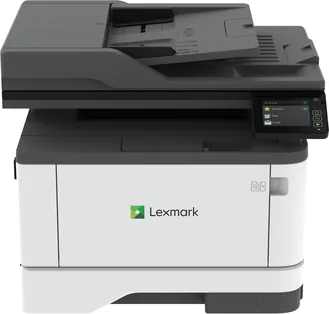
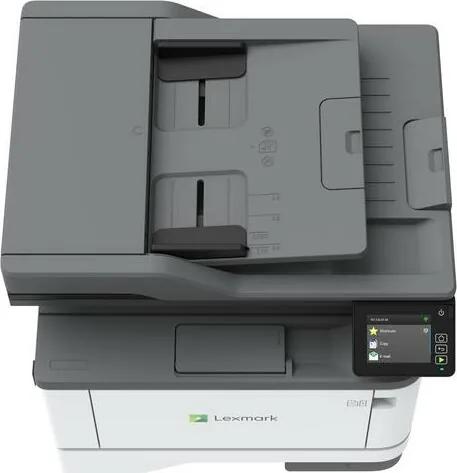
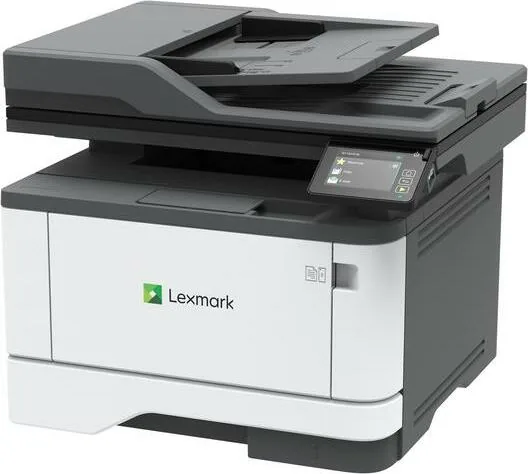
Lexmark MX431adn Manual
PDF manual · 211 Pages
English



Quick check
Incorrect answer, please try again.
Chat with your Lexmark MX431adn manual using AI
Get instant AI answers from your Lexmark MX431adn manual
Ask anything about the Lexmark MX431adn. Answers come from this manual, with the pages they are based on.
Ask a Question
Do you recommend MX431adn?
Yes NoFrequently Asked Questions
The MX431adn is a monochrome multifunction printer that can print, copy, scan, and fax. It also supports features such as held print jobs, scan shortcuts, mobile printing, cloud-connected workflows, and configurable paper handling.
Is this answer helpful?
Yes. The printer supports automatic two-sided printing for compatible paper sizes and media. It can also create two-sided copies, helping reduce paper usage for reports, forms, and routine office materials.
Is this answer helpful?
The standard configuration includes a 250-sheet tray and a multipurpose feeder. An optional 550-sheet tray can be added. Supported media includes plain paper, recycled paper, letterhead, envelopes, card stock, and certain labels.
Is this answer helpful?
Compatible mobile devices can print using Lexmark Mobile Print, AirPrint, Mopria Print Service, or Wi-Fi Direct. Network availability and the selected printing method depend on the printer configuration and device compatibility.
Is this answer helpful?
Scans can be sent to e-mail, FTP servers, network folders, USB storage, and supported Cloud Connector profiles. The automatic document feeder is useful for multi-page originals, while the scanner glass handles single pages and smaller items.
Is this answer helpful?
Yes. Confidential jobs can be protected with a four-digit PIN and released at the printer. The device also includes held-job controls, memory erasure options, factory reset settings, and a physical security lock slot.
Is this answer helpful?
Advantages and Disadvantages
Advantages

- Combines monochrome printing, copying, scanning, and faxing in one office-ready device.
- Supports automatic two-sided printing and copying to help reduce paper use.
- Includes a 250-sheet tray and multipurpose feeder, with an optional 550-sheet tray for expanded capacity.
- Offers scan destinations including e-mail, FTP, network folders, USB storage, and supported cloud services.
- Provides PIN-protected confidential jobs, memory erasure, firmware updates, and network management tools.
Disadvantages

- Monochrome laser output is not intended for color printing needs.
- Wireless features may require a compatible adapter or Wi-Fi-ready configuration.
- Label support is limited to occasional one-sided use, with vinyl and two-sided labels unsupported.
- Fax setup depends on local telephone connections, adapters, and compatible service arrangements.
- Some advanced administration and shortcut setup tasks may require browser-based configuration.
Product Specification
Format
A4 (printing), A4 (scanning)
Type
Printer/scanner/copier/fax
Color system
Monochrome, 1x single toner
Consumables
55B2000, 55B2H00, 55B2X00, 55B0ZA0
Printing
600 x 600 dpi - 40 ppm (A4) (ISO)
Scanning
600 x 600 dpi (CIS) - 42/20 ppm (A4)
Copying
600 x 600 dpi - 39 ppm (A4) (ISO)
Paper input
350 sheets (1x 250 sheets + 1x 100 sheets), DADF (50 sheets), duplex unit
Memory
512 MB (RAM)
Ports
1x USB-B 2.0, 1x fax (RJ-11)
Network
Gigabit LAN, AirPrint
Display
Color, 2.8 in, touchscreen
Power consumption
580 W (typical), 0.1 W (sleep)
Sound pressure level
55.0 dB(A)
Emulation
PCL 6, PCL 5e, PostScript 3, PPDS, PDF 1.7, Direct Image
Case color
White, black
Dimensions
16.18 x 13.35 x 14.41 in
Weight
28.22 lb
Manufacturer warranty
1 year
Product Description
Lexmark MX431adn Laser Monochrome - Read, Download & Print Free
The Lexmark MX431adn Laser Monochrome is a compact multifunction printer designed for busy offices, home workspaces, and teams that need dependable black-and-white output. This model combines printing, copying, scanning, and faxing in one practical device, helping users handle everyday paperwork without relying on separate machines. Its clear control panel and organized menu system make common tasks easy to access.
Built around monochrome laser technology, the MX431adn is suited to professional letters, invoices, forms, reports, and other text-heavy materials. It supports one-sided and two-sided printing, allowing users to reduce paper consumption while keeping documents organized. Toner darkness, print resolution, page layout, separator sheets, and multiple-pages-per-sheet settings provide useful control over final output.
Flexible Paper Handling
The printer includes a standard 250-sheet tray, a multipurpose feeder, and support for an optional 550-sheet tray. This configuration gives workplaces flexibility when handling plain paper, letterhead, recycled media, card stock, envelopes, labels, and other compatible materials. Automatic tray linking can simplify work by using trays configured with the same paper size and type.
For scanning and copying, the automatic document feeder is ideal for multi-page originals, while the scanner glass supports single sheets, photos, cards, book pages, and delicate media. Users can enlarge or reduce copies, collate sets, copy both sides, create ID copies, and place several pages on one sheet. These tools make the MX431adn useful for routine administration and fast document preparation.
Connected Workflow Features
Wired Ethernet connectivity supports shared office printing, while compatible configurations can use wireless networking, Wi-Fi Direct, and mobile setup options. Mobile printing is supported through services such as AirPrint, Mopria Print Service, Lexmark Mobile Print, and Wi-Fi Direct. This allows compatible phones and tablets to send jobs without a traditional desktop workflow.
The printer also supports scanning to e-mail, FTP servers, network folders, USB storage, and cloud-connected destinations. Cloud Connector profiles can be created for supported services, giving users another way to access and share work across locations. Fax tools include scheduled sending, destination shortcuts, resolution adjustments, call logs, forwarding, and controls to help block unwanted faxes.
Security and Maintenance
Security features include confidential print jobs protected with PINs, held-job controls, memory erasure options, factory reset settings, and a physical security slot. Administrators can manage settings through the control panel or Embedded Web Server, update firmware, export configurations, and review reports.
Note: Use compatible media, set the correct paper type, and keep paper stored in a dry, stable environment to help prevent jams and maintain consistent print quality.
Lexmark MX431adn Laser Monochrome - Read, Download & Print Free highlights a versatile all-in-one solution for organizations that value efficient monochrome output, flexible scanning, practical paper handling, and manageable security controls.
Search for 67,706 Manuals online


Type-in Brand or Model