
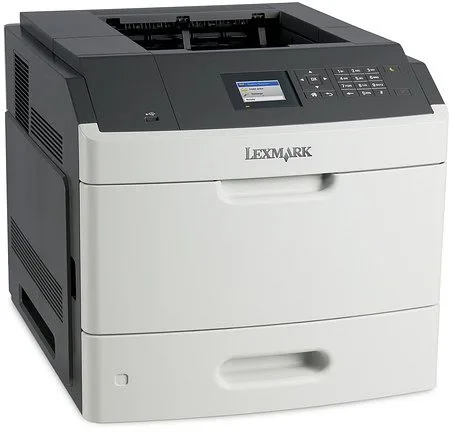
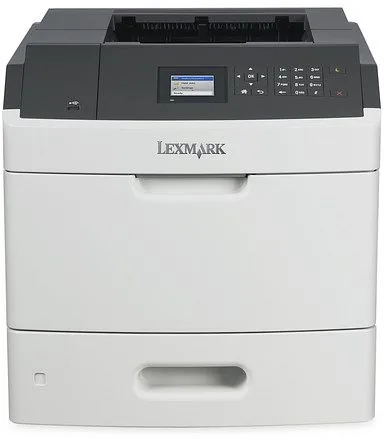
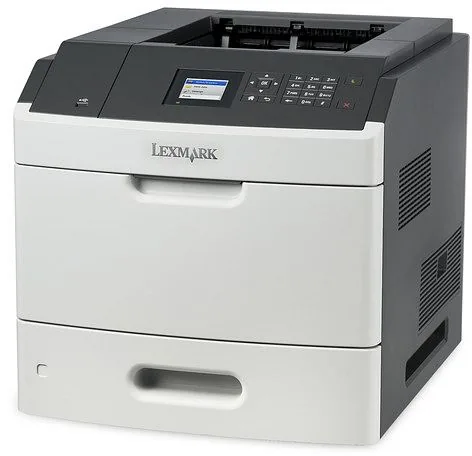
Lexmark MS811dn Manual
PDF manual · 362 Pages
English



Quick check
Incorrect answer, please try again.
Chat with your Lexmark MS811dn manual using AI
Get instant AI answers from your Lexmark MS811dn manual
Ask anything about the Lexmark MS811dn. Answers come from this manual, with the pages they are based on.
MS811dn Maintenance Schedule
Remove dust and paper debris with a soft brush or vacuum. Wipe the outside with a damp, lint-free cloth. Do not use cleaning agents.
Replace when the low toner warning appears or the cartridge is empty. Use original Lexmark consumables for optimal performance.
Replace when the low capacity warning appears or after the estimated life is reached. Avoid exposing the drum to direct light.
Replace when the low capacity warning appears or when recommended life is exceeded. Includes separation, fuser, pickup, and transfer rollers.
Replace when the system indicates the roller kit needs replacement to ensure proper paper feeding.
Ask a Question
Do you recommend MS811dn?
Yes NoFrequently Asked Questions
The weight exceeds 18 kg so two trained people are needed to move the unit safely.
Is this answer helpful?
Yes with optional adapter installed to enable network connectivity for print jobs.
Is this answer helpful?
Check trays and duplex unit areas following specific safety warnings before touching parts.
Is this answer helpful?
Supports Letter to A4 plus custom sizes within specific measurement guidelines for feeding.
Is this answer helpful?
Yes if hard disk is installed to protect data during wipe or security processes.
Is this answer helpful?
Enable Eco-mode or Hibernate settings to reduce power consumption during low activity.
Is this answer helpful?
Advantages and Disadvantages
Advantages

- High capacity paper handling with optional trays supports high volume workloads effectively.
- Secure confidential printing features protect sensitive data during release processes.
- Wireless printing capabilities allow flexible connectivity options for mobile workers.
- Energy saving modes reduce power consumption and environmental impact significantly.
Disadvantages

- Heavyweight design requires two people to move safely during setup.
- Installation of internal options requires careful handling to avoid static damage.
- Complex configurations may require specialized IT knowledge for optimal setup.
- Initial investment cost is higher compared to standard home office printers.
Product Specification
Format
A4
Type
Laser Printer
Color System
Monochrome
Consumables
522X, 522H, 522, 520XA, 520Z, 520ZA
Printing
1200x1200dpi - 60 ppm (A4)
Paper Input
650 sheets (1x 550 sheets + 1x 100 sheets), Duplex Unit
Memory
512MB (RAM)
Connections
1x USB-B 2.0, 1x USB-A 2.0 (Host)
Network
Gb LAN
Display
Color, 2.4"
Power Consumption
770W (max), 55W (standby), 0.5W (sleep)
Sound Pressure Level
57.0dB(A)
Emulation
PCL 6, PCL 5e, PostScript 3, PPDS, PDF 1.7, XML
Dimensions
16.73x16.50x20.08"
Weight
52.25 lbs
Features
Direct Print, Blue Angel
Manufacturer Warranty
1 Year
Product Description
Experience High Volume Printing with the Lexmark MS811dn Laser Series
Advanced Office Solutions for Modern Teams
Organizations demand reliability and speed in their daily operations. The Lexmark MS811dn Laser, Monochrome Manual provides insights into a device built specifically for demanding workspaces. This machine combines durability with smart connectivity options to keep workflows moving. It handles large print queues without hesitation or delays. Users appreciate the flexibility offered by multiple input sources available throughout the day. Standard trays feed smoothly while optional modules expand capacity significantly to meet bulk requirements. Security is paramount in modern environments where data leaks occur frequently. This unit allows for confidential print release to protect sensitive data until authorized users retrieve their copies.
Networking and Management Capabilities
Integration into existing networks happens quickly and securely. Wireless capabilities expand where cables cannot reach the physical space. Administrators utilize remote tools to monitor supply levels easily from any location. Eco modes significantly reduce energy consumption during idle periods to save costs. Maintenance tasks remain straightforward for IT staff managing multiple units. The device supports various paper types including card stock and envelopes without issues. Jam resolution procedures are clearly outlined in the setup procedures to minimize downtime.
Mobile Connectivity Options
Print directly from smartphones today using standard protocols. The system supports standard protocols without complex drivers needing installation. Teams share resources efficiently across different departments within the building. The interface stays intuitive even with complex configurations installed by vendors. Heavy lifting is a consideration during initial placement on a desk or cart. Two personnel handle the movement safely due to weight specifications listed in safety sections. Stability requires a solid surface near a power outlet for consistent performance. Support for cloud print services enables employees to submit jobs from remote locations efficiently.
Safety and Maintenance
Safety warnings highlight electrical hazards during installation steps. Always unplug the device before accessing internal components or controller boards. Dust and debris must be kept away from the intake area to prevent jams. Regular cleaning ensures the fuser unit operates at peak temperatures. Storing supplies correctly prevents contamination of sensitive printing materials. Contact customer support if messages persist despite troubleshooting attempts. This equipment represents a solid investment for professional printing needs requiring longevity. High security environments may require specific wiping protocols before decommissioning hardware to ensure data privacy. Remember to replace consumables before they reach zero to avoid unexpected interruptions.
Search for 67,706 Manuals online


Type-in Brand or Model