
Lexmark MS622de Manual
PDF manual · 184 Pages
English



Quick check
Incorrect answer, please try again.
Chat with your Lexmark MS622de manual using AI
Get instant AI answers from your Lexmark MS622de manual
Ask anything about the Lexmark MS622de. Answers come from this manual, with the pages they are based on.
Ask a Question
Do you recommend MS622de?
Yes NoFrequently Asked Questions
It is a monochrome laser printer designed for office printing, with a focus on dependable document output, security, and flexible paper handling.
Is this answer helpful?
It supports multiple trays, held jobs, mobile printing, network controls, and administrative tools that help manage shared printing in busy environments.
Is this answer helpful?
Yes. The printer supports compatible flash drives and can print common document and image formats directly from the USB drive interface.
Is this answer helpful?
Yes. It includes confidential print setup, PIN-protected jobs, access restrictions, encryption-related options, and network security features.
Is this answer helpful?
It works with plain paper, labels, envelopes, card stock, recycled paper, letterhead, and several specialty media types within supported size and weight limits.
Is this answer helpful?
Yes. The guidance covers cleaning, replacing supplies, clearing jams, moving the device, and monitoring status through reports and alerts.
Is this answer helpful?
Advantages and Disadvantages
Advantages

- Fast monochrome printing for everyday office documents and business forms.
- Flexible media support, including envelopes, labels, card stock, and multiple tray options.
- Strong security tools such as confidential jobs, IPSec, SNMP, and access controls.
- Helpful accessibility features like Voice Guidance, magnification mode, and gestures.
Disadvantages

- Monochrome output only, so it is not ideal for color-focused printing needs.
- Advanced menus and network settings may feel complex for casual users.
- Some functions depend on optional hardware, such as hard disk or extra trays.
- Best results require correct paper settings, which adds setup attention.
Product Specification
Format
A4
Type
Laser Printer
Color system
Monochrome
Consumables
56F2U00, 56F2X00, 56F2H00, 56F2000
Printing
1200x1200dpi - 47 ppm (A4)
Paper feed
650 sheets (1x 550 sheets + 1x 100 sheets), Duplex unit
Memory
1GB (RAM)
Ports
1x USB-B 2.0, 2x USB-A 2.0 (Host)
Network
Gb LAN, AirPrint, Universal Print (Azure Cloud Print), PIN Printing
Display
Color, 4.3", Touchscreen
Power consumption
670W (maximum), 9.5W (standby), 0.1W (sleep)
Sound pressure level
56.0dB(A)
Emulation
PCL 6, PCL 5e, PostScript 3, PDF 1.7, XML
Dimensions
15.71x11.93x14.72in
Weight
35.50 lb
Special features
Direct Print
Manufacturer's warranty
1 year
Product Description
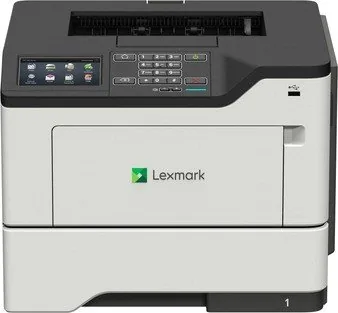
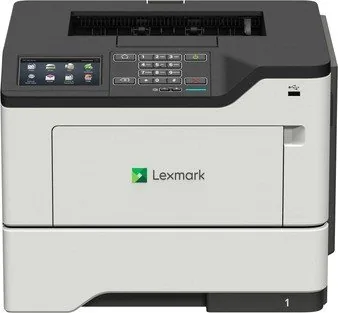
Lexmark MS622de Laser Monochrome: Built for Reliable Office Printing
The Lexmark MS622de is a monochrome laser printer designed for busy teams that need dependable output, flexible paper handling, and strong administrative control. It focuses on the essentials that matter in everyday business use: fast black-and-white printing, secure document handling, and straightforward operation from the control panel or a connected computer. For offices that print invoices, reports, forms, and internal paperwork, this model offers a practical balance of speed, durability, and manageability.
One of its biggest strengths is versatility. The printer supports a wide range of paper sizes and media types, including plain paper, card stock, envelopes, labels, and specialty formats. With a standard tray, optional trays, and a multipurpose feeder, it can adapt to changing workloads without forcing constant paper swaps. Tray linking and paper-type matching also help reduce interruptions and keep output consistent.
The control panel and home screen are built for convenient access. Users can launch print tasks, check supply status, manage held jobs, and adjust eco-settings or accessibility features directly on the device. Voice guidance, magnification mode, gesture navigation, and spoken input options make the printer more inclusive and easier to use in shared environments.
Network and security features are another highlight. The printer supports Ethernet, advanced TCP/IP settings, SNMP, IPSec, 802.1x, and controlled access to USB and web services. Administrators can also configure confidential printing, job accounting, reports, and power management to match workplace policies. These tools make the MS622de a solid fit for organizations that care about both productivity and data protection.
Mobile and direct printing add extra convenience. Compatible users can print from phones, tablets, flash drives, and cloud-connected services, which helps reduce dependency on desktop workflows. Maintenance tasks such as cleaning, replacing supplies, clearing jams, and moving the device are clearly organized, making day-to-day upkeep more manageable.
The Lexmark MS622de Laser monochrome Manual is especially useful for learning how to configure trays, secure the printer, manage menu settings, and solve common printing issues. It reflects a machine designed not just to print, but to integrate smoothly into a modern office routine.
Notes
- Best suited for black-and-white business printing.
- Security and network setup options are extensive.
- Optional trays and held-job features improve workflow control.
Search for 67,706 Manuals online


Type-in Brand or Model