
Lexmark MS610dn Manual
PDF manual · 247 Pages
English



Quick check
Incorrect answer, please try again.
Chat with your Lexmark MS610dn manual using AI
Get instant AI answers from your Lexmark MS610dn manual
Ask anything about the Lexmark MS610dn. Answers come from this manual, with the pages they are based on.
Ask a Question
Do you recommend MS610dn?
Yes NoFrequently Asked Questions
The printer includes a standard 550-sheet tray and a 100-sheet multipurpose feeder. Optional 250-sheet or 550-sheet trays may be added to increase available input capacity.
Is this answer helpful?
Yes. It supports automatic two-sided printing, which can help reduce paper use for routine office output.
Is this answer helpful?
It supports Ethernet networking. Wireless networking can be configured with a compatible optional wireless adapter, using setup tools such as the Wireless Setup Wizard, WPS, or the Embedded Web Server.
Is this answer helpful?
Supported mobile workflows include Mopria Print Service for Android, Google Cloud Print, AirPrint for compatible Apple devices, and Lexmark Mobile Print. The printer and mobile device generally need to share the same wireless network.
Is this answer helpful?
The multipurpose feeder can handle different paper sizes and specialty media such as card stock, transparencies, labels, envelopes, and letterhead. Load media below the maximum fill indicator and select matching paper settings.
Is this answer helpful?
Confidential print settings allow jobs to be held until the user enters a PIN at the printer control panel. Administrators can also limit invalid PIN attempts and set expiration times for held jobs.
Is this answer helpful?
Advantages and Disadvantages
Advantages

- Standard 550-sheet tray and 100-sheet multipurpose feeder support varied office workloads.
- Automatic duplex printing can reduce paper consumption.
- Ethernet, USB, mobile printing support, and direct USB printing offer flexible connectivity.
- Embedded Web Server supports remote status checks, configuration, supply alerts, and security settings.
- Eco, Sleep, Hibernate, and Quiet modes help manage energy use and noise.
Disadvantages

- The MS610dn does not include the MS610de-only hard disk and Internal Solutions Port options.
- Wireless networking requires a separately purchased compatible adapter.
- Correct paper size and type settings are essential to avoid jams and print quality issues.
- The standard output bin capacity is limited to 150 sheets.
- Some mobile printing features are available only on supported printer models and devices.
Product Description
Lexmark MS610dn - Read, Download & Print Free
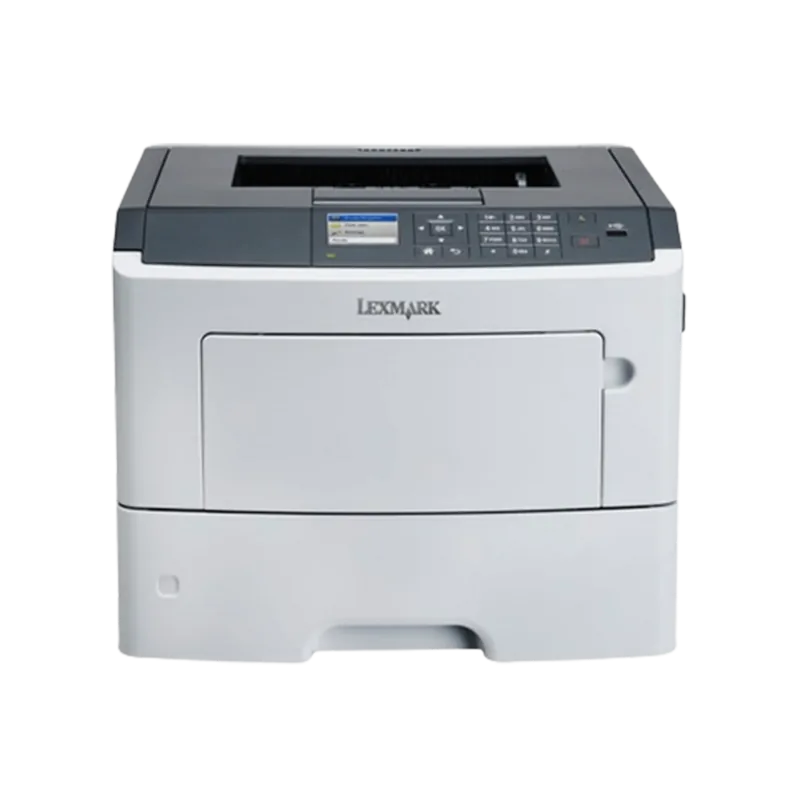
The Lexmark MS610dn is a monochrome laser printer designed for dependable office printing, flexible paper handling, and straightforward network administration. It combines a standard 550-sheet tray with a 100-sheet multipurpose feeder, giving teams practical capacity for everyday reports, correspondence, labels, envelopes, and other specialty media. Optional 250- or 550-sheet trays can expand the setup for busier environments.
Built for efficient everyday output
Automatic two-sided printing helps reduce paper use while maintaining a professional workflow. The standard output bin holds up to 150 sheets and includes a paper stop to keep completed prints organized. Adjustable paper guides support accurate loading, while configurable paper size and type settings help prevent jams and improve output consistency.
The multipurpose feeder is useful when a task calls for a different stock type or size. It supports single-sheet letterhead jobs as well as card stock, transparencies, labels, and envelopes when loaded according to the recommended orientation. Universal paper settings also allow custom sizes within the supported range, adding flexibility for specialized office needs.
Connected management and printing options
The Lexmark MS610dn supports USB and Ethernet connections, making it suitable for direct computer use or shared network environments. Administrators can use the Embedded Web Server to review printer status, manage supplies, change paper settings, configure security options, and copy settings to other compatible printers.
For organizations that need mobile workflows, supported configurations can work with Mopria Print Service, Google Cloud Print, AirPrint, and Lexmark Mobile Print. A front USB port also enables direct output from compatible FAT-formatted flash drives, including supported PDF, XPS, and common image formats.
Security, maintenance, and energy controls
Confidential printing settings can hold jobs until a user enters a PIN at the control panel. The printer also provides configurable supply notifications, menu access protection, and options for removing stored settings when the unit is reassigned or retired. Routine care includes cleaning the printer, monitoring supplies, replacing consumables, and following the guided jam-clearance locations.
Eco-Mode, Sleep mode, Hibernate mode, and Quiet Mode provide useful controls for reducing energy use, paper consumption, and operating noise. These settings make the Lexmark MS610dn a practical choice for offices that want manageable output costs alongside dependable monochrome printing.
Notes
- Match tray paper settings to the loaded media for reliable feeding and print quality.
- Power off and unplug the printer before installing internal hardware options.
- Wireless operation requires a compatible optional wireless network adapter.
Search for 67,706 Manuals online


Type-in Brand or Model