
Lexmark MS531dw Manual
PDF manual · 194 Pages
English



Quick check
Incorrect answer, please try again.
Chat with your Lexmark MS531dw manual using AI
Get instant AI answers from your Lexmark MS531dw manual
Ask anything about the Lexmark MS531dw. Answers come from this manual, with the pages they are based on.
Ask a Question
Do you recommend MS531dw?
Yes NoFrequently Asked Questions
From the home screen, navigate to settings network and choose Wi-Fi Direct to broadcast the network name and password for your mobile device.
Is this answer helpful?
Yes, use Lexmark Mobile Print or Mopria to send jobs securely from your phone to the network printer without extra setup.
Is this answer helpful?
It handles Letter, Legal, A4, and various envelopes with high versatility across standard trays and the multipurpose feeder.
Is this answer helpful?
Yes, a security slot is included on the rear side to attach a compatible lock cable to prevent theft or unauthorized movement.
Is this answer helpful?
Use the Embedded Web Server to check for updates or upload a file manually from a computer via the browser interface.
Is this answer helpful?
Avoid using extension cords and ensure proper grounding to prevent shocks. Allow the fuser to cool before touching internal parts.
Is this answer helpful?
Yes, simply insert the drive into the front port and select the file from the home screen to print directly without a PC.
Is this answer helpful?
Advantages and Disadvantages
Advantages

- Robust wireless connectivity including Wi-Fi Direct and AirPrint for mobile devices.
- Strong security features like confidential print PINs and encrypted memory erasure.
- Flexible paper handling with support for envelopes, labels, and various card stocks.
- Intuitive control panel with accessibility features like Voice Guidance for users.
- Energy saving modes and firmware updates to maintain long-term performance.
Disadvantages

- Monochrome only output means it cannot print color documents or graphics.
- Specific safety warnings regarding hot surfaces require careful handling after print.
- Setup requires sufficient ventilation space which may not fit tight office desks.
- Mobile printing requires specific apps or configurations which may need IT support.
- Optional trays need separate purchasing and installation to maximize paper capacity.
Product Specification
Format
A4
Type
Laser Printer
Color System
Monochrome
Consumables
66S2000, 66S0HA0, 66S2H00, 66S0Z00, 66S0ZA0
1200x1200dpi - 44/23 ppm (A4)
Paper Input
350 Sheets (1x 250 Sheets + 1x 100 Sheets), Duplex Unit
Memory
512MB (RAM)
Interfaces
1x USB-B 2.0
Network
Gb LAN, Wi-Fi 5 (WLAN 802.11a/b/g/n/ac), Wi-Fi Direct, Universal Print (Azure Cloud Print), PIN Printing
Display
Color, 2.8", Touchscreen
Power Consumption
644W (typical), 6.8W (standby), 0.9W (sleep), 0.1W (off), TEC: 0.54kWh/Week
Noise Level
55.0dB(A)
Emulation
PCL 6, PCL 5, PCLm, PostScript 3, PPDS, PDF 1.7, Direct Image
Dimensions
15.71 x 10.35 x 15.31 in
Weight
29.76 lbs
Manufacturer Warranty
1 Year (On-site, Next Day)
Product Description
Excellence in Monochrome Performance
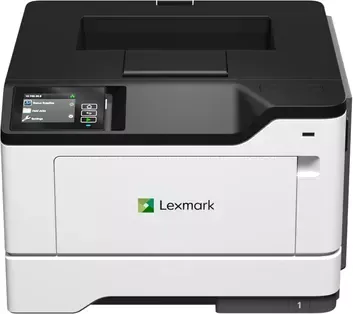
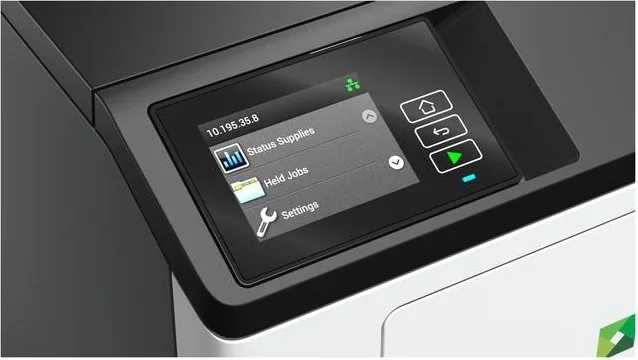
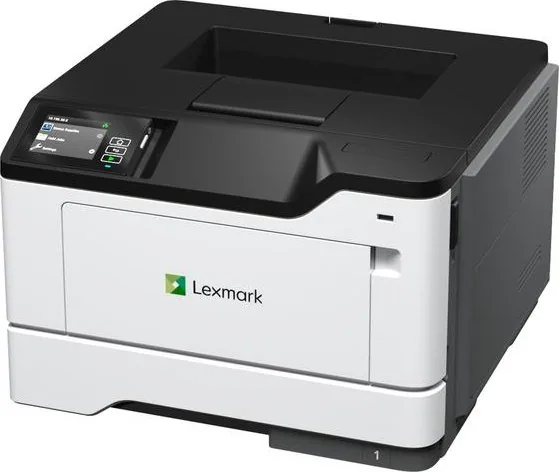
Welcome to the future of office productivity. The Lexmark MS531dw Laser Monochrome is engineered to handle demanding print jobs with precision and speed. For those seeking comprehensive guidance, accessing the official Lexmark MS531dw Laser Monochrome Manual offers detailed insights into maximizing this equipment. The control panel features a bright display that simplifies navigation through complex menus. Indicator lights provide immediate status updates regarding printing, errors, or power states. Accessibility features like Voice Guidance ensure that all users can operate the interface effectively.
Connectivity options are robust and versatile. Wireless printing is supported through standard Wi-Fi protocols and Wi-Fi Direct technology. This allows Android and Apple devices to connect directly to the printer for on-the-go solutions. Print servers and mobile applications like Lexmark Mobile Print integrate seamlessly. Network configurations can be managed via the embedded web server from a browser. Ethernet connections ensure stable wired performance. AirPrint support facilitates native printing from iPhones and iPads. Mopria certification enables broad compatibility with other mobile operating systems.
Paper versatility is a key strength of this machine. It accommodates standard paper sizes such as Letter and Legal as well as international formats like A4. The multipurpose feeder accepts envelopes and special media types. Users must select appropriate paper weights to prevent jams. Supported weights range from 60 to 120 grams per square meter. Heavy card stock is supported in specific trays. Security features include confidential print modes where users enter a PIN to release jobs. This prevents sensitive documents from sitting in the output tray. Physical security is enhanced by a slot for a cable lock. Data protection methods include erasing non-volatile memory before disposal.
Maintenance routines are designed for ease of use. The system prompts users for supply levels and replacements. Cleaning tasks are outlined to ensure optimal print quality over time. Energy conservation modes automatically put the printer to sleep when idle. Thermal management requires proper ventilation around the unit. Installation requires following specific safety warnings about power cords and hot surfaces. Handling the device involves specific lifting instructions to avoid injury or damage. Regular firmware updates are recommended to maintain security patches and performance improvements.
In summary, this laser printer offers a solid foundation for document creation. It balances security, connectivity, and ease of use. Whether managing high-volume outputs or simple daily tasks, reliability is assured. The interface allows for deep customization through the menu system. Reports can be printed to monitor usage and supply status. Troubleshooting tools help resolve common issues quickly. This comprehensive approach makes it a top choice for professional environments. Setting up the device requires careful planning regarding location. Sufficient clearance must be left around the printer for ventilation and tray access. Temperature extremes should be avoided to prevent mechanical issues. Power sources must be grounded outlets to prevent shock hazards. Security protocols are vital in modern networks. The menu system allows administrators to restrict access to specific features. Firewall protection settings can be configured via the network tab. Backup configurations can be exported to a USB drive for rapid deployment on similar units. This ensures consistency across the fleet of printers. Overall, the Lexmark MS531dw Laser Monochrome serves as a dependable asset. It combines speed with security in a compact form factor. The manual serves as an essential reference for unlocking every capability. From simple copy jobs to complex confidential prints, this machine adapts to your needs. Investing in this hardware ensures a smooth workflow for your business operations. Environment and safety are critical. The printer must operate within specific temperature ranges to prevent malfunction. Dust and humidity can impact performance significantly. Always ensure power is disconnected before adding options. This protects internal components from electrical shock. Following these steps ensures longevity. Ensure paper is stored flat on a shelf rather than the floor. This prevents moisture absorption. Proper care leads to extended hardware life.
Search for 67,706 Manuals online


Type-in Brand or Model