
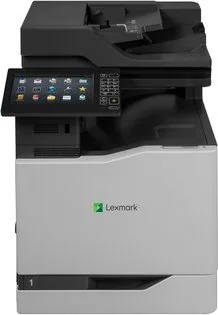

Lexmark CX825de Manual
PDF manual · 317 Pages
English



Quick check
Incorrect answer, please try again.
Chat with your Lexmark CX825de manual using AI
Get instant AI answers from your Lexmark CX825de manual
Ask anything about the Lexmark CX825de. Answers come from this manual, with the pages they are based on.
Ask a Question
Do you recommend CX825de?
Yes NoFrequently Asked Questions
It is a color laser multifunction printer built for office productivity. It can print, copy, scan, fax, and send e-mail, making it a strong all-in-one solution for shared workgroups.
Is this answer helpful?
Its value comes from speed, tray flexibility, and workflow shortcuts. Users can save time with mobile printing, scan presets, address book tools, and held-job management for secure output.
Is this answer helpful?
Yes. It supports plain paper, envelopes, labels, card stock, transparencies, and banner media, depending on the tray and configuration. Proper paper size and type settings are important for best results.
Is this answer helpful?
Yes. It includes confidential print features, PIN protection, job holding, memory clearing, and disk encryption options. These tools help protect sensitive documents in shared environments.
Is this answer helpful?
Yes. The printer supports several mobile printing methods, including Lexmark Mobile Print, Mopria, AirPrint, Wi-Fi Direct, and Google Cloud Print where available.
Is this answer helpful?
Yes. Users can adjust the home screen, create shortcuts, manage bookmarks, configure scan destinations, and enable accessibility features such as magnification and voice guidance.
Is this answer helpful?
Advantages and Disadvantages
Advantages

- Fast, multifunction color laser output for printing, copying, scanning, faxing, and e-mailing.
- Flexible paper support with trays, multipurpose feeding, and options for envelopes, labels, and card stock.
- Strong workflow tools including shortcuts, cloud features, mobile printing, and scan destinations.
- Helpful security and accessibility features for shared office use and inclusive operation.
Disadvantages

- Setup can feel complex because of the many menus, options, and configuration paths.
- Advanced features may require admin access or network setup before they become useful.
- Specialty media and finishing options need careful tray and paper-type configuration.
- Some applications and options are available only on selected printer models or regions.
Product Specification
Format
A4 (Printing), A4 (Scanning)
Type
Printer/Scanner/Copier/Fax
Color system
4-color, 4x individual toner
Consumables
72K2XK0, 82K2XC0/M0/Y0, 82K2HC0/M0/Y0
Printing
1200x1200dpi - 52/52 ppm (A4) (ISO)
Scanning
1200x600dpi (CCD) - 57/57 ppm (A4)
Copying
600x600dpi - 52/52 ppm (A4) (ISO)
Paper input
650 sheets (1x 550 sheets + 1x 100 sheets), DADF (150 sheets), Duplex unit
Memory
2GB (RAM)
Connections
1x USB-B 2.0, 4x USB-A 2.0 (Host), 1x Fax (RJ-11)
Network
Gb LAN, AirPrint, Universal Print (Azure Cloud Print), PIN Printing
Display
color, 9.8", Touchscreen
Power consumption
825W (typical), 125W (standby), 0.3W (sleep)
Sound pressure level
59.0dB(A)
Emulation
PCL 6, PCL 5c, PostScript 3, PPDS, PDF 1.7, XML
Housing color
grey, black
Dimensions
22.01x32.00x23.15in
Weight
183.27lb
Features
USB direct scan, Direct Print, Blue Angel
Manufacturer's warranty
1 year (On-site)
Product Description
Lexmark CX825de: A Color Laser MFP Built for Busy Workflows
The Lexmark CX825de is a powerful multicolor laser multifunction printer designed for teams that need speed, reliability, and polished output in one compact system. It combines printing, copying, scanning, faxing, and e-mailing into a single device, making it a practical fit for offices that want to simplify daily document handling without giving up performance. With a clear touchscreen, easy navigation, and support for shortcuts, it feels ready for fast-paced environments from the start.
One of the biggest strengths of this model is its flexible paper handling. It supports multiple tray options, a multipurpose feeder, and specialty media such as envelopes, labels, card stock, and banner paper. That flexibility makes it useful for everything from standard correspondence to branded handouts and internal forms. The printer also supports duplex workflows, tray linking, and finishing options, helping users create cleaner, more efficient print runs.
The CX825de is built with business productivity in mind. Users can print from computers, mobile devices, flash drives, and cloud-connected profiles, while scan destinations can be configured for FTP, network folders, computers, and other workflows. Its home screen applications, shortcut tools, and address book features help reduce repetitive steps and keep common tasks within easy reach. For shared office settings, that can save meaningful time every day.
Security and control are also well represented. The printer includes confidential print options, PIN-based access, device quotas, memory clearing, and hard disk encryption features. It can also support accessibility tools such as voice guidance, magnification, and spoken prompts, making the interface more inclusive and easier to use in a wider range of environments.
For teams looking for a dependable Lexmark CX825de laser, multicolor solution, this model stands out as a strong balance of performance and control. It is especially appealing when the goal is to manage high-volume tasks, maintain organized workflows, and produce sharp color output with consistent results.
Notes
- Best suited for office teams that need versatile print, scan, copy, and fax features.
- Supports both everyday paper tasks and specialty media handling.
- Built-in security and accessibility tools add real workplace value.
Search for 67,706 Manuals online


Type-in Brand or Model