
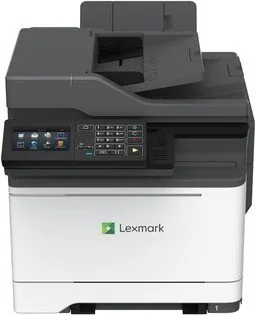
Lexmark CX522ade Manual
PDF manual · 299 Pages
English



Quick check
Incorrect answer, please try again.
Chat with your Lexmark CX522ade manual using AI
Get instant AI answers from your Lexmark CX522ade manual
Ask anything about the Lexmark CX522ade. Answers come from this manual, with the pages they are based on.
CX522ade Maintenance Schedule
Remove dust, lint, and paper debris with a soft brush or vacuum. Wipe the outside with a damp, soft, lint-free cloth. Do not use cleaning agents.
Open the scanner cover and clean the ADF glass, ADF glass pad, flatbed glass, and scanner glass pad with a damp, soft, lint-free cloth.
Free maintenance reminders
Timed to your purchase date. Always free, unsubscribe anytime.
Ask a Question
Do you recommend CX522ade?
Yes NoFrequently Asked Questions
It is a color laser multifunction printer designed for office tasks such as printing, copying, scanning, and faxing. It is aimed at shared work environments that need dependable document handling.
Is this answer helpful?
Yes. The printer supports mobile workflows such as Lexmark Mobile Print, Mopria, AirPrint, and Wi-Fi Direct on compatible devices. This makes it easier to print without using a desktop computer.
Is this answer helpful?
Yes. It supports plain paper, envelopes, labels, card stock, and other specialty media, depending on the tray or feeder being used. Correct paper size and type settings are important for good results.
Is this answer helpful?
Yes. It includes features for confidential jobs, held jobs, PIN-based release, and other security-oriented controls. These tools help keep sensitive documents from being printed too early or seen by others.
Is this answer helpful?
Yes. Supported accessibility tools include magnification mode, voice guidance, speech rate adjustment, gesture navigation, and spoken passwords or PINs on compatible models.
Is this answer helpful?
Users should pay close attention to tray configuration, paper settings, network setup, and fax or e-mail configuration. The printer also needs proper placement, ventilation, and safe power connections.
Is this answer helpful?
Advantages and Disadvantages
Advantages

- Color laser multifunction design supports printing, copying, scanning, and faxing in one device.
- Mobile, USB, cloud, and shortcut-based workflows make everyday tasks faster and more flexible.
- Security tools like confidential jobs and held print options help protect sensitive documents.
- Accessibility features and customizable home screen options improve usability for different users.
Disadvantages

- Initial setup can be detailed, especially for network, fax, and e-mail features.
- Some apps and advanced functions are only available on select models or with added licensing.
- Paper handling requires careful tray, size, and type matching to avoid jams or print issues.
- Specialty media and fax-related features may need extra attention to configuration and support limits.
Product Specification
Format
A4 (Printing), A4 (Scanning)
Type
Printer/Scanner/Copier/Fax
Color system
4-color, 4x single toner
Consumables
78C0Z10, 78C0Z50, 78C0ZK0, 78C0ZV0, 78C0W00
Printing
1200x1200dpi - 33/33 ppm (A4) (ISO)
Scanning
1200x600dpi (CIS) - 47/30 ppm (A4)
Copying
1200x600dpi - 33/33 ppm (A4) (ISO)
Paper input
250 sheets, RADF (50 sheets), Duplex unit
Memory
2GB (RAM)
Ports
1x USB-B 2.0, 1x USB-A 2.0 (Host), 1x Fax (RJ-11)
Network
Gb LAN, AirPrint, Universal Print (Azure Cloud Print), PIN Printing
Display
color, 4.3", Touchscreen
Power consumption
530W (maximum), 485W (typical), 35W (standby), 0.2W (sleep)
Sound pressure level
56.0dB(A)
Emulation
XPS, PCL 6, PCL 5c, PostScript 3, PPDS, PDF 1.7
Housing color
white, black
Dimensions
17.40x18.19x23.15in
Weight
59.75lb
Special features
USB Direct Scan, Direct Print
Manufacturer warranty
1 year (four years after registration)
Product Description
Lexmark CX522ade: A Smart Color Laser Workhorse for Busy Teams
The Lexmark CX522ade is built for offices that need more than basic printing. This color laser multifunction device combines printing, copying, scanning, faxing, and digital sending tools in one compact platform, making it a practical choice for teams that handle mixed workloads every day. Its design leans toward productivity, but it also pays attention to control, security, and ease of use.
One of the biggest strengths of this model is its flexible document handling. It supports automatic document feeding for multi-page jobs, a scanner glass for books and delicate originals, and tray options for different paper sizes and media types. That makes it useful for everything from everyday reports to envelopes, labels, card stock, and specialty forms. For businesses that value workflow variety, the CX522ade can adapt without feeling limited.
The printer also stands out for its network-ready features. Users can print from computers, mobile devices, USB flash drives, and cloud-based profiles. Built-in support for held jobs, confidential printing, and shortcut creation helps reduce repetitive steps and keeps sensitive information under control. The interface is designed for practical navigation, with home screen apps, customizable icons, and accessibility options such as voice guidance and magnification.
Beyond convenience, the CX522ade emphasizes safe and efficient operation. The manual highlights proper placement, power connection, paper loading, and jam prevention to help maintain consistent output. It also includes guidance on energy saving, recycling, maintenance alerts, and supply notifications, which makes it easier to keep the device running smoothly over time.
For small teams and larger departments alike, the Lexmark CX522ade offers a balanced mix of speed, color output, and document management tools. It is especially appealing where reliability, secure workflows, and multi-function flexibility matter more than a simple desktop printer. If your office wants a color laser MFP that can handle daily tasks without constant oversight, this model deserves a closer look.
Notes
- Best suited for shared office use
- Strong choice for print, scan, copy, and fax workflows
- Paper and security settings should be configured carefully for best results
- Some features depend on model, firmware, or optional licenses
Search for 67,706 Manuals online


Type-in Brand or Model