
Lexmark CS730de Manual
PDF manual · 235 Pages
English



Quick check
Incorrect answer, please try again.
Chat with your Lexmark CS730de manual using AI
Get instant AI answers from your Lexmark CS730de manual
Ask anything about the Lexmark CS730de. Answers come from this manual, with the pages they are based on.
Ask a Question
Do you recommend CS730de?
Yes NoFrequently Asked Questions
Navigate to Settings on the home screen, select Security, and then choose Confidential Print Setup. Configure the maximum invalid PIN attempts and expiration times. When printing from your computer, select the Print and Hold option in the driver properties and assign a user name and PIN to secure the job.
Is this answer helpful?
The printer accepts a wide range of paper weights from 60 g/m2 to 218 g/m2. Supported types include plain paper, recycled paper, card stock, glossy paper, labels, vinyl labels, bond, envelopes, letterhead, preprinted forms, and colored paper. Always check tray configuration settings before loading specialty media.
Is this answer helpful?
Yes, you can enable wireless connectivity by installing a compatible MarkNet wireless module. Once installed, use the control panel to navigate to Network/Ports and set up the Wi-Fi connection using WPS, manual entry, or the Lexmark Mobile Assistant application.
Is this answer helpful?
Go to Settings, select Device, then Maintenance, and choose Out of Service Erase. Check the boxes for sanitizing nonvolatile memory and the hard disk if present. Follow the prompts to start the operation, which will permanently delete all user data, settings, and encryption keys.
Is this answer helpful?
Ensure you are using new, undamaged paper stored properly in a dry environment. Check that the paper guides are adjusted correctly and that you are not mixing different sizes or weights in the same tray. Clean the rollers and remove any debris from the paper path if jams persist.
Is this answer helpful?
Yes, you can customize the home screen via the Embedded Web Server. Enter the printer IP address in a browser, go to Settings, select Device, then Home Screen Customization. From there, you can add, remove, rename, or rearrange icons to suit your workflow preferences.
Is this answer helpful?
It is recommended to update the firmware regularly to enhance performance and fix known issues. Visit the Lexmark website, download the latest firmware for your model, and upload it via the Embedded Web Server under the Device Update Firmware section.
Is this answer helpful?
Advantages and Disadvantages
Advantages

- Supports diverse media types including card stock, envelopes, and labels
- High-speed color printing with excellent image clarity
- Secure confidential print jobs requiring PIN release
- Intuitive touch control panel with customizable home screen
- Optional wireless and internal storage upgrades available
Disadvantages

- Requires careful handling during installation due to weight
- Initial setup may take time with complex network configurations
- Some advanced features need specific hardware options installed
- Paper jams can occur if incorrect media is used improperly
- Limited mobile app support compared to some competitors
Product Specification
Format
A4
Type
Laser Printer
Color System
4-color
Consumables
71C0H10, 71C0H20, 71C0H30, 71C0H40, 71C20K0, 71C20C0, 71C20M0, 71C20Y0, 71C2HK0, 71C2HC0, 71C2HM0, 71C2HY0, 71C0W00, 71C0Z10, 71C0Z50
Printing
1200x1200dpi - 40/40 ppm (ISO) (Letter)
Paper Input
650 sheets (1x 550 sheets + 1x 100 sheets), Duplex Unit
Memory
1GB (RAM)
Connections
1x USB-B 2.0, 2x USB-A 2.0 (Host)
Network
Gb LAN, AirPrint, Universal Print (Azure Cloud Print), PIN Printing
Display
color, 4.3 in., Touchscreen
Power Consumption
610W (typical), 57W (standby), 0.3W (sleep), TEC: 0.50 kWh/week
Sound Pressure Level
52.0 dB(A)
Emulation
PCL 6, PCL 5c, PostScript 3, PPDS, PDF 1.7, XML
Dimensions
18.9x16.3x19.2 in.
Weight
71 lbs
Features
Blue Angel
Manufacturer Warranty
1 year (on-site)
Product Description
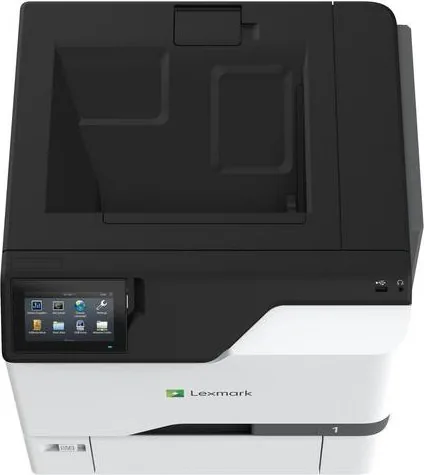
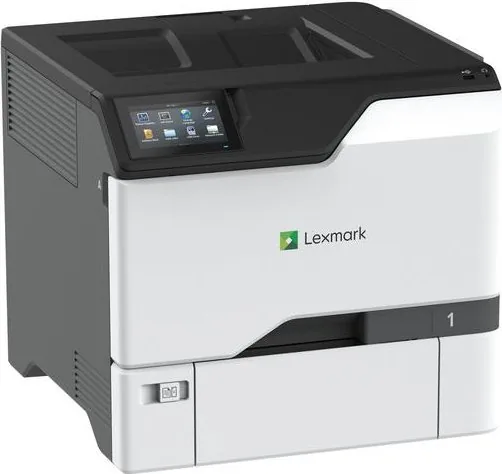
Lexmark CS730de Laser Color: The Ultimate Printing Solution
The Lexmark CS730de Laser Color printer stands as a beacon of efficiency and high-quality output for modern workspaces. Designed to handle demanding print environments, this machine delivers vibrant color documents with exceptional speed and precision. Whether you are producing marketing materials, detailed reports, or everyday correspondence, the CS730de ensures every page meets professional standards.
At the heart of its performance is a robust architecture capable of managing large volumes without compromising on quality. Users can enjoy seamless integration into their existing network infrastructure through versatile connectivity options including Ethernet and optional wireless modules. The intuitive control panel simplifies navigation, allowing for quick adjustments to settings such as paper size, toner darkness, and duplex printing configurations.
Versatility is another hallmark of this device. It supports a wide array of media types ranging from standard plain paper to heavy card stock, envelopes, and specialty labels. The ability to load multiple trays simultaneously means less downtime and greater productivity. Advanced features like confidential print hold ensure sensitive data remains secure until the authorized user releases it at the device.
Maintaining the printer is straightforward with built-in tools for monitoring supply levels and scheduling maintenance tasks. The unit also offers accessibility features designed to assist users with visual impairments, ensuring an inclusive environment. With its durable construction and smart power management modes, the Lexmark CS730de Laser Color is not only a powerful tool but also an environmentally conscious choice for businesses looking to optimize their document workflows while reducing operational costs.
Search for 67,706 Manuals online


Type-in Brand or Model