
Lexmark C792de Manual
PDF manual · 222 Pages
English



Quick check
Incorrect answer, please try again.
Chat with your Lexmark C792de manual using AI
Get instant AI answers from your Lexmark C792de manual
Ask anything about the Lexmark C792de. Answers come from this manual, with the pages they are based on.
Ask a Question
Do you recommend C792de?
Yes NoFrequently Asked Questions
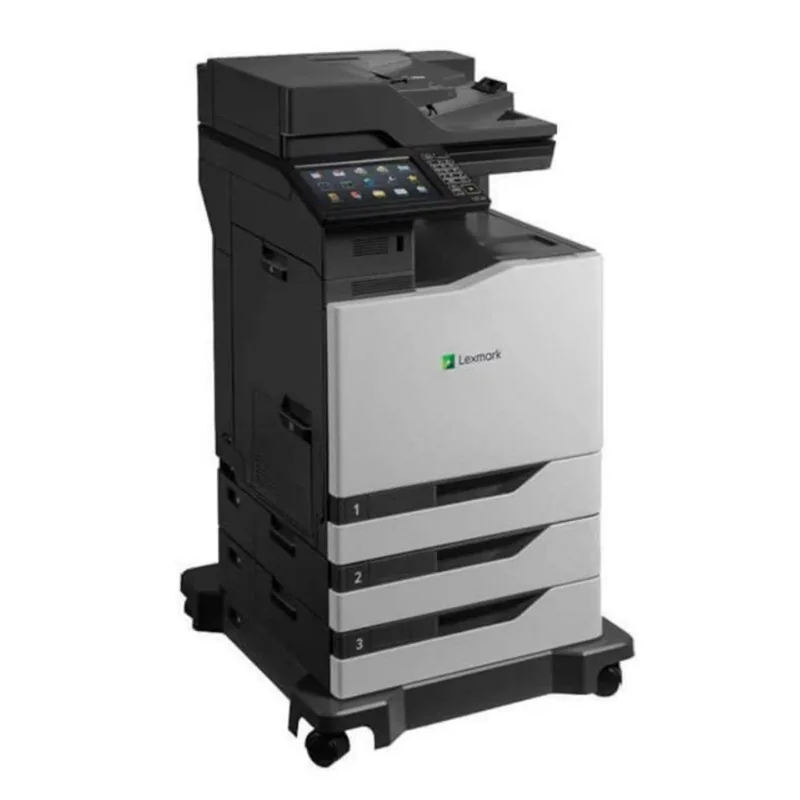
The Lexmark C792de is a color laser printer for office teams that need flexible paper handling, connected administration, specialty-media capability, and optional finishing functions.
Is this answer helpful?
Yes. It includes a standard 550-sheet tray and can be expanded with optional 550-sheet trays or a 2,000-sheet high-capacity feeder. Compatible trays can be linked for continuous feeding.
Is this answer helpful?
Yes. Two-sided printing is supported for compatible paper weights and can be used to reduce paper consumption. Correct paper orientation and tray settings are important for reliable results.
Is this answer helpful?
Yes. The front USB port supports compatible FAT-formatted flash drives. Supported formats include PDF and XPS documents, plus common image formats such as JPEG, PNG, TIFF, GIF, BMP, and PCX.
Is this answer helpful?
Administrators can use the Embedded Web Server through the printer IP address. It provides access to settings, network configuration, reports, alerts, home-screen customization, and configuration import or export.
Is this answer helpful?
The multipurpose feeder supports paper, envelopes, transparencies, labels, and card stock within supported dimensions. Use media made for laser printers and follow loading and temperature guidance to avoid damage or jams.
Is this answer helpful?
Advantages and Disadvantages
Advantages

- Expandable input capacity with optional 550-sheet trays and a 2,000-sheet high-capacity feeder.
- Touch-screen controls, USB printing, held-job access, and customizable home-screen applications improve usability.
- Embedded Web Server supports remote setup, monitoring, reporting, alerts, and configuration transfer.
- Optional stacker, stapling, hole-punch, and mailbox accessories support higher-volume finishing workflows.
- Eco-Mode, duplex printing, Sleep, Hibernate, and Quiet Mode help reduce resource use and noise.
Disadvantages

- The printer weighs more than 18 kg and requires at least two trained people for safe lifting.
- Large tray and finisher configurations may require a printer stand or base to prevent tipping.
- Specialty media has limitations; some media types print at reduced speed and unsupported labels can affect quality.
- Wireless connectivity requires an optional internal print server and network setup details.
- Incorrect paper size, type, loading orientation, or overfilled trays can lead to jams and print issues.
Product Description
Lexmark C792de - Read, Download & Print Free
The Lexmark C792de is a robust color laser printer designed for busy offices that need dependable output, flexible media handling, and practical control over everyday printing. As part of the C790 Series, it combines a clear touch-screen interface with network-ready tools that help teams manage jobs, supplies, settings, and security from one central device.
Built for adaptable office workflows
A standard 550-sheet tray provides a solid starting point, while optional 550-sheet trays and a 2,000-sheet high-capacity feeder can expand paper availability for demanding environments. The multipurpose feeder supports a wide selection of specialty media, including envelopes, labels, transparencies, card stock, and custom paper sizes. This flexibility makes the printer suitable for routine reports, branded letterhead, marketing materials, and occasional specialty jobs.
The C792de also supports optional finishing equipment, including an offset stacker, staple finisher, staple and hole-punch finisher, and 5-bin mailbox. These additions can streamline distribution and reduce manual sorting in shared workgroups. Linked trays and output bins help maintain continuous workflows by automatically using compatible available sources.
Simple control and connected management
Its control panel includes a display, keypad, Home button, USB port, and touch-screen shortcuts for common actions. Users can access held jobs, print supported content from a USB flash drive, review supply status, and adjust core settings directly at the printer. The home screen can be customized with useful applications such as Forms and Favorites, Eco-Settings, Background and Idle Screen, and Remote Operator Panel.
For administrators, the Embedded Web Server enables remote configuration through a browser. It supports monitoring, home-screen customization, configuration import and export, report access, email alerts, and network management. Wired Ethernet connectivity is available, with optional wireless, serial, fiber, and parallel connectivity solutions for specialized infrastructure needs.
Efficient printing with responsible settings
The Lexmark C792de includes settings that help reduce paper, toner, energy use, and operating noise. Automatic two-sided printing, multiple-pages-per-sheet output, Eco-Mode, Sleep Mode, Hibernate Mode, and Quiet Mode provide useful ways to balance productivity with resource-conscious operation. Lexmark also supports recycling programs for hardware, packaging, and toner cartridges.
Notes
Use media designed for laser printers, configure each tray's paper size and type correctly, and keep paper dry and flat to reduce jams. Optional trays and finishing hardware should be installed securely, with appropriate support for larger floor-standing configurations.
Lexmark C792de - Read, Download & Print Free highlights a versatile color printing platform for organizations seeking expandability, connected management, specialty-media support, and practical environmental controls.
Search for 67,706 Manuals online


Type-in Brand or Model