

Kramer VS-211H2 Manual
PDF manual · 14 Pages
English



Quick check
Incorrect answer, please try again.
Chat with your Kramer VS-211H2 manual using AI
Get instant AI answers from your Kramer VS-211H2 manual
Ask anything about the Kramer VS-211H2. Answers come from this manual, with the pages they are based on.
Ask a Question
Do you recommend VS-211H2?
Yes NoFrequently Asked Questions
It is used to automatically switch between two HDMI sources and send the active signal to one display or acceptor. It is commonly used in meeting rooms, classrooms, and other AV installations where quick source selection is needed.
Is this answer helpful?
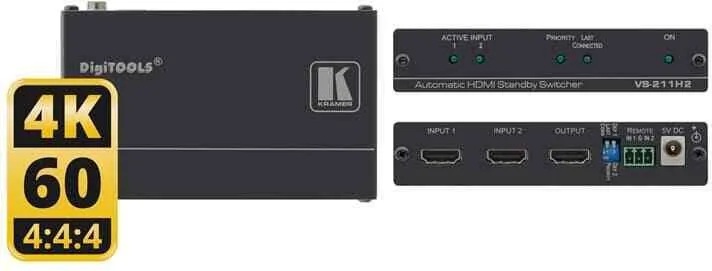
Yes. It supports up to 4K@60 UHD video with 4:4:4 color sampling, making it suitable for modern high-resolution presentation and playback setups.
Is this answer helpful?
Yes. The unit supports remote contact-closure pushbuttons, allowing manual source selection. This override remains active until the selected source disconnects or the unit is powered off.
Is this answer helpful?
It offers priority switching and last-connected switching. Priority mode favors a defined input, while last-connected mode switches to the most recently active source.
Is this answer helpful?
Use high-quality HDMI cables to reduce signal loss and interference. Good cabling is important for stable 4K performance and reliable source detection.
Is this answer helpful?
No. It is intended for indoor use only and should be connected only to equipment installed indoors as well.
Is this answer helpful?
Advantages and Disadvantages
Advantages

- Supports automatic HDMI switching with priority or last-connected logic.
- Handles up to 4K@60 UHD and modern HDMI/HDCP standards.
- Includes remote contact-closure control for manual override.
- Compact design suits installed AV systems and rack-adjacent setups.
Disadvantages

- Only two HDMI inputs, so it is not suited for larger source counts.
- Manual override requires external contact-closure switches.
- Indoor use only; it is not designed for outdoor environments.
- Performance depends on proper cabling and source/display compatibility.
Product Specification
Video Inputs
2x HDMI 2.0 In
Video Outputs
1x HDMI 2.0 Out
Resolutions up to
3840x2160@60Hz
Power Consumption
2W typical
Dimensions
4.72x0.96x2.82in (WxHxD)
Weight
0.44 lb
Product Description
Kramer VS-211H2 Manual: A Smart HDMI Standby Switcher for Seamless AV Control
The Kramer VS-211H2 is a compact automatic HDMI standby switcher built for environments where dependable source switching matters. In conference rooms, classrooms, houses of worship, studios, and rental setups, it helps keep presentations running smoothly by detecting active HDMI signals and switching accordingly. If one source drops out, the unit can move to the next available input without requiring constant user intervention.
What makes this device especially useful is its flexible switching logic. Users can choose between priority switching and last-connected behavior, depending on the setup. That means the VS-211H2 can either always favor one preferred input or follow the most recently connected active source. For teams working with laptops, media players, and fixed installations, this adds a practical layer of control without making the workflow complicated.
The VS-211H2 also supports manual override through remote contact closure switches. This is valuable when an operator needs to take control instantly, bypassing automatic behavior until the selected source is disconnected or the unit is powered off. Combined with DIP-switch configuration, the device gives installers a simple but effective way to tailor the signal path to the room.
Performance is another strong point. With support for 4K@60 UHD video, HDCP 2.2, HDMI 2.0, Deep Color, 3D pass-through, and up to 7.1-channel uncompressed audio, the switcher is designed for modern AV demands. EDID pass-through also helps maintain better communication between display and source, reducing compatibility issues in real-world setups.
For readers looking up the Kramer VS-211H2 Manual, the main takeaway is that this switcher is about reliability, clarity, and ease of integration. It is small, efficient, and intended for indoor use with good-quality cabling and proper installation practices. In short, it is a practical tool for users who want automatic HDMI switching with the option to step in manually when needed.
Notes
- Use quality HDMI cables for best results.
- Manual switching overrides automatic behavior.
- The unit is intended for indoor installations only.
Search for 67,706 Manuals online


Type-in Brand or Model