
Kramer VS-161H Manual
PDF manual · 24 Pages
English



Quick check
Incorrect answer, please try again.
Chat with your Kramer VS-161H manual using AI
Get instant AI answers from your Kramer VS-161H manual
Ask anything about the Kramer VS-161H. Answers come from this manual, with the pages they are based on.
Ask a Question
Do you recommend VS-161H?
Yes NoFrequently Asked Questions
It is used to switch one of 16 HDMI sources to a single HDMI display or acceptor. It is well suited for conference rooms, presentation systems, and rental AV setups where multiple sources need reliable selection.
Is this answer helpful?
Yes. The unit supports HDCP, which helps it work with protected digital video sources and compliant displays. This is important when using commercial media, set-top boxes, or other encrypted HDMI content.
Is this answer helpful?
You can control it from the front panel, by infrared remote, through RS-232, or over Ethernet. That gives it flexibility for both standalone use and system integration in larger AV environments.
Is this answer helpful?
PC mode keeps EDID available all the time so computers do not reset when the display is disconnected. DVD mode only exposes the display EDID when that input is actively switched, which suits media players and similar sources.
Is this answer helpful?
Yes. The front panel can be locked to prevent accidental button presses or tampering. This is useful in public spaces, meeting rooms, or any installation where only authorized users should change routing.
Is this answer helpful?
Yes. The VS-161H is designed for 1U installation in a standard 19-inch rack, making it easy to integrate into professional AV racks and equipment closets.
Is this answer helpful?
Advantages and Disadvantages
Advantages

- 16 HDMI inputs make it easy to route many sources to one display.
- Supports HDMI, HDCP, EDID handling, and up to 1080p/UXGA signals.
- Multiple control methods: front panel, RS-232, Ethernet, and IR.
- 1U rack design fits cleanly into professional AV installations.
Disadvantages

- Setup may require basic networking or serial configuration knowledge.
- No advanced matrix routing; it is a 16x1 switcher, not a full crosspoint.
- Best performance depends on using good-quality HDMI cables.
- Front-panel features are functional rather than highly intuitive for beginners.
Product Specification
Video Inputs
16x HDMI 1.2 Input
Video Outputs
1x HDMI 1.2 Output
Other Connectors
RJ-45, 1x RS-232
Resolutions up to
1920x1080
Power Consumption
22W typical
Dimensions
17.17x1.72x7.20in (WxHxD)
Weight
3.97lb
Product Description
Kramer VS-161H: A Practical 16x1 HDMI Switching Solution
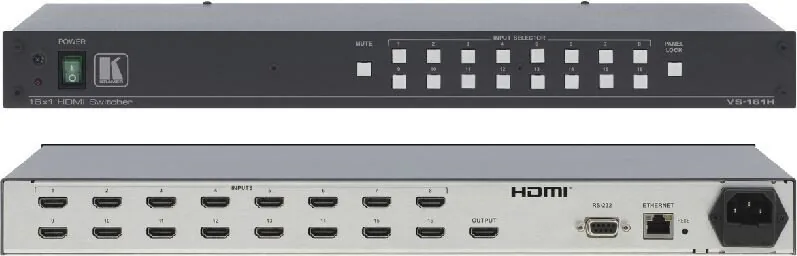
The Kramer VS-161H is built for environments where multiple HDMI sources need to feed a single display without fuss. Think conference rooms, rental setups, presentation spaces, and any AV rack where reliability matters more than flashy extras. With 16 HDMI inputs and one HDMI output, it gives operators a simple way to route the right source to the screen while keeping signal quality stable.
What makes the VS-161H stand out is its balanced mix of control options and signal management features. It supports HDCP and HDMI 1.3, offers EDID pass-through, and includes modes tailored for both computers and playback devices. That means a laptop connected in PC mode can stay stable even when the display is disconnected, while DVD mode is useful for sources that should follow the active output’s EDID only when selected.
For day-to-day use, the front panel is straightforward: select an input, mute the output, or lock the controls to prevent accidental changes. In more advanced installations, the unit can also be managed via RS-232, Ethernet, or infrared remote control, making it a flexible fit for both simple and integrated systems. Rack-mountable in 1U, it is designed to sit neatly alongside other professional AV equipment.
The Kramer VS-161H Manual also highlights practical setup advice that matters in the real world: use quality cables, avoid tight cable bundles, keep the unit away from dust and moisture, and match the right mode to the right source type. These details help preserve signal integrity and reduce troubleshooting later.
If you need a dependable HDMI switcher with professional control options, the VS-161H is a strong candidate. It is not trying to do everything; instead, it focuses on clean switching, broad compatibility, and installation-friendly operation. For many AV systems, that is exactly the kind of product that keeps presentations running smoothly.
Notes
- Best suited for conference rooms and staging systems.
- EDID behavior can be managed for better source compatibility.
- Rack installation and remote control options make integration easier.
Search for 67,706 Manuals online


Type-in Brand or Model