
Kramer VM-24HC Manual
PDF manual · 21 Pages
English



Quick check
Incorrect answer, please try again.
Chat with your Kramer VM-24HC manual using AI
Get instant AI answers from your Kramer VM-24HC manual
Ask anything about the Kramer VM-24HC. Answers come from this manual, with the pages they are based on.
Ask a Question
Do you recommend VM-24HC?
Yes NoFrequently Asked Questions
It takes one of two HDMI inputs and distributes the selected signal to four HDMI outputs at the same time. It is meant for mirrored playback and simple AV distribution in home, presentation, or rental setups.
Is this answer helpful?
Yes. Its EDID handling helps the source recognize compatible display settings. You can use a single output, Auto-Mix from multiple displays, or the default EDID to improve handshake stability.
Is this answer helpful?
Use the front-panel INPUT SELECTOR button to switch between Input 1 and Input 2. The front-panel LEDs indicate which input is currently active.
Is this answer helpful?
Yes. The unit supports IR remote control and RS-232 control, so it can be operated locally or integrated into a larger control system.
Is this answer helpful?
Yes. When the unit powers up or when a new input is introduced, the video is displayed simultaneously on all outputs once they are ready to show the signal.
Is this answer helpful?
The VM-24HC supports HDMI and HDCP, Deep Color, x.v.Color, 3D pass-through, and up to 7.1 uncompressed audio channels, making it suitable for modern AV sources.
Is this answer helpful?
Advantages and Disadvantages
Advantages

- Two HDMI inputs feed four simultaneous outputs for simple signal distribution.
- EDID management supports single-output, auto-mix, or default modes for better compatibility.
- IR, front-panel, and RS-232 control options make integration flexible.
- Compact size and optional rack mounting suit both desktop and installed AV setups.
Disadvantages

- Only two inputs are available, so it is not ideal for larger source-heavy systems.
- Designed for indoor use only, limiting deployment in harsh environments.
- Setup still depends on proper EDID selection for mixed display environments.
- No advanced scaling is included, so source and display compatibility matters.
Product Specification
Video Inputs
2x HDMI In
Video Outputs
4x HDMI Out
Additional Connections
1x RS-232
Resolutions up to
1920x1080
Power Consumption
5.5W typical
Dimensions
8.45x1.72x6.42in (WxHxD)
Weight
1.98 lb
Product Description
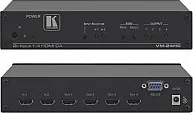
Kramer VM-24HC: Simple HDMI Distribution with Pro-Level Control
The Kramer VM-24HC is a compact HDMI distribution solution designed to take one of two HDMI sources and send the selected signal to four displays at the same time. For home theaters, demo spaces, rental setups, and presentation environments, that kind of flexibility can make signal routing much easier without adding complexity. If you’re looking for the Kramer VM-24HC Manual, the main takeaway is that this unit is built around reliable switching, clean signal handling, and easy setup.
One of its biggest strengths is how it manages EDID. The VM-24HC can learn EDID from a single output, combine the information from multiple connected displays using Auto-Mix, or fall back to a default profile. That means the source device gets a display handshake that helps maintain stable output and smoother plug-and-play behavior. For mixed-display systems, this is especially useful because different screens may support different resolutions or audio formats.
The unit also supports HDCP, Deep Color, x.v.Color, and up to 7.1 uncompressed audio channels, so it is aimed at users who want modern HDMI compatibility without sacrificing simplicity. Kramer’s equalization and re-clocking technology helps rebuild the signal for longer cable runs, which can improve performance in real-world installations where distance matters.
Operation is straightforward. You can choose between Input 1 and Input 2 from the front panel, and the same device can also be controlled through IR or RS-232 for integration into a larger AV setup. Another practical detail is that all four outputs can display the active video simultaneously once they are ready, making the VM-24HC well suited for mirrored playback across multiple screens. That behavior is especially helpful during power-up and when a new source is introduced.
In terms of physical design, the VM-24HC is small enough for desktop use but can also be rack mounted with the optional adapter. Its indoor-only design, simple LED indicators, and modest power requirements make it a practical choice for installers who want dependable HDMI distribution in a compact form.
Notes
- Use quality HDMI cables for the best signal stability.
- Keep cables neat and avoid tight coils or bundles.
- The output video is shown simultaneously on all ready outputs after power-up or when new video is introduced.
- EDID selection can be stored and reused for future setups.
Search for 67,706 Manuals online


Type-in Brand or Model