
Kramer VM-24H Manual
PDF manual · 23 Pages
English



Quick check
Incorrect answer, please try again.
Chat with your Kramer VM-24H manual using AI
Get instant AI answers from your Kramer VM-24H manual
Ask anything about the Kramer VM-24H. Answers come from this manual, with the pages they are based on.
Ask a Question
Do you recommend VM-24H?
Yes NoFrequently Asked Questions
It takes one of two HDMI inputs and distributes the selected signal to up to four HDMI outputs. It is meant for sharing video across multiple displays while keeping the signal stable and consistent.
Is this answer helpful?
The VM-24H supports up to 6.75Gbps and works with HDMI features such as Deep Color, x.v.Color, Lip Sync, CEC, and 3D pass-through. That makes it suitable for modern AV systems.
Is this answer helpful?
EDID helps the source understand what the connected displays can handle. The VM-24H can copy EDID from one output, combine several outputs in auto-mix mode, or use a default profile for easier compatibility.
Is this answer helpful?
Yes. You can use front-panel buttons, infrared control, or RS-232 commands. This makes it easy to integrate into a simple setup or a larger controlled installation.
Is this answer helpful?
Yes. The unit is built for a standard 19-inch rack and occupies 1U of space, which is helpful for professional AV racks and equipment closets.
Is this answer helpful?
Use quality HDMI cables, keep the unit indoors, and disconnect power before connecting devices. If you plan to use RS-232 or external IR, be sure the correct cabling and accessories are in place.
Is this answer helpful?
Advantages and Disadvantages
Advantages

- Two HDMI inputs and four outputs provide flexible source distribution for small AV systems.
- Reclocking and equalization help improve signal stability and reduce quality loss.
- EDID options simplify compatibility with mixed displays and tricky handshake setups.
- Multiple control methods support front-panel use, IR operation, and RS-232 integration.
Disadvantages

- Designed for indoor use only, so it is not suitable for outdoor environments.
- No user-serviceable parts inside, so service requires qualified personnel.
- RS-232 setup may need a crossed cable or null-modem adapter.
- External IR control may require dealer-installed internal cabling.
Product Specification
Video Inputs
2x HDMI In
Video Outputs
4x HDMI Out
Other Connections
1x RS-232
Resolutions up to
1920x1080
Power Consumption
16W typical
Dimensions
17.17x1.72x7.21in (WxHxD)
Weight
3.53 lb
Product Description
Kramer VM-24H: HDMI Distribution Made Practical
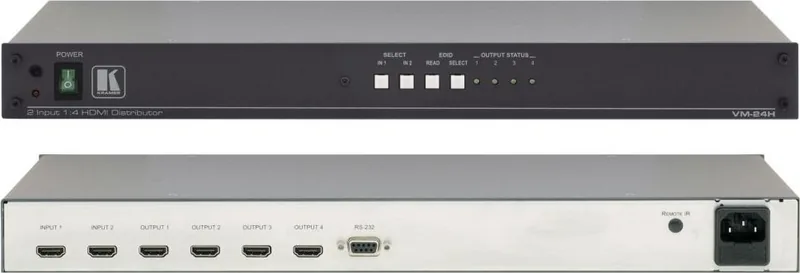
The Kramer VM-24H is a compact HDMI distribution amplifier designed for setups that need reliable signal sharing without complexity. With two selectable HDMI inputs and four identical HDMI outputs, it lets one source be routed to multiple displays, or switch between two sources with ease. For blog readers looking for a straightforward way to manage video distribution, the Kramer VM-24H Manual highlights a device built for stability, flexibility, and everyday AV use.
At its core, the unit reclocks and equalizes the selected HDMI signal before sending it onward, helping maintain a cleaner connection across longer or more demanding cable runs. It supports a maximum data rate of 6.75Gbps and works with key HDMI features such as Deep Color, x.v.Color, Lip Sync, CEC, and 3D pass-through. That makes it a strong fit for home theater systems, presentation spaces, multimedia rooms, and rental or staging environments where consistent performance matters.
One of the VM-24H’s most useful strengths is its EDID handling. Instead of forcing every connected display to behave the same way, it can learn EDID from one output, combine information from several connected displays using auto-mix, or fall back to a default EDID profile. This helps reduce handshake problems and improves plug-and-play behavior when different screens are used together.
Control is also practical. The front panel includes input selection, EDID buttons, power, and status LEDs, while RS-232 control supports integration with a PC or external controller. An infrared receiver and optional external IR extension add another layer of convenience for remote operation. The result is a unit that can work well in both simple standalone setups and more structured AV systems.
Installation is equally straightforward. The VM-24H fits into a 19-inch rack space, uses a universal AC power supply, and is intended for indoor use. The setup guidance emphasizes quality HDMI cabling, careful routing, and proper placement away from heat, moisture, and dust. These details help preserve signal quality and extend the life of the system.
Notes
- Best suited for distributing one selected HDMI source to multiple displays.
- EDID management is especially helpful when displays have different capabilities.
- Rack mounting makes it easy to integrate into professional AV setups.
- Good cable selection is important for the best possible output quality.
Search for 67,706 Manuals online


Type-in Brand or Model