

Kramer VM-22H Manual
PDF manual · 14 Pages
English



Quick check
Incorrect answer, please try again.
Chat with your Kramer VM-22H manual using AI
Get instant AI answers from your Kramer VM-22H manual
Ask anything about the Kramer VM-22H. Answers come from this manual, with the pages they are based on.
Ask a Question
Do you recommend VM-22H?
Yes NoFrequently Asked Questions
It is used to select between two HDMI sources and distribute the chosen signal to two HDMI displays. It is a practical solution for small AV setups that need simple switching and signal duplication.
Is this answer helpful?
Yes. It reclocks and equalizes the HDMI signal, which helps maintain integrity over longer cable runs and can reduce problems caused by weaker or poorly matched cables.
Is this answer helpful?
It can connect HDMI sources such as media players, computers, or presentation devices to HDMI displays like TVs, projectors, or monitors. It is commonly used in home theater and presentation environments.
Is this answer helpful?
EDID helps the source understand what video formats the display supports. Proper EDID handling can prevent handshake issues and ensure smoother plug-and-play operation across connected devices.
Is this answer helpful?
Yes. The selected HDMI input can be routed to two outputs simultaneously, making it useful when the same content needs to appear on two screens.
Is this answer helpful?
No. It is designed for straightforward installation with clear input, output, and status indicators. Once the cables and power are connected, setup is mainly focused on choosing the desired input and EDID mode.
Is this answer helpful?
Advantages and Disadvantages
Advantages

- Switches between two HDMI sources and distributes the chosen signal to two outputs.
- Reclocking and equalization help maintain signal quality and reduce HDMI dropouts.
- EDID management improves compatibility and simplifies setup with different displays.
- Compact form factor and clear LEDs make it easy to install and monitor.
Disadvantages

- Limited to two inputs and two outputs, so it is not ideal for larger AV systems.
- Requires external 5V power, adding one more connection to manage.
- Designed for indoor use only, with limited environmental tolerance.
- EDID setup may need manual attention during installation.
Product Specification
Video Inputs
2x HDMI In
Video Outputs
2x HDMI Out
Resolutions up to
1920x1080
Power Consumption
4.6W typical
Dimensions
4.72x0.96x2.82in (WxHxD)
Weight
0.66lb
Product Description
Kramer VM-22H: Compact HDMI Switching and Distribution
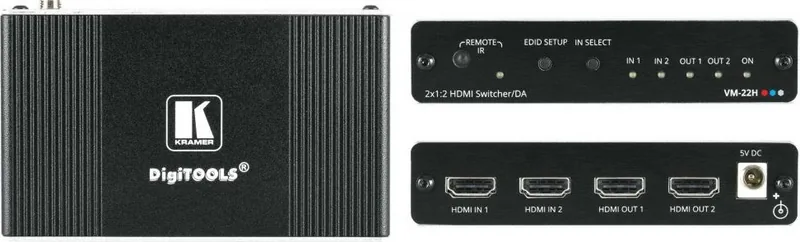
The Kramer VM-22H Manual highlights a practical 2x1:2 HDMI switcher/distribution amplifier built for simple, reliable signal routing. In everyday use, the VM-22H lets you choose between two HDMI sources and send the selected signal to two displays at the same time. That makes it a handy fit for home theater setups, presentation rooms, and rental or staging environments where quick switching and stable output matter.
What makes it useful
One of the strongest advantages of the VM-22H is its ability to keep HDMI signals clean over longer distances. It reclocks and equalizes the incoming signal, helping preserve image quality and reduce issues caused by weaker cabling or less stable connections. It also supports common HDMI features such as Deep Color, x.v.Color, Lip Sync, CEC, HDCP, and 3D pass-through, which gives it broad compatibility with modern AV gear.
Smart EDID handling
A standout feature is Kramer’s intelligent EDID processing. This helps the unit communicate properly with connected displays so sources can negotiate the best supported video mode. In practice, that means fewer handshake problems and smoother plug-and-play behavior. The VM-22H can store EDID in non-volatile memory, so once it is configured during installation, it usually does not need frequent adjustments.
Design and operation
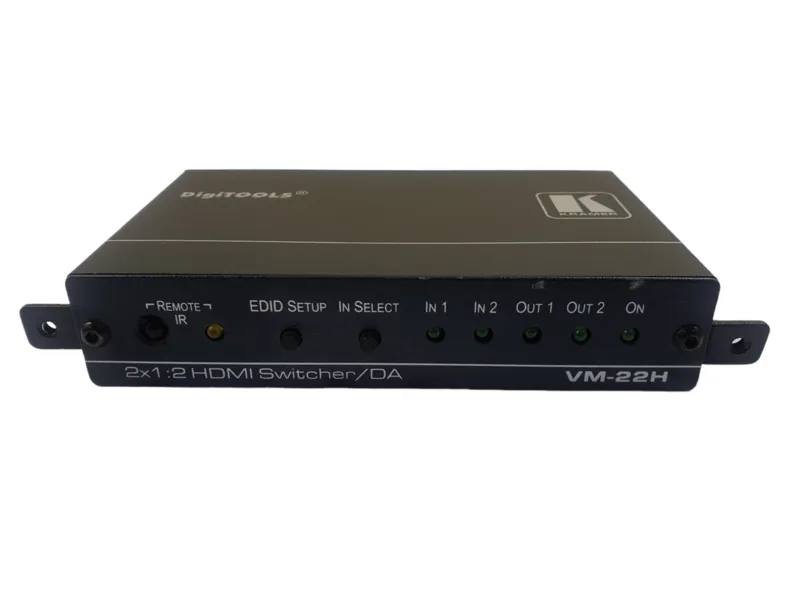
The unit keeps things straightforward with front-panel buttons and LED indicators for input selection, output activity, and power status. That makes it easy to confirm what is active at a glance. Its compact DigiTOOLS enclosure and 5V DC power design also make it suitable for small AV racks and tight installation spaces. With only a few connections to manage, setup remains fast and user-friendly.
Where it fits best
The VM-22H is a good choice when you need dependable HDMI switching without unnecessary complexity. It is especially well suited for spaces where one source may need to feed multiple displays, or where two sources must be shared across a pair of screens. For installers and AV users who value signal stability, compact size, and easy control, it offers a balanced mix of performance and convenience.
Notes
- Best results come from using high-quality HDMI cables.
- The unit is intended for indoor use only.
- EDID setup is usually a one-time installation step.
- Always power off connected devices before wiring the system.
Search for 67,706 Manuals online


Type-in Brand or Model