
Kramer SID-X3N Manual
PDF manual · 37 Pages
English



Quick check
Incorrect answer, please try again.
Chat with your Kramer SID-X3N manual using AI
Get instant AI answers from your Kramer SID-X3N manual
Ask anything about the Kramer SID-X3N. Answers come from this manual, with the pages they are based on.
Ask a Question
Do you recommend SID-X3N?
Yes NoFrequently Asked Questions
It supports HDMI, DisplayPort, DVI-D, and PC graphics input. That makes it useful in mixed environments where several device types need to share one display path.
Is this answer helpful?
When connected to a compatible switcher, the SID-X3N can request control of the active input using the STEP-IN button or a remote step-in switch. If access is granted, it takes over the selected input.
Is this answer helpful?
Yes. It can operate in manual mode or last-connected mode. In automatic operation, it prioritizes live signals and can switch based on connection status and configured delay settings.
Is this answer helpful?
EDID lock prevents the stored EDID from being overwritten. This is useful when you want stable source behavior and consistent display negotiation across connected devices.
Is this answer helpful?
The unit supports unbalanced stereo audio input and output, and it can embed audio into the HDMI signal. DIP-switch settings control whether analog or embedded audio is used in different modes.
Is this answer helpful?
Yes. It includes remote switch and LED terminals, RS-232 support, configuration DIP-switches, and compact hardware that suits rack or furniture-based installations.
Is this answer helpful?
Advantages and Disadvantages
Advantages

- Supports HDMI, DisplayPort, DVI, and VGA sources in one compact unit.
- Flexible audio routing with analog input embedding and stereo output support.
- Manual, automatic, and step-in control options fit many AV workflows.
- EDID lock and VGA phase adjustment improve compatibility and picture quality.
Disadvantages

- DIP-switch changes require a power cycle, which slows quick reconfiguration.
- Step-in control depends on compatibility with the connected switcher.
- Audio behavior can be confusing because it changes with DIP-switch settings.
- Designed for indoor use only, so it is not suitable for outdoor installations.
Product Specification
Video Inputs
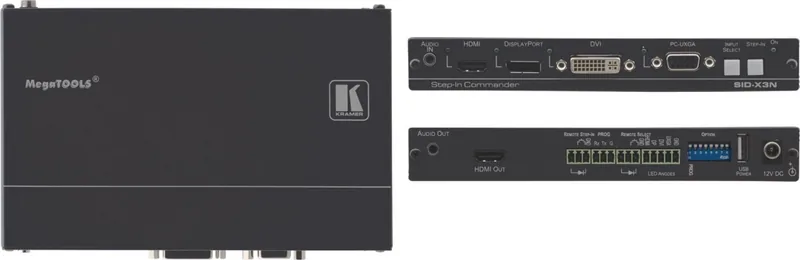
1x HDMI In, 1x DisplayPort In, 1x DVI-D In, 1x VGA In
Video Outputs
1x HDMI Out
Other Connections
1x Jack Audio In, 1x Jack Audio Out, 1x RS-232
Resolutions up to
1920x1080@60Hz
Power Consumption
13.2W typical
Dimensions
7.38x1.00x4.53in (WxHxD)
Weight
1.10lb
Product Description
Kramer SID-X3N: A Versatile Step-In Commander for Modern AV Setups
The Kramer SID-X3N Manual highlights a compact but capable source selector built for classrooms, meeting rooms, rental rigs, and presentation spaces. At its core, the SID-X3N is designed to simplify how users bring different signals into one workflow, while keeping the experience fast, reliable, and easy to understand.
Flexible input handling for mixed environments
The SID-X3N accepts HDMI, DisplayPort, DVI-D, and PC graphics signals, plus unbalanced stereo audio. That makes it a practical fit for spaces where laptops, desktops, and media players all need to share the same display path. It can embed analog audio into the output signal and pass everything onward through HDMI to a compatible switcher, helping keep cabling neat and system design straightforward.
Built for control, automation, and confidence
One of the strongest parts of this device is its control logic. Users can switch sources manually from the front panel, or let the unit follow automatic rules based on the last connected input and signal priority. In real-world use, that means less time spent hunting for the right source and more time focused on the content. The step-in function adds another layer of convenience when paired with supported switchers, letting the SID-X3N take control of the connected system input when needed.
Audio, EDID, and image tools that matter
The SID-X3N does more than route video. Its audio behavior can be tailored with DIP-switch settings, and its EDID handling helps improve compatibility across different sources and displays. For analog computer sources, VGA phase adjustment is available to refine image sharpness and reduce visual noise. These details matter when a system needs to work consistently for non-technical users.
Compact hardware with practical extras
The unit’s small MegaTOOLS-style enclosure makes it easy to integrate into tight spaces, and optional rack mounting support adds deployment flexibility. Remote switch and LED connections allow the front panel experience to be extended to custom control points, while RS-232 support provides a maintenance path for firmware updates and system management.
Notes
- Best suited for mixed-source presentation systems
- Works well where automatic switching and step-in control are needed
- Power-cycle the unit after changing DIP-switch settings
- Use quality cables for the most stable performance
Search for 67,706 Manuals online


Type-in Brand or Model