
Kramer SID-X2N Manual
PDF manual · 39 Pages
English



Quick check
Incorrect answer, please try again.
Chat with your Kramer SID-X2N manual using AI
Get instant AI answers from your Kramer SID-X2N manual
Ask anything about the Kramer SID-X2N. Answers come from this manual, with the pages they are based on.
Ask a Question
Do you recommend SID-X2N?
Yes NoFrequently Asked Questions
It is used to select and route presentation sources such as HDMI, DisplayPort, DVI, and VGA to a compatible HDBaseT receiver. It is common in classrooms, meeting rooms, and staged AV setups.
Is this answer helpful?
Yes. It accepts unbalanced stereo audio, can embed that audio into the output signal, and also provides a separate stereo audio output for external sound systems or acceptors.
Is this answer helpful?
Yes. It can operate in automatic modes based on live signal presence or last-connected priority. It also supports manual switching from the front panel when direct control is preferred.
Is this answer helpful?
With the right cable and setup, it can reach up to 130 m in normal mode and up to 180 m in extended range mode. Actual distance depends on resolution, cable quality, and receiver type.
Is this answer helpful?
EDID lock prevents the stored EDID from being overwritten. This helps keep source behavior consistent, especially in installations where stable handshake and resolution management are important.
Is this answer helpful?
Yes. It supports remote step-in switches, remote input select switches, indicator LEDs, and RS-232 control, making it easy to integrate into larger AV control environments.
Is this answer helpful?
Advantages and Disadvantages
Advantages

- Supports HDMI, DisplayPort, DVI, and VGA inputs for broad source compatibility.
- Combines video switching, audio embedding, and HDBaseT transmission in one compact unit.
- Offers both manual control and automatic source selection for flexible operation.
- Includes EDID locking and shutdown logic for more stable room setups.
Disadvantages

- Configuration relies on DIP-switch settings, which may feel technical for first-time users.
- Best performance depends on quality cabling and proper HDBaseT wiring.
- Extended transmission range varies by resolution, display, and cable type.
- Protected HDCP content may not display if the connected screen lacks HDCP support.
Product Specification
Video Inputs
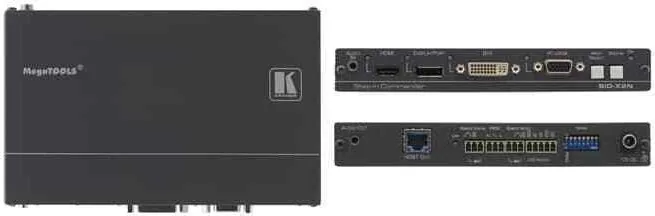
1x HDMI Input, 1x DisplayPort Input, 1x DVI-D Input, 1x VGA Input
Other Connections
1x Jack Audio Input, 1x Jack Audio Output, RJ-45, 1x RS-232
Resolutions up to
1920x1080@60Hz
Power Consumption
11.4W typical
Dimensions
7.38x1x4.53in (WxHxD)
Weight
1.10 lb
Product Description
Kramer SID-X2N: Flexible Step-In Switching for Modern AV Spaces
The Kramer SID-X2N is a compact step-in commander built for presentation environments that need reliable source selection with minimal effort. At its core, it brings together HDMI, DisplayPort, DVI, and PC graphics inputs, then sends the chosen signal over HDBaseT to a compatible receiver. That makes it a practical fit for classrooms, meeting rooms, rental setups, and any space where users need to switch sources quickly without complicated control systems.
What makes the SID-X2N especially appealing is its balance of automation and manual control. It can choose inputs automatically based on live signal detection or last-connected priority, yet it also gives users direct front-panel selection when a hands-on approach is better. The Kramer SID-X2N Manual highlights how this flexibility helps streamline everyday operation while still supporting more advanced integration through remote switches and RS-232 control.
Audio handling is another strong point. The unit accepts unbalanced stereo audio, can embed it into the output stream, and also provides a dedicated audio output. This is useful in mixed-source installations where sound from laptops, PCs, and media devices needs to be routed cleanly alongside video. Add EDID control, audio mode configuration, and adjustable UXGA phase tuning, and the device becomes more than a simple switcher.
For integrators, the SID-X2N also offers a thoughtful set of operational safeguards. Automatic output shutdown can reduce waste when signals disappear, and the lockable EDID option helps keep system behavior stable after configuration. Its MegaTOOLS-sized aluminum enclosure keeps the footprint small, while HDBaseT connectivity supports long-distance transmission in professional installations.
In practice, the SID-X2N is best seen as a source-management hub for rooms that value simplicity, consistency, and clean connectivity. It is not designed to overwhelm with features; instead, it focuses on dependable routing, predictable switching behavior, and easy integration into AV systems that need to work the same way every day.
Notes
- Use high-quality twisted pair cabling for the best HDBaseT performance.
- Power-cycle the unit after changing DIP-switch settings.
- Manual selection can override automatic source priority.
- Check display compatibility when using protected HDCP content.
Search for 67,706 Manuals online


Type-in Brand or Model