
Kramer DIP-31 Manual
PDF manual · 79 Pages
English



Quick check
Incorrect answer, please try again.
Chat with your Kramer DIP-31 manual using AI
Get instant AI answers from your Kramer DIP-31 manual
Ask anything about the Kramer DIP-31. Answers come from this manual, with the pages they are based on.
Ask a Question
Do you recommend DIP-31?
Yes NoFrequently Asked Questions
It is an automatic video switcher for selecting between HDMI, VGA, and audio sources in presentations, classrooms, and similar AV installations. It helps route signals to a display or compatible receiver with minimal manual effort.
Is this answer helpful?
Yes. It supports up to 4K@60Hz (4:2:0) UHD on HDMI, which makes it suitable for modern displays and high-resolution content sources.
Is this answer helpful?
Yes. It can switch automatically based on input priority or the last connected source. It also allows manual switching, so installers can choose the behavior that fits the room.
Is this answer helpful?
It can be controlled from front panel buttons, remote contact-closure switches, RS-232 commands, Protocol 3000, and embedded web pages over Ethernet.
Is this answer helpful?
Yes. The DIP-31 supports analog stereo audio and can embed or route audio depending on the selected input and configuration settings.
Is this answer helpful?
EDID management helps the switcher present compatible display information to source devices. This improves plug-and-play behavior and can reduce handshake problems with HDMI equipment.
Is this answer helpful?
Advantages and Disadvantages
Advantages

- Supports HDMI and VGA inputs, making it useful for mixed legacy and modern AV setups.
- Automatic switching can follow priority or last-connected rules for smoother operation.
- Web control, RS-232, and contact-closure options give installers plenty of control paths.
- 4K UHD support and EDID handling help maintain compatibility with modern displays.
Disadvantages

- Some configuration changes require a power cycle, which can slow adjustments during setup.
- VGA and audio behavior may need careful tuning to match the room’s equipment.
- Advanced features can be more than a basic user needs, adding setup complexity.
- Outdoor use is not intended; the unit is designed for indoor installations only.
Product Specification
Video Inputs
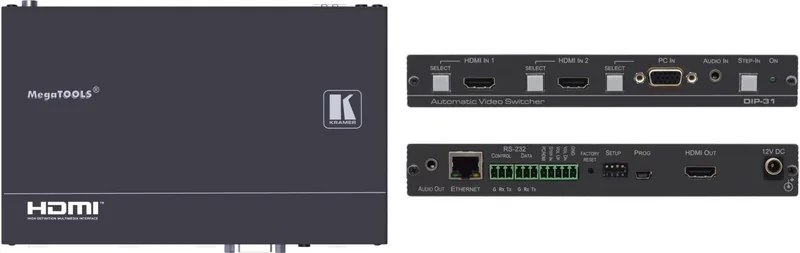
2x HDMI In, 1x VGA In
Video Outputs
1x HDMI Out
Other Connections
1x Jack Audio In, 1x Jack Audio Out, RJ-45, 1x RS-232
Resolutions up to
3840x2160@60 Hz
Power Consumption
7.2 W typical
Dimensions
7.40x0.98x4.53in (WxHxD)
Product Description
Kramer DIP-31: Smart Switching for Flexible AV Setups
The Kramer DIP-31 Manual points to a compact yet capable automatic video switcher designed for modern presentation spaces, classrooms, hospitality rooms, and simple meeting environments. At its core, the DIP-31 brings together HDMI, VGA, audio, Ethernet, and RS-232 control in one unit, making it a practical bridge between older and newer AV sources.
What makes it useful
One of the strongest ideas behind the DIP-31 is simplicity. It can detect active inputs and switch automatically based on priority or the last connected source, while still allowing full manual control from the front panel, remote contact-closure switches, serial commands, or embedded web pages. That flexibility is especially helpful in rooms where different users need different levels of control.
The switcher also supports 4K UHD video up to 4K@60Hz (4:2:0), which keeps it relevant for high-resolution displays and modern source devices. Alongside HDMI sources, it can accept VGA input and analog audio, then embed or route audio according to configuration. For legacy systems, that means fewer converters and less complexity.
Features that stand out
The DIP-31 includes EDID management, HDCP support, VGA phase adjustment, configurable timeouts, and Step-in support when paired with compatible Kramer equipment. Its web interface adds another layer of convenience, letting installers adjust network settings, security, video/audio behavior, and firmware without touching the front panel.
It is also built for integration. The RS-232 data port, protocol support, and remote terminal blocks make it suitable for controlled environments where automation matters. Whether the goal is source selection in a classroom or seamless input handling in a conference room, the DIP-31 aims to keep operation smooth and predictable.
Practical impression
This is not a flashy consumer device; it is a workhorse for AV professionals. Its value comes from dependable switching, strong compatibility, and enough configuration depth to fit many installation styles. The combination of automatic detection, manual override, and remote management gives it a balanced feature set that can simplify everyday use while still supporting advanced control.
Notes
- Best suited for installed AV systems that need mixed-format input handling.
- EDID and audio behavior should be planned during setup for best results.
- Power cycling is required after some DIP-switch and network changes.
- Use quality cables to maintain signal integrity and stable performance.
Search for 67,706 Manuals online


Type-in Brand or Model