
Kramer DIP-20 Manual
PDF manual · 81 Pages
English



Quick check
Incorrect answer, please try again.
Chat with your Kramer DIP-20 manual using AI
Get instant AI answers from your Kramer DIP-20 manual
Ask anything about the Kramer DIP-20. Answers come from this manual, with the pages they are based on.
Ask a Question
Do you recommend DIP-20?
Yes NoFrequently Asked Questions
It is used to select and route video and audio sources in professional AV setups. It accepts HDMI, VGA, analog audio, and control signals, then sends them over HDBaseT to a compatible receiver.
Is this answer helpful?
Yes. It can switch automatically based on priority or the last connected source. It also supports manual switching, so installers can choose the behavior that fits the room and workflow.
Is this answer helpful?
Yes. It supports up to 4K UHD at 60 Hz in 4:2:0 format. Actual distance and performance depend on the receiver, cable quality, and signal resolution.
Is this answer helpful?
The unit can embed analog audio into the output signal, de-embed audio to its analog output, and adjust volume remotely. It can also prioritize embedded HDMI audio or analog input audio based on configuration.
Is this answer helpful?
Yes. It can be controlled through RS-232, contact-closure switches, Protocol 3000 commands, and embedded web pages over Ethernet. This makes it easy to integrate into managed AV systems.
Is this answer helpful?
Step-in lets a source take control of a connected display path when used with supported Kramer equipment. It is useful in collaborative rooms where multiple presenters may need quick access to the system.
Is this answer helpful?
Advantages and Disadvantages
Advantages

- Flexible switching modes support manual, priority, and last-connected workflows.
- Combines HDMI, VGA, audio, RS-232, Ethernet, and HDBaseT in one compact unit.
- PoE and long-distance HDBaseT output simplify installation in larger rooms.
- Web control and Protocol 3000 make remote setup and integration straightforward.
Disadvantages

- Best performance depends on using high-quality, compatible cables.
- Some advanced settings require EDID tuning and careful timeout configuration.
- DIP-switch changes need a power cycle before they take effect.
- Extended range depends on approved receivers and the right cable standard.
Product Specification
Video Inputs
2x HDMI In, 1x VGA In
Video Outputs
1x HDMI Out
Other Connections
1x Jack Audio In, 1x Jack Audio Out, RJ-45, 1x RS-232
Resolutions up to
3840x2160@60Hz
Power Consumption
7.2 W typical
Dimensions
7.38x1.00x4.53in (WxHxD)
Weight
1.10 lb
Product Description
Kramer DIP-20: Smart Switching for Modern AV Spaces
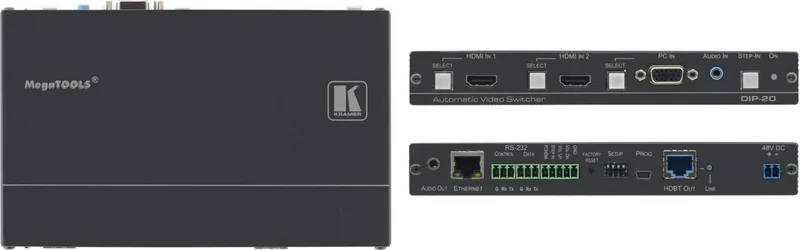
The Kramer DIP-20 is a compact 4K UHD HDBaseT transmitter and automatic video switcher built for installations where speed, simplicity, and dependable signal transport matter. It accepts HDMI and VGA computer graphics sources, unbalanced stereo audio, Ethernet, and serial data, then sends the combined signal over a single twisted-pair link to a compatible HDBaseT receiver. In meeting rooms, classrooms, hotel suites, and presentation environments, that means fewer cables, cleaner setups, and a much smoother user experience.
One of the most useful strengths of the DIP-20 is its flexible switching logic. It can work in manual mode, last-connected mode, or priority mode, so installers can decide whether the system should react automatically or wait for a user command. Front-panel buttons, contact-closure switches, RS-232, and embedded web pages all provide control options, while EDID management helps keep source and display compatibility stable. The Step-in feature is another valuable touch for collaborative systems, allowing a connected source to take control when supported by the receiving device.
Audio handling is equally practical. The DIP-20 can embed analog audio, de-embed output audio, and adjust volume remotely, which is especially helpful when a laptop or legacy source needs to feed both video and sound through one AV path. It also supports PoE for compatible receivers, reducing the need for extra power supplies at the far end of the cable run.
For integrators, the Kramer DIP-20 Manual is especially helpful because it explains configuration switches, timeout behavior, EDID locking, remote management, and Protocol 3000 commands in detail. That makes the unit easier to tailor for different room layouts and workflow needs. The web interface also adds convenience by allowing network setup, authentication, firmware updates, and device monitoring from a browser.
Performance is built around real-world demands. The DIP-20 supports up to 4K@60 UHD (4:2:0), HDCP-compliant sources, Deep Color, x.v.Color, and 3D. Its HDBaseT output can reach long distances with the right cable and receiver, making it a solid fit for distributed AV systems where reliability matters more than flashy complexity.
Notes
- Use high-quality, recommended Kramer cables for the best signal stability.
- Power-cycle the unit after changing DIP-switch settings.
- EDID and timeout values can be tuned to match the display chain.
- Extended-range performance depends on the receiver and cable type.
Search for 67,706 Manuals online


Type-in Brand or Model