Manual.ly Logo

JBL Aquaristic ProFlora CO2 Control Manual

0.0 · 0 Ratings

PDF manual · 81 Pages

English

M: QW-35-FL
page

/ 81

Loading...
7fdf6f30da03b008f09924ce409c13047ff2 page c
7.7 Valve
Open with the following steps:
Settings key > select Valve > press OK > select “auto”, “man open” or “man shut” > press OK.
In this menu item you can select the operation mode of the externally controlled solenoid valve� The options are automatic operation (auto), manual
open (man open) and manual shut (man closed)� For the regulation feature to work, the “auto“ setting (factory setting) needs to be selected� For the
settings “man open “ and “man closed“, the valve stays open or shut until the setting is changed again�
A green symbol for “open“ or a red symbol for “shut“ and “A“ for automatic or “m“ for manual appear on the value overview (chap� 4)�
7.8 Alarm
The device has a versatile alarm function for the pH value and temperature�
Open with the following steps:
Settings key > select Alarm > press OK > use selection key to select alarm type (“alarm o ”, “flashing”, “flashing and tone”) > press OK
> select your chosen limit values for pH and temperature with „plus“ and „minus“ > press OK.
pH alarm:
If the current pH value in the aquarium exceeds the set target value upwards or downwards by more than the value entered, a warning triangle will
flash on the display and the pH value indication will change to red and flash (if “flashing” was selected)� Where “flashing and tone” was selected, an
acoustic signal will sound as well�
The alarm limit can be set as follows: +/- 0�10 to +/- 2�00 pH in steps of 0�05 pH� Factory setting: +/- 1�00 pH
Tip: We recommend setting the alarm value for the pH to +/- 0,50 to check the function of the CO₂ supply� If the device then triggers an alarm, check
your CO₂ system to see if the cylinder is empty or the supply amount has been adjusted etc�
Temperature alarm:
The temperature alarm function enables you to set the upper and lower alarm limits separately� Thus you can freely select the alarm limits relevant
to your aquarium� If one of the limit values is exceeded or not reached, the same occurs as for the pH alarm�
Factory setting: 20 °C < t < 30 °C
The limit values set appear in the status line on the value overview (chap� 4)�
7.9 Brightness
Open with the following steps:
Settings key > select Brightness > press OK > select the desired value using “plus” and “minus” > press OK.
Factory setting: middle level�
7.10 Contrast
Open with the following steps:
Settings key > select Contrast > press OK > select the desired value using “plus” and “minus” > press OK.
Factory setting: middle level�
7.11 Key lock
Open with the following steps:
Settings key > select Key Lock > press OK > confirm with “locked“/”unlocked“ > press OK.
For selection “locked“ > enter the password (4-digit number) > press OK.
After locking the 4-space number field appears when any key is pressed� Enter the 4-digit password and confirm with OK� The keys are now unlo
-
cked again
� In the event that you have forgotten the password, you can unlock the device with the following master password: 7422�
In the value overview (chap� 4) a symbol for keys locked (red padlock locked) and for keys unlocked (green padlock unlocked) appears�
7.12 Software version
Open with the following steps:
Settings key > select software version > press OK
The version of the software currently installed and the serial number of the device are displayed� This information is only required for service purpo
-
ses
�
7.13 Reset function
Open with the following steps:
Settings key > select “Restore all factory” > press O.K.
If you press longer than 1 sec on OK, all individual settings will be deleted and reset to the factory setting. The master password
7442 is retained.
Factory setting after reset:
Language: German
Calibration reminder: 30 days
Auto pH: ON, KH 8 / pH 7�03
Hysteresis: 0�10
Valve: auto
Alarm: pH +/- 1,00; 20 °C < t < 30 °C
Brightness: medium value
Contrast: medium value
Key lock: unlocked
Master password: 7422
8. Miscellaneous
8.1 Calibration
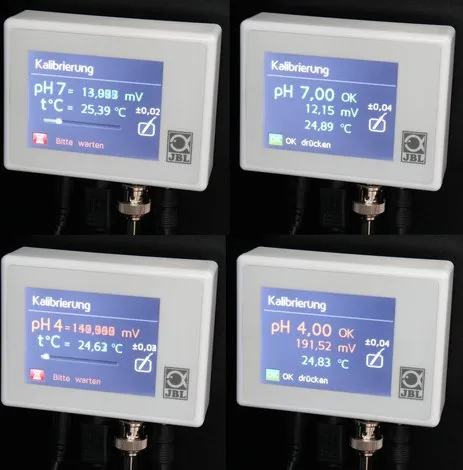
Display during waiting time: Whilst the sensor is in the buer solutions the device measures the sensor voltage delivered and waits until the signal
has stabilised� This takes a maximum of 1�5 minutes per buer solution�
The following appears on the display during the waiting time:
First line: pH value of the required buer solution and voltage in millivolt
Second line: temperature in °C
Third line: progress bar
The far right of the display also shows the current accuracy of the measurement, which is redefined for the sensor used during each calibration�
Example: +/- 0�02 pH� The higher this value is, the worse the condition of the sensor is�
Calibration reminder: the device has an automatic calibration reminder function which gives you a reminder for calibration every 30, 45 or 60
days� The time to the next calibration is displayed in days and hours in the value overview (chap� 4)� The remaining time display also appears on the
top right of the idle screen 5 days before the calibration period expires� Its colour changes to red two days before calibration is due� After the expiry
of the deadline the display flashes and counts the days with a minus sign, to remind you how many days the calibration is overdue for�
If calibration cannot be carried out at that moment, the device continues to measure and control as before� However, the warning signal (flashing)
can only be cancelled by calibration�
The time to the next calibration can only be recorded as long as the device is connected to the power supply� After a longer pause, it is vital that
calibration is carried out before the device is again used to measure and regulate�
Error messages during or after the calibration:
The measuring behaviour of pH sensors changes with age i�e� it begins to deviate from the original setting� Regular re-calibration of the device (com
-
parison with the changed measuring behaviour of the sensors) is vital to obtain reliable results
� As a rule, the more often, the better�
If, at the end of the calibration process, the symbol of the operating instructions and an error message such as DELTAV, OFFSET or similar appear, the
sensor may be defective� Then repeat the calibration�
In the event that calibration is unsuccessful a second time, consult the following table:
Error message Cause Solution/Action
DELTAV Voltage dierence per full pH unit is less than
35 mV: sensor too old or accidentally calibrated
twice with same buer solution�
Repeat calibration, check correct buer
solution is used� If unsuccessful, connect new
sensor and calibrate�
OFFSET Sensor voltage at pH 7�00 is outside the range:
sensor too old, cable faulty, no sensor connec-
ted or initially calibrated with buer solution
4
�00 by accident�
Check sensor cable for damage, connect
sensor correctly and repeat calibration (starting
with buer solution 7�00!)� If unsuccessful,
connect new sensor and calibrate�
UNSTAB Unstable sensor voltage: sensor tip soiled,
electrolyte leaked out of sensor or sensor tip
broken o�
Clean sensor tip� If unsuccessful, connect new
sensor and calibrate�
UKUK
22 23

Chat with your JBL Aquaristic ProFlora CO2 Control manual using AI

Get instant AI answers from your JBL Aquaristic ProFlora CO2 Control manual

Ask anything about the JBL Aquaristic ProFlora CO2 Control. Answers come from this manual, with the pages they are based on.

ProFlora CO2 Control Maintenance Schedule

Remind me when maintenance is due
Monthly
Calibrate the pH sensor

Perform a two-point calibration using buffer solutions pH 7.00 and then pH 4.00. The device recommends intervals of 30, 45, or 60 days, with 30 days being the factory default.

As needed / When dirty
Clean the sensor tip

Remove dirt from the glass sensor tip by dabbing it gently with a soft cloth. Never rub vigorously to avoid damaging the sensitive tip.

Show in the manual (page 12)
Regularly
Check sensor placement

Regularly check that the sensor is fully submerged in water. If pulled out or if water level drops, measurements will be incorrect and fish may be endangered.

Show in the manual (page 12)

Free maintenance reminders

Timed to your purchase date. Always free, unsubscribe anytime.

By submitting you agree to the privacy policy. Unsubscribe with one click in any email.
M: qwen/qwen3.8-flash

Ask a Question

0/1000

Do you recommend ProFlora CO2 Control?

Yes No

Frequently Asked Questions

A

The device recommends calibration every thirty days to maintain high accuracy. The timer resets upon successful completion. Frequent calibration compensates for natural sensor aging processes.

Is this answer helpful?

A

Auto pH calculates the optimal pH set point based on the carbonate hardness input. It uses a standard CO2 value of 22.5 mg/l to determine safe targets for plants and fish.

Is this answer helpful?

A

No, the pH sensor is sold separately as part of a dedicated kit. Buyers must acquire the JBL PROFLORA CO2 pH SENSOR SET independently for full functionality.

Is this answer helpful?

A

Yes, it can be used with calcium reactors in marine water applications. It monitors pH inside the reactor to regulate CO2 dosing for effective lime dissolution.

Is this answer helpful?

A

You can enable key lock via the settings menu. Enter a four-digit password or use the master password 7442 to unlock the interface after locking.

Is this answer helpful?

A

Default alarms trigger if pH deviates plus or minus 1.00 or temperature goes outside 20 to 30 degrees Celsius. These limits are adjustable through the menu.

Is this answer helpful?

M: QW-35-FL

Advantages and Disadvantages

Advantages

  • Automatic pH regulation based on entered carbonate hardness reduces manual effort significantly.
  • Colorful touch display allows intuitive menu navigation and status monitoring easily.
  • Low voltage operation ensures maximum user safety during installation and daily use.
  • Multi-language support includes nine options catering to diverse international markets globally.
  • Comprehensive alarm system notifies owners of critical deviations via visual and audio signals.
VS

Disadvantages

  • pH sensor must be purchased separately which adds initial cost to the setup.
  • Regular calibration every 30 days is required to maintain measurement accuracy consistently.
  • Sensors degrade over time requiring replacement typically every two years of usage.
  • Manual installation of rail and sensors requires basic technical knowledge and tools.
  • Power outage interruptions reset calibration timers leading to temporary tracking issues.
M: QW-35-FL

Product Specification

Category

Water Treatment, Water Parameters

Type

Controller for CO2 Regulator with Solenoid Valve (BNC Connection for pH Electrode, Thermometer, Touchscreen)

Suitability

Freshwater, Aquarium

Dimensions

3.50x2.64x0.98 in (WxHxD)

Weight

1.01 lbs

M: QW-35-FL

Product Description

JBL Pro Flora CO2 Control Manual Overview

Maintaining a healthy aquarium environment requires precise monitoring of carbon dioxide levels to support aquatic vegetation. The JBL PROFLORA CO2 CONTROL system offers a sophisticated solution for freshwater planted tanks globally. When you consult the detailed JBL Pro Flora CO2 Control Manual, you discover a device designed to automate plant growth conditions effectively. This digital measuring and control unit monitors pH and temperature continuously using advanced sensors. It regulates CO2 supply to ensure plants thrive while keeping fish completely safe from harmful gas spikes. Installation is straightforward when following the guide provided by the manufacturer carefully. Mount the rail near the aquarium and connect the sensors securely to ports. The device features a colorful touch display for easy navigation through various menus. You can choose from nine languages including English and German for user convenience. This ensures consistent performance for all users regardless of experience level.

Key Features and Functionality

One standout feature is the Auto pH function which simplifies complex calculations. By entering your carbonate hardness value, the device calculates the optimal target pH automatically based on internal algorithms. This prevents dangerous fluctuations that could harm aquatic life significantly over time. The manual highlights safety protocols extensively throughout its pages regarding electrical safety. Operating on low voltage ensures user protection against potential electrical hazards during maintenance. It includes alarm functions for pH and temperature deviations which are fully configurable by the owner. If levels go outside set limits, visual and audio alerts notify the owner immediately through flashing symbols.

Maintenance and Care

Regular calibration is essential for accuracy and reliability over time within the ecosystem. The device guides users through a two-point calibration process using buffer solutions safely provided. Remember that the pH sensor is sold separately and must be replaced periodically as it ages over time consistently. The average service life is approximately twenty-four months depending on specific care routines taken. Additional settings allow customization of hysteresis and valve operation modes for specific needs. Users can lock the interface to prevent accidental changes via a four digit password system. Maintenance involves cleaning the surface gently with a damp cloth avoiding immersion. Whether you manage a lush planted tank or experiment with aquascaping this equipment provides reliable performance consistently. The system works with external solenoid valves specifically designed for this application perfectly. Adhering to the instructions found in the documentation ensures longevity and precision for many years. This comprehensive approach helps hobbyists achieve vibrant plant growth without constant manual intervention required daily. The technology bridges the gap between simple bubble counters and professional automation systems found in large facilities. Furthermore it supports use in calcification reactors for marine water applications efficiently allowing carbonate release.

M: QW-35-FL

© Copyright 2026 Manual.ly