

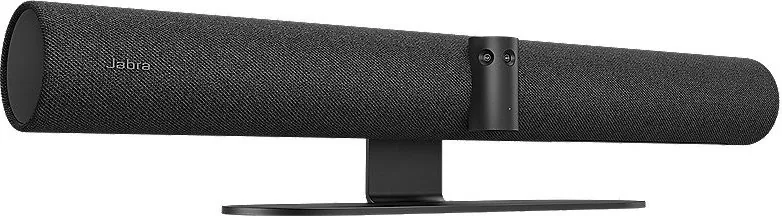

Jabra PanaCast 50 Manual
PDF manual · 44 Pages
English


Quick check
Incorrect answer, please try again.
Chat with your Jabra PanaCast 50 manual using AI
Get instant AI answers from your Jabra PanaCast 50 manual
Ask anything about the Jabra PanaCast 50. Answers come from this manual, with the pages they are based on.
Ask a Question
Do you recommend PanaCast 50?
Yes NoFrequently Asked Questions
The Jabra PanaCast 50 is designed for meeting rooms up to 4.5 meters by 4.5 meters. It effectively covers huddle spaces with its 180-degree field of view.
Is this answer helpful?
Intelligent Zoom is an automatic mode that dynamically includes all visible people within a 3.5-meter radius in the camera frame, ensuring everyone is part of the conversation.
Is this answer helpful?
Yes, the device supports whiteboard sharing in both main camera view and as a separate content stream for Teams Rooms and Zoom Rooms with automatic perspective correction.
Is this answer helpful?
No, the Jabra PanaCast 50 is plug-and-play and does not require additional drivers for Windows 10 or higher and macOS 10.15 or higher.
Is this answer helpful?
Press and hold the Reset button on the back for 5 seconds until the LED blinks pink. The device will restart and return to default settings after about one minute.
Is this answer helpful?
Advantages and Disadvantages
Advantages

- Delivers true 4K panoramic video with 180-degree coverage using three 13MP cameras
- Intelligent Zoom and Virtual Director modes automatically frame speakers and participants
- Seamless compatibility with Microsoft Teams Rooms and Zoom Rooms without extra drivers
- Advanced whiteboard sharing with automatic perspective correction and text enhancement
- Flexible installation options including wall, screen, and table mounting
Disadvantages

- Requires specific mounting heights (30-35cm above table) for optimal facial recognition
- Not suitable for outdoor use or extreme temperatures outside 0°C to 30°C
- Vivid HDR mode disables manual adjustment of contrast, saturation, and sharpness
- Remote management setup requires initial connection via Jabra Direct software
- Whiteboard must be positioned strictly within the field of view of one lens cluster
Product Specification
Image Sensor
3x CMOS 8.0 MP
Resolution
3840x2160 pixels (30fps)
Viewing Angle
180° (horizontal), 54° (vertical)
Zoom Function
6x optical
Connections
1x USB-C 3.0 (5Gb/s, jack), 1x RCA Stereo L+R Line-In, 1x RJ-45 LAN
Wireless
Bluetooth LE
Camera Cover
Sliding cover
Microphone
Integrated (8-channel, omnidirectional)
Speaker
Integrated (4x)
Lighting
N/A
Cable Length
6.56 ft
Power Supply
Mains power
Dimensions
25.59x3.15x4.92 in
Weight
4.85 lbs
Features
Multistreaming
Product Description
Experience the Future of Huddle Rooms with Jabra PanaCast 50
The Jabra PanaCast 50 redefines video conferencing for small to medium meeting spaces. Designed specifically for huddle rooms, this all-in-one device delivers stunning 4K panoramic video quality that captures every participant in a natural 180-degree field of view. Powered by three integrated 13-megapixel cameras and patented real-time video stitching technology, it ensures that no one is left out of the conversation.
Intelligent video features take collaboration to the next level. The Intelligent Zoom automatically frames all visible participants within a 3.5-meter radius, while Virtual Director focuses on whoever is speaking. Vivid HDR technology guarantees excellent video performance even under fluctuating lighting conditions. Whether you are using Microsoft Teams Rooms or Zoom Rooms, the device offers seamless plug-and-play compatibility without the need for additional drivers.
Installation is flexible and straightforward. The unit can be wall-mounted, attached to a screen via VESA mounts, or placed on a desk. For optimal results, mounting at eye level is recommended. The device also excels at whiteboard sharing, automatically correcting perspective and enhancing text visibility for remote attendees. With support for remote management via Jabra Xpress and intuitive control through Jabra Direct or the mobile Sound+ app, managing your meeting room has never been easier.
Key Notes
- Supports room sizes up to 4.5 x 4.5 meters.
- Includes built-in microphones and speakers for complete audio solutions.
- Compatible with Windows 10+, macOS 10.15+, iOS, and Android.
- Features PeopleCount technology for safety capacity monitoring.
Search for 67,706 Manuals online


Type-in Brand or Model