
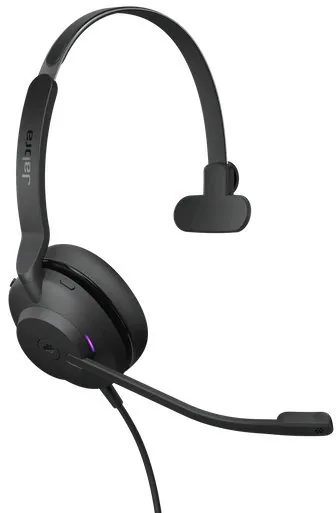
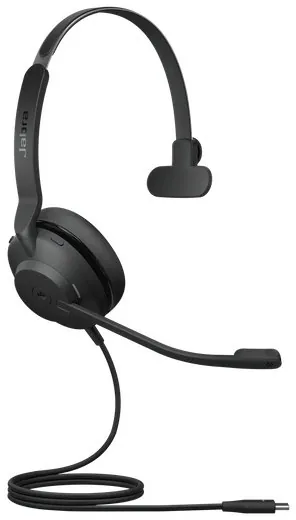
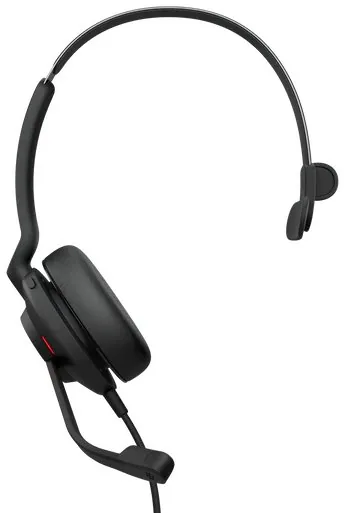
Jabra Evolve2 30 Manual
PDF manual · 18 Pages
English


Quick check
Incorrect answer, please try again.
Chat with your Jabra Evolve2 30 manual using AI
Get instant AI answers from your Jabra Evolve2 30 manual
Ask anything about the Jabra Evolve2 30. Answers come from this manual, with the pages they are based on.
Ask a Question
Do you recommend Evolve2 30?
Yes NoFrequently Asked Questions
It is a wired professional headset for calls, meetings, computer audio, and everyday work. Its mono design leaves one ear open, which can help users remain aware of activity around them.
Is this answer helpful?
Connect the headset directly to a computer USB port. The available connection depends on the headset version: USB-A or USB-C.
Is this answer helpful?
It can connect to a USB-C mobile device, but audio compatibility depends on the specific device and the app being used. Not every USB-C device supports headset audio connections.
Is this answer helpful?
During a call, press the Mute button. You can also raise the microphone boom arm to mute and lower it again to unmute. The mute status LED indicates when the microphone is muted.
Is this answer helpful?
The Busylight communicates headset activity to nearby people. It can indicate an incoming call and other status conditions. It can be turned on or off by pressing the volume up and volume down buttons together.
Is this answer helpful?
Teams functions are available on the Microsoft Teams headset variant. Its dedicated Teams button can bring Teams to the foreground, join an active meeting, and show notifications, missed calls, or voicemails when signed in.
Is this answer helpful?
Keep it in the supplied carry pouch when not in use. Avoid rain, liquids, and extreme storage temperatures above 55 C or below -5 C. Use Jabra Direct on a computer to check for firmware updates.
Is this answer helpful?
Advantages and Disadvantages
Advantages

- Mono design keeps one ear free for awareness of colleagues and surroundings.
- Two-microphone call technology supports clearer professional conversations.
- Adjustable boom arm provides quick answer and mute controls.
- Built-in Busylight helps communicate call status to people nearby.
- Jabra Direct supports firmware updates, sidetone settings, and voice guidance.
Disadvantages

- Wired USB connection may be less flexible than a wireless headset.
- Mobile audio support through USB-C depends on the device and app.
- Microsoft Teams button features require the dedicated Teams variant.
- Mono design may offer less immersive music listening than stereo models.
- The headset should be protected from liquids and extreme temperatures.
Product Specification
Type
Headphones (On-Ear)
Design
Headband, monaural
Acoustic design
Closed
Microphone
Boom microphone
Wireless
No
Cable
4.92 ft, single-sided
Controls
3-button remote control, mute button
Frequency range
20 Hz-20 kHz
Sensitivity
115 dB
Driver
1.1 in
Device features
Status light
Software features
Volume limiting
Color
Black
Weight
3.25 oz
Product Description
Jabra Evolve2 30 Mono - Read, Download & Print Free
The Jabra Evolve2 30 Mono is a wired professional headset designed for focused calls, clear communication, and comfortable everyday use. Its single-ear design keeps one ear open to the surrounding environment, making it a practical choice for offices, home workspaces, customer service roles, and hybrid professionals who need to stay aware of nearby conversations.
Clear calls and practical controls
This headset uses two microphones to support clearer voice pickup during calls. The adjustable boom arm should sit close to the mouth for the best performance, and it can also provide a quick mute control: lift the boom to mute and lower it to unmute. A dedicated mute button is available as well, with an LED indicator to show microphone mute status.
The Jabra Evolve2 30 Mono includes easy-to-reach controls for answering, ending, and rejecting calls. Users can adjust volume, pause music, skip tracks, and restart audio directly from the headset. The multi-function button also supports call handling tasks such as putting a call on hold and switching between active and held calls.
Comfort for the working day
Designed for all-day comfort, the headset has an adjustable headband that can be fitted to the wearer. The mono wearing style is useful for people who need professional audio without being fully isolated from their surroundings. A 28 mm speaker delivers sound for calls, music, and other computer audio.
A built-in Busylight helps signal availability to nearby colleagues. It can show an incoming call or indicate headset activity, and it may be switched on or off using the volume buttons. The status lighting is designed to minimize distractions while the headset is worn.
Connectivity and software support
The Jabra Evolve2 30 Mono connects directly to a computer through its USB-A or USB-C version. USB-C mobile devices may also work, although audio support depends on the device and app. Selected Microsoft Teams variants include an extra Teams button for notifications, meetings, and missed-call access.
Jabra Direct software adds useful management options, including sidetone settings, voice guidance controls, and firmware updates. Keeping firmware current can improve performance and add features over time.
Notes
Store the headset in the included carry pouch when not in use. Avoid exposure to liquids and extreme temperatures above 55 C or below -5 C. The Jabra Evolve2 30 Mono - Read, Download & Print Free keyword highlights a convenient way to explore its features and operating guidance.
Search for 67,706 Manuals online


Type-in Brand or Model