
iStorage diskAshur2 Manual
PDF manual · 68 Pages
English



Quick check
Incorrect answer, please try again.
Chat with your iStorage diskAshur2 manual using AI
Get instant AI answers from your iStorage diskAshur2 manual
Ask anything about the iStorage diskAshur2. Answers come from this manual, with the pages they are based on.
Ask a Question
Do you recommend diskAshur2?
Yes NoFrequently Asked Questions
Its main security feature is AES 256-bit hardware encryption. The drive encrypts data at the device level, so files stay protected even if the drive is disconnected or lost.
Is this answer helpful?
Connect the drive to a USB port, enter the default Admin PIN, and press Unlock. After that, the LED indicators will show that the drive is ready for use.
Is this answer helpful?
After repeated wrong entries, the brute force defense activates. The drive deletes the encryption key and all data, which prevents unauthorized access and recovery.
Is this answer helpful?
Yes. The drive supports Windows, macOS, and Linux. It may need to be reformatted for the file system used by each operating system.
Is this answer helpful?
The self-destruct PIN performs a crypto-erase. It deletes the data, encryption key, and PINs, then unlocks the drive in a wiped state for reinitialization.
Is this answer helpful?
Yes. Admins and users can configure read-only mode. This is useful when you want to prevent changes and keep the contents protected from editing.
Is this answer helpful?
Advantages and Disadvantages
Advantages

- Military-grade AES 256-bit hardware encryption protects data without relying on software.
- PIN-based access with Admin and User modes gives flexible control for individuals and teams.
- Self-destruct, brute-force defense, and auto-lock add strong protection against unauthorized access.
- Works across Windows, macOS, and Linux with clear setup guidance.
Disadvantages

- Forgetting the PIN can make stored data permanently inaccessible.
- Security resets and brute-force protection can erase all data after repeated failures.
- Initial setup and formatting may be needed for non-Windows systems.
- The feature set is powerful but may feel complex for casual users.
Product Specification
Form Factor
2.5"
Internal Connector
1x SATA 6Gb/s
External Connector
1x USB-A 3.0
RAID Level
N/A
Fan
N/A
Manufacturer Warranty
two years
USB Designation
Link
Product Description
iStorage diskAshur2 256-bit External HDD
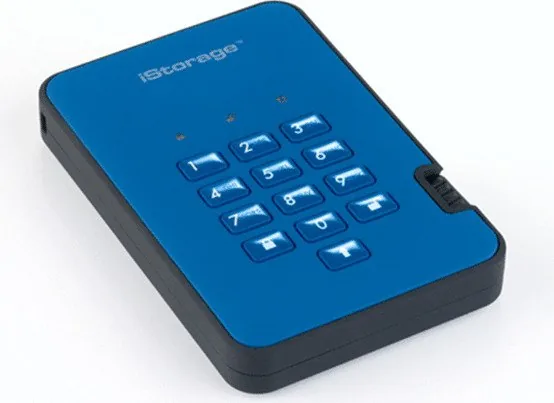
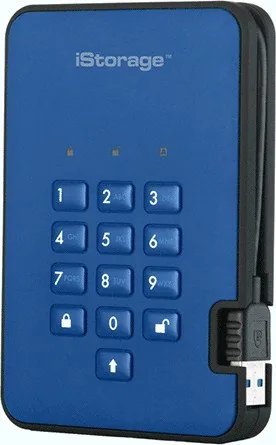
The iStorage diskAshur2 is a portable encrypted drive made for people who want simple access and serious protection in one device. With an integrated USB 3.1 cable, up to 2TB of storage, and PIN-based unlocking, it removes the need for software-heavy security while still keeping data tightly controlled. For buyers comparing secure storage options, the iStorage diskAshur2 256bit external HDD Manual shows a product built around fast access, strong defense, and practical everyday use.
At the heart of the drive is AES 256-bit hardware encryption in XTS mode. That means files are protected at the device level, not just by the operating system. Once the drive is locked or safely ejected, the entire contents are encrypted automatically. This makes it a strong fit for business users, travelers, and anyone carrying sensitive files that should not be exposed if the drive is lost or stolen.
The PIN system adds another layer of control. The diskAshur2 supports 7 to 15 digit PINs, plus separate Admin and User modes for flexible management. Admins can add or remove users, set read-only or read/write access, create a self-destruct PIN, and enable unattended auto-lock for extra protection when the drive is left alone. These options make it suitable for teams that need both security and structured access.
What also stands out is how the drive handles threats. If the wrong PIN is entered too many times, the brute force defense activates and wipes the encryption key and data. That is a serious safeguard, but it also means users must remember their PIN and back up important files elsewhere. LED indicators help guide each step, showing whether the drive is in standby, unlocked, or admin mode.
Setup is straightforward across major platforms. The drive is ready for Windows out of the box, and the instructions also cover Mac and Linux formatting for users who need a different file system. Combined with its compact design, travel case, and built-in cable, the diskAshur2 is designed to move easily from desk to bag without compromising security.
Notes
- Keep the PIN in a safe place; access depends on it.
- Safely eject the drive before locking to avoid file corruption.
- Reset, self-destruct, and brute-force protection permanently remove data.
- Best suited for users who value encryption and access control over simplicity.
Search for 67,706 Manuals online


Type-in Brand or Model