
Inter-Tech ST-7227U Manual
PDF manual · 5 Pages
English



Quick check
Incorrect answer, please try again.
Chat with your Inter-Tech ST-7227U manual using AI
Get instant AI answers from your Inter-Tech ST-7227U manual
Ask anything about the Inter-Tech ST-7227U. Answers come from this manual, with the pages they are based on.
Ask a Question
Do you recommend ST-7227U?
Yes NoFrequently Asked Questions
Yes, it is safe for indoor use. Do not use with wet hands to avoid damage or injury.
Is this answer helpful?
Follow specific model instructions regarding SATA and power cables. Fix the device in a free bay or PCI slot.
Is this answer helpful?
Inter-Tech grants a 12-month warranty by proper use from the date of purchase.
Is this answer helpful?
No general maintenance required. Take up dust or dirt with a vacuum cleaner if needed.
Is this answer helpful?
Dispose by using the official way. Contact your municipality or local dealer for questions.
Is this answer helpful?
No, this product is only for indoor use. Do not store it close to water or in humid rooms.
Is this answer helpful?
Please contact your local dealer for replacement if parts are missing or there are external damages.
Is this answer helpful?
Advantages and Disadvantages
Advantages

- Low maintenance needs generally for the device units.
- Clear safety warnings provided for user protection.
- Warranty support available for 12 months from purchase.
- Supports multiple drive sizes for flexibility.
- Includes useful installation guidance notes.
Disadvantages

- Some edges may not be polished initially.
- Specific slot requirements vary by model version.
- Disposal requires official channels or municipality.
- Risk of damage if used with wet hands.
- Original packaging must be kept for warranty shipping.
Product Specification
Type
Chassis
Internal Connectors
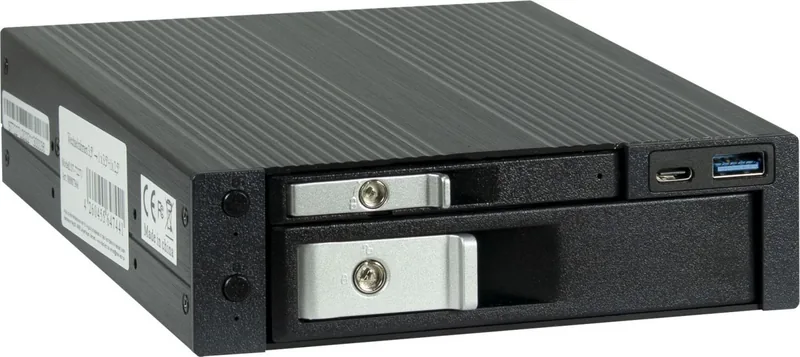
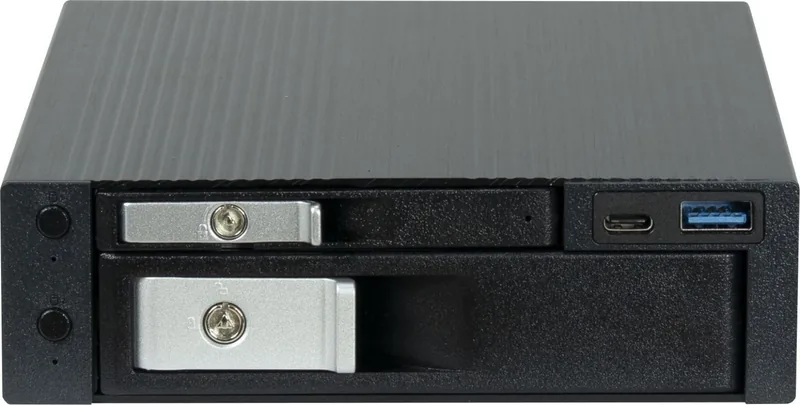
1x 2.5" SATA 6Gb/s, 1x 3.5" SATA 6Gb/s
External Connectors
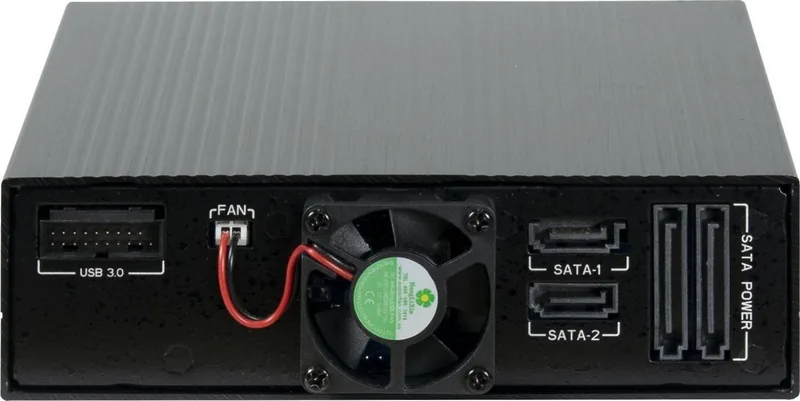
2x SATA 6Gb/s, 1x USB 3.0 19-Pin
Hot-Swap
Yes
Drive Bay
1x 5.25"
Case Cooling
1x Fan
Power Supply
2x 15-Pin SATA
Lock
Yes
Features
carrier-free, USB-Hub (1x USB-A 3.0, 1x USB-C 3.0)
Weight
1.83 lbs
Manufacturer Warranty
2 Years
Product Description
Upgrading your computer storage capacity often requires specific hardware solutions to maximize efficiency and flexibility. The Inter-Tech ST-7227U 1x 5.25 Drive Adapter for 1x 3.5 and 1x 2.5 offers a robust solution for enthusiasts and professionals alike. This hardware allows users to integrate different drive sizes into their systems efficiently without wasting valuable internal space. Versatility is key when building custom PC hardware in modern computing environments. Safety is a major priority for this equipment during operation and handling. Users must avoid applying external force during installation and ensure hands are completely dry before touching the device. Water exposure can cause significant electrical damage to the internal components. Some edges might need checking due to specific manufacturing processes. Indoor use is strictly required for optimal performance and longevity. Water exposure or humid rooms are forbidden for safe operation. The device connects via SATA data cables and power cables reliably. Proper installation ensures longevity and stable data transfer speeds. The unit fits into available bays or slots depending on the specific model version. USB 3.0 connectivity might be needed for specific models requiring external power. Maintenance is minimal for these units over time. Regular cleaning prevents dust buildup from affecting operation efficiency. Keep the original packaging for warranty claims and shipping purposes. Inter-Tech provides a 12-month warranty period from the date of purchase. Customers should read all instructions carefully before starting. Contact local dealers for support if issues arise during setup. Disposal follows official guidelines to protect the environment and ensure safety. This ensures environmental compliance and proper handling of electronic waste. The product supports HDD and SSD combinations effectively for mixed storage needs. Installation involves screwing the unit into the case panel securely. Data transfer relies on reliable SATA connections for consistent performance. Power supply must be connected securely to prevent faults or shutdowns. Checking the package content is the first step before mounting begins. Replacement is available for damaged goods from the authorized dealer. Overall, this adapter streamlines internal storage organization within any computer case efficiently. It maximizes case space utilization effectively without creating clutter. Users gain flexibility in drive configuration for their specific storage needs. The build quality focuses on safety features and durability guidelines strictly. Following guidelines minimizes injury risks during assembly and usage phases. The system integrates smoothly with standard modern motherboards available today. Proper ventilation is implied by the mechanical design of the chassis. Model specific details indicate some versions require PCI slots. Users should remove slot brackets carefully to avoid bending the metal. USB 3.0 ports on the motherboard are necessary for connection. The device does not require complex software configuration steps. Simply connect the cables and secure the screws for completion. The Inter-Tech Elektronik Handels GmbH provides contact details for inquiries. Information regarding warranty terms is available on their website. Users should forward safety instructions when forwarding the product to another owner. Disposal of cardboard and plastics must follow local laws strictly. Contact municipality for power supply disposal questions regarding recycling.
Search for 67,706 Manuals online


Type-in Brand or Model