
Inter-Tech GD-MS013 Manual
PDF manual · 24 Pages
English



Quick check
Incorrect answer, please try again.
Chat with your Inter-Tech GD-MS013 manual using AI
Get instant AI answers from your Inter-Tech GD-MS013 manual
Ask anything about the Inter-Tech GD-MS013. Answers come from this manual, with the pages they are based on.
Ask a Question
Do you recommend GD-MS013?
Yes NoFrequently Asked Questions
This unit supports M.2 SSDs utilizing PCIe NVMe architecture. It fits standard lengths of 80, 60, 42, and 30mm. Both Key M and Key B+M key types are fully supported. SATA based M.2 drives are not supported by this enclosure interface. Refer to the manual for specific compatibility confirmation before purchase.
Is this answer helpful?
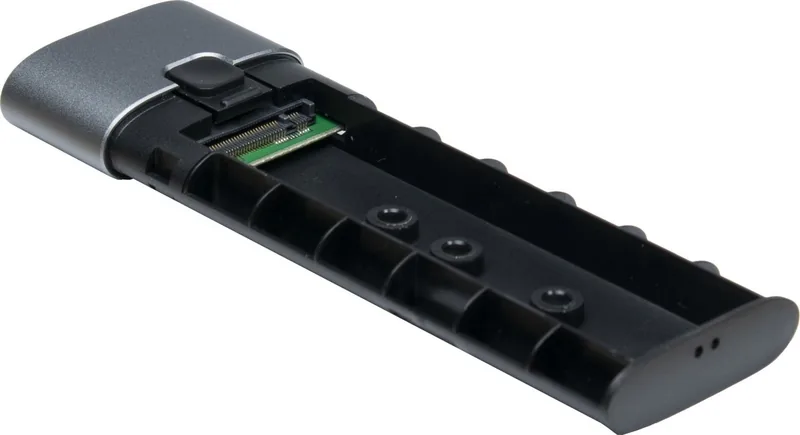
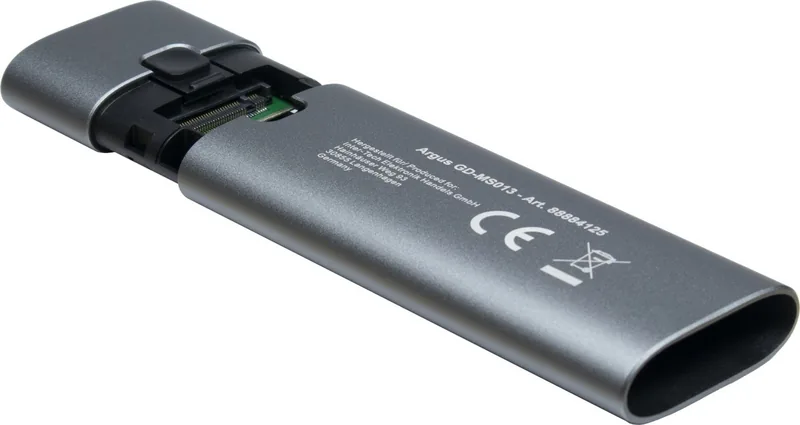
Press the button to release the locking mechanism. Slide the cover aside to access the slot. Insert the SSD gently into the connector slot. Secure it with the rubber holder included in the package. Slide the cover back until the latch clicks into place. This requires no tools or external equipment for assembly. Connect via USB cable to power the device.
Is this answer helpful?
Check if the USB cable is secure at both ends. Ensure the cable is not damaged. Verify if the new drive has been formatted and partitioned within your operating system. Use the disk management tool on your computer to initialize new drives. If issues persist, test the drive in another enclosure or computer.
Is this answer helpful?
The product is compatible with Windows versions starting from 2000. Mac OS version 10.x and above work correctly. Linux distributions based on kernel version 2.4.2 or newer are also supported. No additional drivers should be necessary due to standard USB mass storage class compliance for most modern systems.
Is this answer helpful?
Inter-Tech provides a warranty period of twenty-four months starting from the date of purchase. This covers defects during proper use of the product. You must contact your dealer with a valid proof of purchase. Warranty does not cover damage caused by water, misuse, or unauthorized modification of the hardware.
Is this answer helpful?
Yes, provided your laptop has a free USB Type-C port available. The enclosure draws power directly from the USB connection without needing a wall outlet. It works as an external mass storage device. Ensure the host system supports USB 3.0 or higher for optimal transfer speeds.
Is this answer helpful?
No, it draws power directly from the USB connection. It removes the need for any external power adapter in most setups which reduces cable clutter. This simplifies the setup process for mobile users and reduces desk mess significantly during operation.
Is this answer helpful?
Advantages and Disadvantages
Advantages

- Toolless installation for easy and quick drive setup every time.
- USB 3.2 Gen2 speeds ensure rapid data transfers for large files.
- Plug-and-play compatibility across Windows, Mac, and Linux systems.
- Supports multiple M.2 SSD lengths including 80, 60, 42, and 30mm.
Disadvantages

- Does not support SATA M.2 SSDs, only PCIe NVMe types.
- Requires a USB-C port for connectivity on all host devices.
- Warranty does not cover data loss due to negligence or user error.
- Must be kept away from water and heat sources to prevent damage.
Product Specification
Form Factor
M.2 2280, M.2 2260, M.2 2242, M.2 2230
Internal Interface
1x M.2 (PCIe, NVMe)
External Interface
1x USB-C 3.0 (5Gb/s)
RAID Level
N/A
Fan
N/A
Dimensions
4.61 x 1.46 x 0.47 inches
Weight
1.59 oz
Color
Black
Features
Aluminum case, incl. USB cable (USB-C)
Manufacturer Warranty
2 years
USB Label
Link
Product Description
Overview
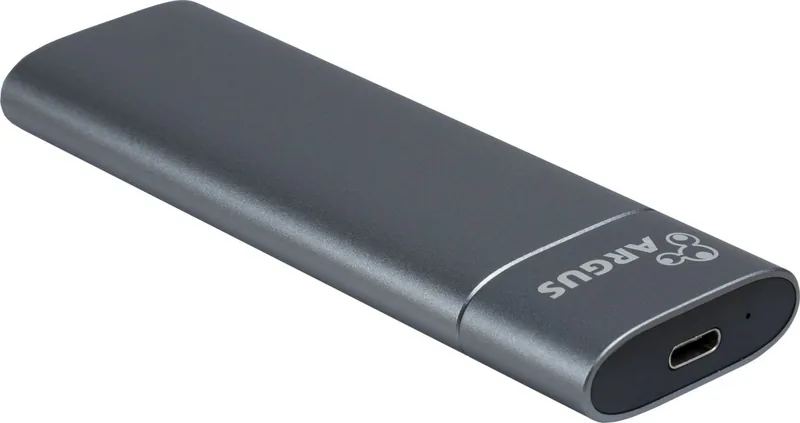
Unlock the full potential of your high-speed storage with the Inter-Tech GD-MS013 enclosure. This sleek M.2 SSD accessory transforms your internal NVMe drives into a portable powerhouse. Whether you are a professional data engineer or a casual user needing reliable backup and transport solutions, this device meets rigorous contemporary digital demands. The design prioritizes plug-and-play functionality, allowing users to install the drive quickly without complex tools. This toolless installation saves time during setup every time you need to access your data externally. The enclosure supports various standard lengths including 80, 60, 42, and 30mm forms to accommodate different drive sizes. It handles both Key M and Key B+M keys seamlessly, offering flexibility for different SSD types found in the market. Connectivity is managed through a robust USB-C port ensuring transfer rates reach USB 3.2 Gen2 levels. This high speed means large file transfers happen in seconds rather than minutes.
Safety & Compatibility
The construction emphasizes safety and durability for daily mobile use. Users must keep the device away from water and heat sources to prevent overheating. The safety guidelines explicitly advise against using damaged cables or wet hands during operation to avoid short circuits. Safety remains paramount when handling high-speed electronic storage solutions in any professional environment. The device operates within specific temperature ranges to maintain optimal performance and hardware integrity over years. It draws power directly from the USB connection, removing the need for any external power adapter in most setups. A protective transport bag is included in the scope of delivery to protect the unit during travel. Bright LEDs indicate power and disk activity status so users always know the status instantly.
Specifications & Warranty
Operating system compatibility spans Windows, Mac, and Linux distributions. This cross-platform support ensures broad utility across different computing environments without requiring additional driver installation. Proper disposal of the unit follows strict regulatory guidelines for electronic waste compliance. Users should never throw the enclosure in general household trash bins. Warranty terms cover twenty-four months from the purchase date for any defects under proper use conditions.
Support & Maintenance
If you encounter issues where the drive is not recognized, checking the cable connection first is crucial. New drives often require manual formatting before appearing in the standard file manager. The Inter-Tech GD-MS013, M.2 SSD, USB-C 3.0 Manual provides detailed troubleshooting steps for these common scenarios. Following the instructions ensures longevity and optimal performance. Maintenance is minimal, requiring only occasional external dusting. For those seeking reliable storage solutions, this enclosure delivers exceptional value. Contact information for Inter-Tech is available for further support. Enhance your workflow today with this efficient peripheral.
Search for 67,706 Manuals online


Type-in Brand or Model