
Inter-Tech Desktop HDMI Manual
PDF manual · 15 Pages
English



Quick check
Incorrect answer, please try again.
Chat with your Inter-Tech Desktop HDMI manual using AI
Get instant AI answers from your Inter-Tech Desktop HDMI manual
Ask anything about the Inter-Tech Desktop HDMI. Answers come from this manual, with the pages they are based on.
Ask a Question
Do you recommend Desktop HDMI?
Yes NoFrequently Asked Questions
Yes, the device supports HDMI 1.4b with resolutions up to 4K at 30Hz for clear visual output.
Is this answer helpful?
You can toggle between ports using specific key combinations like CTRL plus SHIFT plus numbers corresponding to the port.
Is this answer helpful?
No, the device uses hardware handling logic and does not require any drivers or software on your computer.
Is this answer helpful?
Available models include the AS-21HA, AS-41HA, AS-22HA, and AS-42HA for varying computer port requirements.
Is this answer helpful?
Yes, it supports Dolby True HD, DTS HD Master Audio, and has analog audio via 3.5mm jack.
Is this answer helpful?
Inter-Tech grants a twenty-four month warranty by proper use starting from the date of purchase.
Is this answer helpful?
No, the product is designed only for indoor use and should not be exposed to outside environmental conditions.
Is this answer helpful?
Advantages and Disadvantages
Advantages

- Supports 4K@30Hz resolution for high-definition displays
- Compatible with Windows, Linux, and macOS operating systems
- No software installation required for driver support
- Switching via physical buttons or keyboard hotkeys
- LED indicators for port status and selection
Disadvantages

- HDMI cables for monitors must be purchased separately
- Designed for indoor use only with environmental restrictions
- Power adapter option varies by model configuration
- Manual suggests shutting down devices for safe connection
- Warranty excludes liability for data loss incidents
Product Specification
Type
KVM Switch
Keyboard/Mouse
1x USB
Audio
1x 3.5mm Jack (In/Out)
LAN
N/A
Resolution
3840x2160@30Hz (HDMI)
Product Description
Unlocking Seamless Multi-Computer Control
Inter-Tech products streamline workspace organization significantly. Managing multiple computers on a single desk can become overwhelming without the right tools. This hardware offers a streamlined solution that simplifies workspace organization. By integrating this device, users control several computers using just one keyboard, mouse, and monitor setup. This efficiency is crucial for professionals who juggle different environments or require instant access to multiple systems daily.
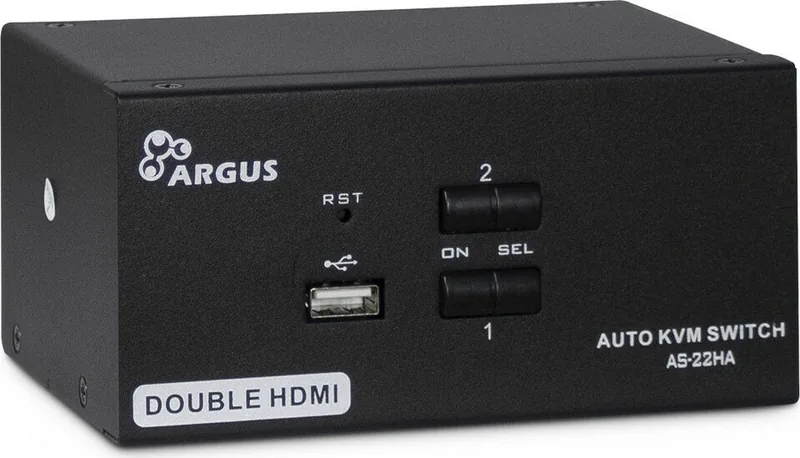
Checking the Inter-Tech Desktop HDMI KVM Switch Manual helps maximize hardware potential. The guide highlights the versatility of the AS-series models available for purchase. Whether you need to switch between two or four computers, there is a model designed to meet specific connectivity needs for your office. The device supports HDMI 1.4b, ensuring high-resolution displays up to 4K at 30Hz resolution levels.
Security and ease of use remain paramount for modern workstations. The switches allow for operation via physical buttons on the front panel or utilizing hotkeys on your keyboard input. This flexibility means you toggle between active ports without reaching for the physical device unit. The system features LED indicators that visually confirm which port is selected and which connection is active currently. There is no need to install additional software drivers.
Safety protocols ensure product longevity during use. The unit is designed for indoor use only and requires proper ventilation to prevent overheating issues. Users must avoid moisture and keep the device away from heat sources. The warranty terms provide peace of mind, offering twenty-four months of coverage provided product is used correctly according to guidelines. Proper disposal instructions ensure environmental responsibility when the unit reaches the end of its lifecycle eventually.
Workspace Optimization
Upgrading your desk setup with this hardware improves productivity significantly for any user. It eliminates cable clutter and allows for smooth transitions between operating systems without rebooting. Whether you are a developer testing code on different machines or a gamer switching accounts, maintaining one consistent input method enhances workflow stability. The robust metal housing protects internal components from dust and physical damage during daily use.
The hardware includes USB emulation for keyboards and mice ensuring compatibility with various operating systems smoothly. It supports Windows, Linux, and macOS environments without requiring driver installation. This universal compatibility makes it a staple for IT administrators. Maintenance is straightforward since the device does not require opening the housing. Regular cleaning keeps the exterior free from dust accumulation. If issues arise, documentation helps troubleshoot common problems like signal loss or unresponsive ports quickly. This setup transforms a chaotic desk into an organized workstation for maximum efficiency. You spend less time physically moving hardware and more time focusing on actual work tasks.
Search for 67,706 Manuals online


Type-in Brand or Model