

Inter-Tech Argus KS-3104 Manual
PDF manual · 16 Pages
English



Quick check
Incorrect answer, please try again.
Chat with your Inter-Tech Argus KS-3104 manual using AI
Get instant AI answers from your Inter-Tech Argus KS-3104 manual
Ask anything about the Inter-Tech Argus KS-3104. Answers come from this manual, with the pages they are based on.
Ask a Question
Do you recommend Argus KS-3104?
Yes NoFrequently Asked Questions
You can run network cables up to 50 meters between the KVM switch and the computers. It is recommended to use Cat 5e or higher quality screened cables to ensure signal integrity and prevent interference.
Is this answer helpful?
Yes, while the KS-3104 controls four computers directly, you can cascade multiple units together. This allows a single console to manage up to 256 computers in total by linking several switches in a chain.
Is this answer helpful?
No, the Inter-Tech Argus KVM switches are designed for easy installation without any additional software. They are plug-and-play devices that work with standard operating systems like Windows, Linux, and UNIX.
Is this answer helpful?
You can switch ports using the physical toggle buttons on the front panel or by using the integrated On-Screen Display menu accessed via hotkeys. The OSD menu also allows for automatic scanning and direct port selection.
Is this answer helpful?
No, this product is strictly intended for indoor use only. Do not store or operate it in humid rooms, near water, or close to heat sources to avoid overheating and potential fire hazards.
Is this answer helpful?
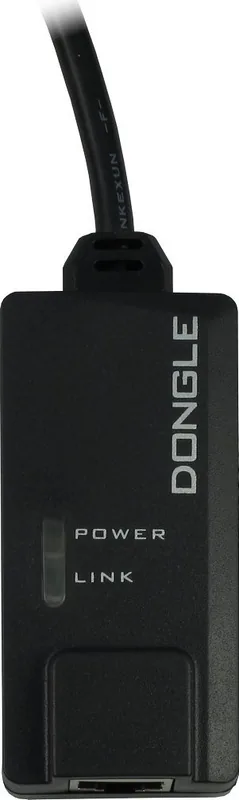
The package includes one Rackmount KVM RJ45 unit, an external 9V DC power supply, a power cord, four RJ45 to VGA/USB dongles, two mounting brackets, six screws for the brackets, safety instructions, and a CD with the manual.
Is this answer helpful?
Advantages and Disadvantages
Advantages

- Supports cable lengths up to 50 meters for flexible server placement
- Allows control of up to 256 computers via cascading multiple units
- Features an intuitive On-Screen Display menu with port naming and scanning
- Hot-plug capability enables adding or removing computers without restart
- Complies with RoHS III and eco-directive 2009/125/EU standards
Disadvantages

- Network cables are not included in the scope of delivery
- Rack mounting screws must be sourced separately from the rack provider
- Requires specific dongles for each computer connection
- Indoor use only; cannot be used in humid or outdoor environments
- Password protection requires manual setup for advanced security features
Product Specification
Type
IP Switch
Ports
4
Monitor
VGA
Keyboard/Mouse
USB, PS/2
Audio
N/A
LAN
4x 100Base-TX
Resolution
1920x1200
Features
rackmount (1HE)
Product Description
Inter-Tech Argus KVM KS-3104 RJ45: Master Your Server Room
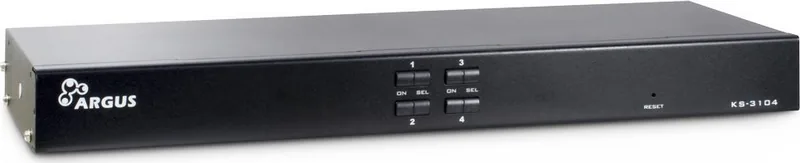
The Inter-Tech Argus KVM KS-3104 RJ45 represents a significant leap in server management efficiency. Designed for professionals who need to control multiple computers from a single console, this rackmount switch eliminates the clutter of excess keyboards, mice, and monitors. By utilizing standard network cables, it allows users to manage up to four PCs directly or expand their reach significantly through cascading capabilities. This device is built for reliability, adhering to RoHS III standards and eco-directives, ensuring both performance and environmental responsibility.
Seamless Connectivity and Control
One of the standout features of the KS-3104 is its ability to transmit video and data signals over distances of up to 50 meters using Cat 5e or higher network cables. This flexibility means you can place your servers far away from your workstation without sacrificing performance. The unit supports high-resolution displays up to 1600x900 and 1280x1024, ensuring crisp visuals for all connected systems. Whether you are running Windows, Linux, or UNIX environments, the compatibility is robust and seamless.
User-Friendly Operation
Managing multiple machines should not be a headache. The Argus series offers intuitive toggling methods. You can switch between active computers instantly using the physical buttons on the front panel, which also display LED status indicators for quick visual feedback. Alternatively, an advanced On-Screen Display menu provides granular control. With hotkeys like Ctrl-Ctrl or Scroll-Scroll, you can access functions such as auto-scanning, port naming, and password protection. This dual approach ensures that both novice and expert users can operate the system with ease.
Installation and Scalability
Installation is straightforward, requiring no additional software drivers. Simply connect the dongles provided, link the network cables, and power up the unit. The hot-plug function allows you to add or remove computers without restarting the entire KVM system. For larger setups, the ability to cascade multiple units enables control of up to 256 computers from a single console, making it ideal for data centers and large enterprise networks.
Important Notes
- Ensure all devices are shut down before mounting the unit into a rack.
- Use only screened network cables to prevent interference.
- Dispose of electronic waste according to local regulations.
- The warranty covers proper use but excludes damage from negligence or unauthorized modifications.
Search for 67,706 Manuals online


Type-in Brand or Model