
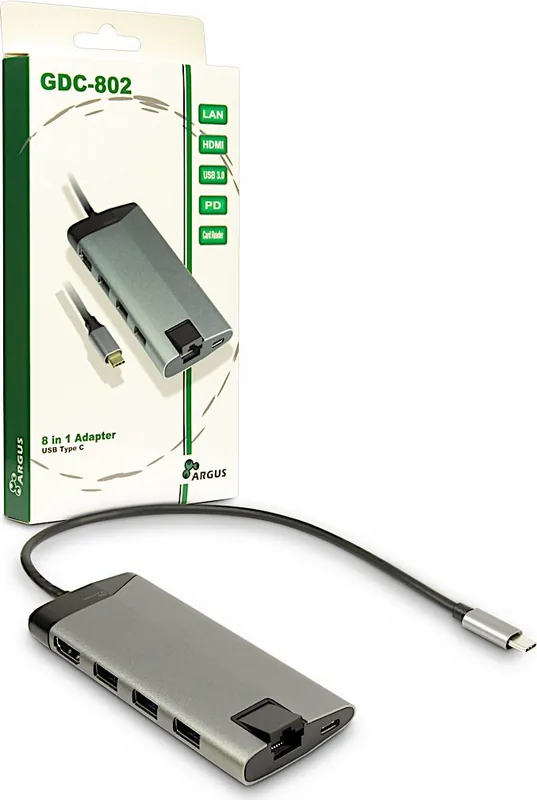
Inter-Tech Argus GDC-802 Manual
PDF manual · 2 Pages
English



Quick check
Incorrect answer, please try again.
Chat with your Inter-Tech Argus GDC-802 manual using AI
Get instant AI answers from your Inter-Tech Argus GDC-802 manual
Ask anything about the Inter-Tech Argus GDC-802. Answers come from this manual, with the pages they are based on.
Ask a Question
Do you recommend Argus GDC-802?
Yes No
Esther Lowe
4 months ago
Will this work with my Samsung Galaxy S10e for charging and video output?
Frequently Asked Questions
It works with most USB-C devices, but they must support DisplayPort Alt Mode to transmit video signals. Without this feature, only data and power functions will work.
Is this answer helpful?
The adapter supports a maximum resolution of 3840x2160 pixels at 30Hz, providing clear 4K display capabilities for monitors and projectors.
Is this answer helpful?
Yes, the USB Type C PD port supports Power Delivery up to 3A, allowing you to charge your device while connected to peripherals.
Is this answer helpful?
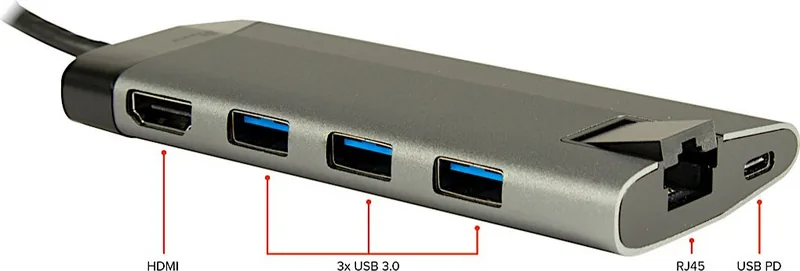
It includes three USB Type A 3.0 ports for connecting mice, keyboards, and external drives, plus one additional USB-C input for the host connection.
Is this answer helpful?
No, the warranty is void if the device undergoes manipulation, updates, or hardware modifications. Damage from such actions is not covered.
Is this answer helpful?
No, although there are two slots for MicroSD and SD cards, only one card can be accessed at a time due to internal controller limitations.
Is this answer helpful?
Advantages and Disadvantages
Advantages

- Supports 4K resolution at 30Hz for high-quality video output
- Includes Power Delivery charging to keep devices powered during use
- Features Gigabit Ethernet for stable wired internet connections
- Three USB 3.0 ports enable fast data transfer speeds up to 5Gbps
- Dual card reader slots accommodate MicroSD and SD cards simultaneously
Disadvantages

- Requires host device to support DisplayPort Alt Mode for video
- Can only use one card reader slot at any given time
- Limited warranty coverage excludes damage from misuse or accidents
- No liability assumed for data loss unless gross negligence is proven
- Must be kept away from moisture and heat sources to prevent damage
Product Specification
Type
LAN adapter, USB hub, card reader, video adapter
Form factor
1x external wired (connection cable not detachable)
Connection
1x USB-C 3.0 (connector via cable, 5Gb/s, USB-C with DisplayPort, USB PD 3.0 max. 20V/5A/100W, 11.81 inch cable length)
Interface
1x RJ-45, 3x USB-A 3.0 (socket), 1x microSD, 1x SD Card, 1x HDMI (socket)
Transmission
1x RJ-45 (10/100/1000Base-T), 3x USB-A 3.0 (socket, 5Gb/s), 1x microSD (microSD), 1x SD Card (SD Card), 1x HDMI (socket, max. 3840x2160@30Hz)
Power supply
Power supply also via connection, mains connection (1x USB-C socket USB PD 3.0 max. 20V/5A/100W, passthrough 100W), external power supply possible but not included
Dimensions
1.97x0.63x4.65 inches (WxDxH)
Weight
3.00 oz
Case color
gray
Compatibility
universal
Features
Wake on LAN, VLAN, metal case
Manufacturer warranty
two years
USB spelling
Link
Product Description
Unlock Versatile Connectivity with the Inter-Tech Argus GDC-802
In today's fast-paced digital environment, having a reliable way to expand your device's capabilities is essential. The Inter-Tech Argus GDC-802 Multiport Adapter USB-C 3.0 stands out as a robust solution for users who need to connect multiple peripherals without cluttering their workspace. This sleek adapter transforms a single USB Type C port into a comprehensive hub, offering seamless integration for computers and smartphones alike.
Designed with durability in mind, the unit features an aluminum body that not only looks professional but also aids in heat dissipation during intensive use. Whether you are presenting on a large screen, transferring files from memory cards, or connecting wired network equipment, this adapter handles it all efficiently. It supports high-resolution video output up to 4K at 30Hz, ensuring crisp visuals for presentations and media consumption. The inclusion of three USB 3.0 ports allows for rapid data transfer speeds of up to 5Gbps, making it ideal for external hard drives and flash storage devices.
One of the standout features is the Power Delivery (PD) capability, which allows you to charge your host device while using other functions. This eliminates the need for separate chargers when traveling or working at a desk. Additionally, the built-in Gigabit Ethernet port provides a stable internet connection, bypassing potential Wi-Fi congestion. For photographers and content creators, the dual card reader slots support both MicroSD and SD/MMC formats, streamlining the workflow of importing photos directly from cameras.
Safety and longevity are prioritized in its design. Users are advised to operate the device in dry, indoor environments away from direct heat sources to prevent overheating. The adapter requires a host device that supports DisplayPort Alt Mode to function correctly for video transmission. Proper disposal of electronic waste is encouraged to protect the environment, adhering to local regulations for recycling electronic components.
With a 24-month warranty covering defects under normal use, the Inter-Tech Argus GDC-802 offers peace of mind. However, liability for data loss is limited unless negligence by the manufacturer is proven. This product represents a practical investment for anyone looking to maximize the utility of their modern USB-C enabled devices.
Important Notes
- Ensure your device supports DP Alt Mode for video output.
- Only one card slot can be active at a time.
- Dispose of packaging and the unit responsibly according to local e-waste laws.
Search for 67,706 Manuals online


Type-in Brand or Model
Amelia Harris
5 months ago
Does this dock overheat during heavy use, especially with devices like the Steam Deck?
Manual.ly
5 months ago
The dock functions reliably with various devices including the Steam Deck, Windows laptops, and Android phones. However, users have reported significant heat generation during operation, with temperatures estimated between 60 to 70 degrees Celsius. While the device handles power delivery and high-throughput tasks effectively, be aware that it may become quite warm under load.