
Intel PRO/1000 MT Server Manual
PDF manual · 167 Pages
English



Quick check
Incorrect answer, please try again.
Chat with your Intel PRO/1000 MT Server manual using AI
Get instant AI answers from your Intel PRO/1000 MT Server manual
Ask anything about the Intel PRO/1000 MT Server. Answers come from this manual, with the pages they are based on.
Ask a Question
Do you recommend PRO/1000 MT Server?
Yes NoFrequently Asked Questions
Download the latest drivers from the support website. Transfer them to the system. If the Found New Hardware Wizard screen is displayed, click Cancel. Start the autorun located in the downloaded software package. Click Install Drivers and Software and follow the instructions in the install wizard.
Is this answer helpful?
Supported systems include Microsoft Windows 7, 8.1, 10, Server 2008 R2, 2012, 2016. Linux kernel v2.4 or higher and FreeBSD are also supported. Some older adapters have base drivers from Microsoft Windows.
Is this answer helpful?
Yes, enable Jumbo Packets only if ALL devices across the network support them. Configure them to use the same frame size. Standard Ethernet frame size is about 1514 bytes. Jumbo packets are larger than this.
Is this answer helpful?
Configure advanced settings for your specific server usage model. Options include optimizing for quick response, throughput, or CPU utilization. Adjust CPU Affinity, enable Jumbo Packets, and increase TCP resources.
Is this answer helpful?
Yes, Intel Network Adapters work with virtual machines. VMQ and SR-IOV can be enabled in host partition on adapter properties. Note that not all virtualization options are available on all combinations.
Is this answer helpful?
Use Category 5 or 5e for 1000BASE-T. Max length is 100 meters. Use Category 6a for 10 Gigabit. Fiber optic cables are supported based on laser wavelength. Ensure compliance with specifications.
Is this answer helpful?
Yes, remote boot features allow booting using only an Ethernet adapter. Intel Boot Agent complies with PXE Version 2.1. iSCSI and FCoE boot capabilities are available for SAN connections.
Is this answer helpful?
Advantages and Disadvantages
Advantages

- Supports multiple operating systems including Windows and Linux
- Enables advanced network offloading for better CPU performance
- Provides flexible cabling options with copper and fiber support
- Includes remote boot capabilities via PXE and iSCSI support
- Compatible with virtualization environments including Hyper-V
Disadvantages

- Some older models lack full software support for latest Windows versions
- Jumbo packet support requires all network components to be configured
- Virtualization features may reduce available virtual ports depending on settings
- Driver installation requires administrative rights on the computer
- Performance optimization requires skilled network administrator intervention
Product Specification
Type
LAN Adapter
Form Factor
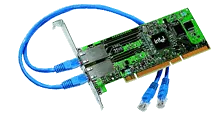
1x PCI Card (interchangeable bracket: full height and low profile bracket included)
Interface
1x PCI-X
Ports
2x RJ-45
Speed
2x RJ-45 (10/100/1000Base-T)
Power
Powered via interface only
Chipset
Intel 82546 (LAN Adapter, RJ-45)
Dimensions
6.50x2.52in (WxH, without bracket)
Compatibility
Universal
Features
Wake on LAN, VLAN, PXE Boot ROM 2.0, SNMP Management, 16KB Jumboframes, LACP
Manufacturer Warranty
lifetime (10 years in AT/DE)
Product Description
Intel PRO/1000 MT Server LAN-Adapter Overview
The Intel PRO/1000 MT Server LAN-Adapter, 2x RJ-45, PCI-X Manual defines standards for server connectivity. This network card enhances connectivity significantly. Installation requires inserting the adapter into an open PCI Express slot compatible with your system. Ensure you install the latest driver software from the support website before proceeding. System requirements must be reviewed to guarantee compatibility with your operating system. Compatibility notes specify that older adapters do not have full software support for the most recent versions of Microsoft Windows. Lists of supported devices per OS are available online. Hardware compatibility check includes confirming the latest BIOS for your system exists prior to any changes. Cabling requirements distinguish between copper twisted pair wiring specifications and fiber optic lengths.
Installation Process
Insert the adapter(s) in the computer carefully. Attach the copper or fiber network cable(s) to the RJ-45 ports. For Windows systems, install the Intel PROSet software to manage advanced features. Troubleshooting basic installation issues is straightforward if steps are followed correctly. Advanced features configuration varies with the adapter and operating system. Optimize performance by configuring advanced settings for your specific server usage model.
Performance Tuning
Configure Intel network adapter advanced settings to help optimize server performance. Options include optimizing for quick response, throughput, or CPU utilization. Enable Jumbo Packets if your other network components support them. Increase TCP and Socket resources from the default value. Adjust CPU Affinity for applications to reduce utilization. Ensure compliance with cabling requirements for Gigabit and 10 Gigabit Adapters using Category 5e or 6a wiring.
Connectivity and Cabling
Connect the RJ-45 network cable using Category 5 or 5e wiring for 1000BASE-T. Maximum length is 100 meters. Use Category 6a for 10 Gigabit connections to ensure compliance with standards. Fiber optic cables are also supported based on the laser wavelength. Always cover fiber optic ports with provided plugs to prevent damage. Remote boot features allow booting using only an Ethernet adapter via PXE specification compliance.
Notes
Update firmware only if updating driver software to the same family version. Check BIOS and open PCI Express slot before installation. Virtualization support allows running multiple operating systems on the same physical system. Ensure VLAN tags match between switch and adapters. Avoid using non-Intel adapters in teams when Jumbo Packets are enabled. Maintain administrative rights during driver installation.
Search for 67,732 Manuals online


Type-in Brand or Model