


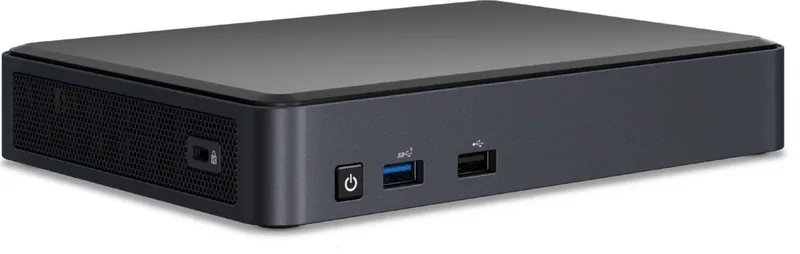
Intel NUC Pro Chassis Element CMCM2FB Manual
PDF manual · 21 Pages
English



Quick check
Incorrect answer, please try again.
Chat with your Intel NUC Pro Chassis Element CMCM2FB manual using AI
Get instant AI answers from your Intel NUC Pro Chassis Element CMCM2FB manual
Ask anything about the Intel NUC Pro Chassis Element CMCM2FB. Answers come from this manual, with the pages they are based on.
Ask a Question
Do you recommend NUC Pro Chassis Element CMCM2FB?
Yes NoFrequently Asked Questions
The Intel NUC Pro Chassis Element is an active enclosure designed specifically for the Intel NUC Compute Element. It serves as a chassis solution to house the compute module, providing connectivity, power distribution, and thermal management essential for a functional PC build.
Is this answer helpful?
Yes, the design supports sustained operation for 24x7 usage with 50% system utilization on average. It is tested with a demonstrated Mean Time Between Failure of 50,000 hours, ensuring reliability for demanding workloads over extended periods.
Is this answer helpful?
Intel vPro Technology is supported if a compatible NUC Compute Element with vPro capabilities is connected. The chassis includes Intel Ethernet Connection technology that facilitates the enhanced manageability and security features provided by the vPro platform.
Is this answer helpful?
The chassis comes with a complete thermal solution including a cold plate with thermal interface material, heat pipes, heat sink, and a dedicated fan. This active cooling ensures the compute element operates within safe temperature limits for sustained performance.
Is this answer helpful?
Wireless and Bluetooth can be enabled or disabled via a jumper setting on the chassis board. Users must power off and unplug the device before changing the jumper setting to enable or disable the wireless module associated with the compute element.
Is this answer helpful?
Products may contain design defects known as errata that could cause deviation from published specifications. Current characterized errata are documented in the product specification, and users should contact their distributor for the latest information before ordering.
Is this answer helpful?
The system includes two M.2 connectors. One supports PCIe NVMe and SATA SSDs, while the other supports PCIe NVMe storage only. This flexibility allows users to configure primary storage and high-speed caching based on specific application needs.
Is this answer helpful?
Advantages and Disadvantages
Advantages

- Dual HDMI ports support high resolution output up to 4K at 60Hz for versatile display setups
- Active thermal solution includes cold plates and heat pipes to maintain performance under load
- Supports Intel vPro technology for enhanced manageability, security, and virtualization capabilities
- Two M.2 slots offer flexible storage options accommodating both PCIe NVMe and SATA SSDs
- Rugged design with VESA mounting compatibility facilitates versatile installation in offices or homes
Disadvantages

- Requires separate purchase of a compatible NUC Compute Element to operate the chassis
- Specific environmental temperature limits must be met to avoid condensation and hardware issues
- Some features like capture card input are limited to specific CMCM2FBAV versions only
- Wireless module must be explicitly enabled via jumper setting for functionality on the chassis
- AC power cord options vary by region and may require separate procurement from distributor
Product Specification
Type
Mini-PC
Chipset
N/A (Edge Connector, NUC Compute Element)
Socket
N/A (Edge Connector, NUC Compute Element)
CPU
N/A (Edge Connector, NUC Compute Element)
CPU Compatibility
NUC Compute Element
RAM
N/A (Edge Connector, NUC Compute Element)
Storage
1x M.2/M-Key (PCIe 3.0 x4/SATA, 2280/2242), 1x M.2/M-Key (PCIe 3.0 x4, 2280)
External Bays
N/A
Internal Bays
N/A
Graphics
N/A (Edge Connector, NUC Compute Element)
GPU Ports
N/A
Front/Side Ports
1x USB-A 3.1 (10Gb/s), 1x USB-A 2.0 (480Mb/s)
Wireless
N/A (Edge Connector)
Card Reader
N/A
Power Supply
External, 1x Barrel Jack (90W/19V/4.74A)
VESA Mount
2.95x2.95/3.94x3.94 inches (included)
Dimensions (WxHxD)
7.87x1.38x5.71 inches
Volume
1.06 quarts
CPU Cooler
included
Features
Security Lock Slot (Kensington), suitable for continuous operation, Intel vPro
Warranty
3 Years
Note
Different power plug types possible. Check the last digit of the order designation. (BNUC11TNHI3000[x], Overview)
USB Notation
Link
Product Description
Building the Ultimate Compact PC
Intel brings powerful computing solutions to the desktop and embedded sectors with the latest chassis designs. The Intel NUC Pro Chassis Element serves as the active enclosure designed specifically for the NUC Compute Element. This combination allows for a highly compact and efficient system configuration ideal for various professional applications. When examining the Intel NUC Pro Chassis Element - Fort Beach Manual details, one can see the robust engineering behind the hardware. This guide outlines the necessary specifications for system architects looking to deploy reliable hardware. Proper configuration is essential for maximizing system longevity and performance.
Technical Features
The chassis supports multiple connectivity options essential for modern setups. Users benefit from dual HDMI ports on most versions, allowing for high-resolution output up to 4K at 60Hz. Some models include capture card capabilities, providing HDMI pass-thru and input for video production workflows. Storage is handled through two M.2 slots, accommodating PCIe NVMe and SATA SSDs for fast data access. This flexibility ensures that storage needs can be tailored to the workload requirements. High bandwidth digital content protection is supported for secure media playback.
Connectivity is further enhanced by wired LAN options featuring Intel Ethernet Connection technology. This supports Intel vPro technology when paired with compatible compute elements. Wireless capabilities depend on the installed compute element, with jumper settings available to enable or disable radio functions directly on the chassis board. Power management is handled by a supplied AC to DC adapter compatible with wide voltage ranges. Security is addressed through features like anti-theft locking mechanisms on the front panel. Display emulation features aid in headless configurations for remote management.
Reliability and Design
Engineers prioritize durability in these systems. The active thermal solution includes cold plates and heat pipes to maintain optimal performance under sustained loads. Reliability testing indicates a Mean Time Between Failure of 50,000 hours under specific conditions. Mechanical dimensions fit standard VESA mounting brackets, facilitating versatile installation in offices or homes. The form factor is compact yet sturdy enough to protect internal components during transport and operation. Shock and vibration specifications ensure resilience in demanding environments.
Operating environments require adherence to specific temperature ranges to prevent condensation issues. The design supports 24/7 operation with average system utilization. System integrators play a key role in ensuring all regulatory approvals are secured for specific regional deployments. This platform remains a strong choice for those seeking flexibility and power in a small form factor. Errata documentation is also available for any known deviations from published specifications. Compliance with international standards guarantees broad applicability for commercial use cases. Careful attention to power safety prevents hardware damage during maintenance. Always verify the latest firmware before installation.
Search for 67,732 Manuals online


Type-in Brand or Model