
Intel NUC Kit June Canyon Manual
PDF manual · 65 Pages
English



Quick check
Incorrect answer, please try again.
Chat with your Intel NUC Kit June Canyon manual using AI
Get instant AI answers from your Intel NUC Kit June Canyon manual
Ask anything about the Intel NUC Kit June Canyon. Answers come from this manual, with the pages they are based on.
Ask a Question
Do you recommend NUC Kit June Canyon?
Yes NoFrequently Asked Questions
It is designed for compact computing tasks such as office work, streaming, digital signage, light productivity, and embedded-style deployments. Its small footprint and low power design make it easy to integrate into space-limited setups.
Is this answer helpful?
The family uses either an Intel Celeron J4005 dual-core processor or an Intel Pentium Silver J5005 quad-core processor, depending on the SKU. Both are soldered-down and built for efficient everyday performance.
Is this answer helpful?
The platform supports DDR4 SO-DIMM memory at 2133 or 2400 MHz, with up to 8 GB total system memory. It uses two memory channels and does not support ECC memory.
Is this answer helpful?
Yes. The system includes dual HDMI 2.0a outputs and supports up to 4096 x 2160 resolution at 60 Hz. This makes it suitable for modern monitors and TVs.
Is this answer helpful?
Storage support includes one SATA 6.0 Gb/s connector for a 2.5-inch drive, an SDXC card reader, and on some models a 32 GB onboard eMMC module. The Mini PC version may also include Windows 10 Home preinstalled.
Is this answer helpful?
Yes. It uses an Intel Wireless-AC 9462 module that supports dual-band Wi-Fi and Bluetooth 5.0. The module is soldered down, which helps keep the design compact and stable.
Is this answer helpful?
Only UEFI-enabled operating systems are supported, including Windows 10 Home and Windows 10 Pro. Legacy operating systems are not supported, so software compatibility should be checked before deployment.
Is this answer helpful?
Advantages and Disadvantages
Advantages

- Compact 4x4-inch design fits small spaces and custom enclosures.
- Dual HDMI 2.0a supports 4K output at 60 Hz for modern displays.
- Strong connectivity includes USB 3.0, Gigabit LAN, Wi-Fi 5, and Bluetooth 5.
- Flexible BIOS, security, and wake features support managed or embedded use.
Disadvantages

- Maximum system memory is limited to 8 GB, which restricts heavier workloads.
- Legacy operating systems are not supported; UEFI-only installs are required.
- Some versions ship without RAM, storage, or an operating system.
- Thermal and power planning are important in tight chassis designs.
Product Specification
Type
Mini-PC
Chipset
System-on-Chip (SoC)
Socket
N/A
RAM
2x DDR4 SO-DIMM, dual PC4-17000S/DDR4-2400, max. 8GB (UDIMM)
Hard drive
1x SATA 6Gb/s
External bays
N/A
Internal bays
1x 2.5" (0.37")
Rear connectors
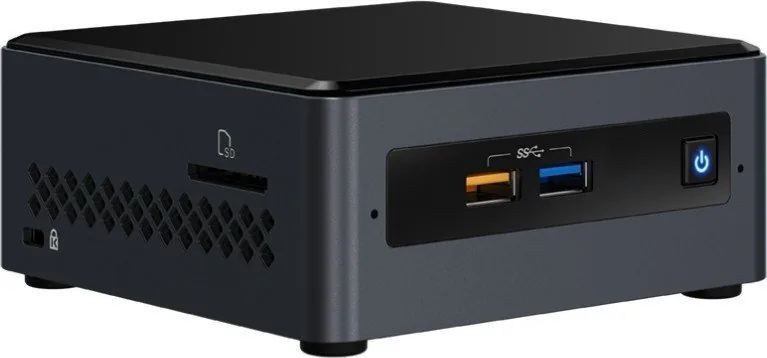
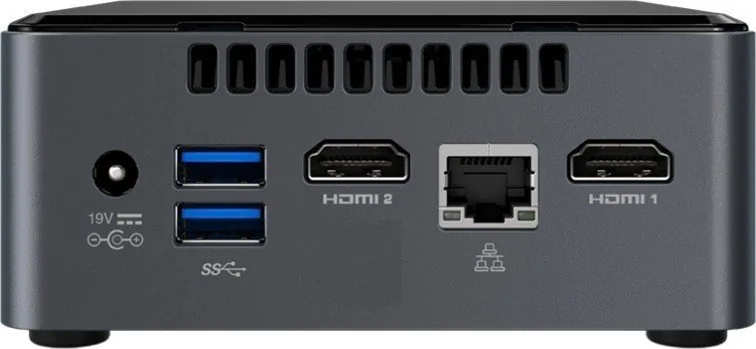
2x HDMI 2.0a, 2x USB-A 3.0 (5Gb/s), 1x RJ-45 1Gb LAN, 1x 3.5mm jack/Mini-Toslink, 1x Barrel connector (power connection)
Front/Side connectors
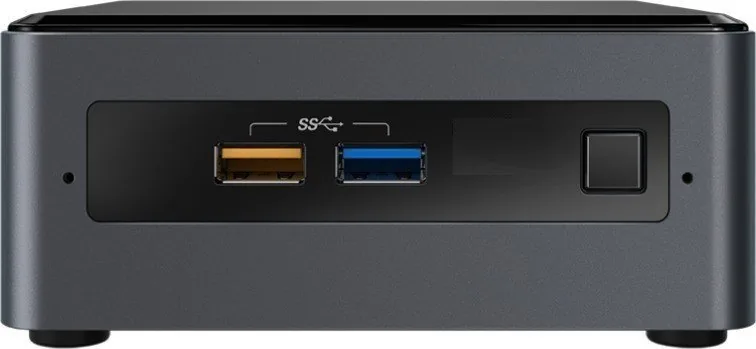
1x USB-A 3.0 (5Gb/s), 1x USB-A 3.0 (5Gb/s, BC), 1x 3.5mm jack, 1x SD Card
Expansion slots
N/A
Wireless
Wi-Fi 5 (WLAN 802.11a/b/g/n/ac, 1x1, Intel 9462, soldered), Bluetooth 5.1
Card reader
SD Card
Power supply
external, 1x Barrel connector (65W)
VESA mount
75x75/100x100 (included)
Dimensions (WxHxD)
4.53x2.01x4.37in
Volume
0.18 gal
CPU cooler
included
Special features
Security lock (Kensington), Infrared sensor
Manufacturer warranty
three years
USB notation
Link
Product Description
Intel NUC Kit June Canyon: Compact Computing with Everyday Flexibility
The Intel NUC Kit June Canyon Manual points to a small system family that focuses on practical performance rather than excess size. Built around Intel Celeron J4005 or Pentium Silver J5005 options, June Canyon delivers a compact 4x4-inch footprint that fits neatly into home offices, kiosks, media setups, and custom embedded builds. It is the kind of platform that feels simple at first glance, yet offers a surprisingly wide set of capabilities for builders who want a balance of size, efficiency, and connectivity.
At the heart of the design is a soldered-down SoC with low power demands, up to 10 W TDP, paired with Intel UHD graphics for everyday visual tasks. The board supports dual HDMI 2.0a outputs with 4K at 60 Hz, making it well suited for modern displays, streaming, digital signage, or dual-monitor productivity. Audio is equally versatile, with front-panel headset support, back-panel optical output, HDMI audio, and a digital microphone array header for voice-oriented use cases.
Memory support is straightforward: DDR4 SO-DIMMs at 2133 or 2400 MHz, with up to 8 GB total capacity. That limit keeps the system lean, but it is enough for lightweight multitasking, office work, and media playback. Storage options include SATA for a 2.5-inch drive, SDXC support, and in some versions a 32 GB eMMC module with Windows 10 Home preinstalled. This makes the Mini PC variant especially appealing for users who want a ready-to-use system with fewer setup steps.
Connectivity is one of the strongest parts of the design. The system includes USB 3.0 ports on both front and rear panels, internal USB 2.0 headers, Gigabit Ethernet, wireless networking via Intel Wireless-AC 9462, and Bluetooth 5.0. Power management and BIOS features also stand out, with ACPI support, wake-from-USB, wake-from-LAN, HDMI CEC, BIOS recovery, and Intel Platform Trust Technology for added security. These details make the platform feel more mature than its size suggests.
Why it stands out
June Canyon is especially attractive for users who value a low-profile system that can still handle modern connectivity and display needs. It is not designed for heavy workstation tasks, but it is very capable for office applications, streaming, light development, and appliance-style deployments.
Notes
- Best suited for compact, quiet, and efficient builds.
- Check SKU differences before buying; some versions ship without memory, storage, or OS.
- Good airflow matters, especially in enclosed chassis designs.
- UEFI-only support means older operating systems are not a fit.
- The board is small, but the feature set is broad enough for many practical uses.
Search for 67,732 Manuals online


Type-in Brand or Model