
Intel NUC Kit Bean Canyon Manual
PDF manual · 74 Pages
English



Quick check
Incorrect answer, please try again.
Chat with your Intel NUC Kit Bean Canyon manual using AI
Get instant AI answers from your Intel NUC Kit Bean Canyon manual
Ask anything about the Intel NUC Kit Bean Canyon. Answers come from this manual, with the pages they are based on.
Ask a Question
Do you recommend NUC Kit Bean Canyon?
Yes NoFrequently Asked Questions
It is ideal for compact desktops, office PCs, digital signage, and small home systems. Its small size and broad connectivity make it useful anywhere space is limited but flexibility still matters.
Is this answer helpful?
The Bean Canyon family uses soldered 8th Gen Intel Core processors: Core i3-8109U, Core i5-8259U, and Core i7-8559U. Each model includes Intel Iris Plus Graphics 655.
Is this answer helpful?
It supports up to 32 GB of DDR4-2400 memory using two 260-pin SO-DIMM slots. Only non-ECC, 1.2 V DDR4 modules are supported, and compatible memory density is important.
Is this answer helpful?
Yes. The rear USB Type-C port supports Thunderbolt 3, DisplayPort, USB 3.1 Gen 2, and charging. This makes it useful for fast peripherals, displays, and docking solutions.
Is this answer helpful?
The platform supports a 2.5-inch SATA drive and M.2 storage modules in 2242 or 2280 sizes. It can work with both SATA and PCIe-based M.2 drives depending on configuration.
Is this answer helpful?
It includes the Intel Dual Band Wireless-AC 9560 module with Wi-Fi 5 and Bluetooth 5 support. That gives the system strong wireless connectivity and modern short-range device pairing.
Is this answer helpful?
Yes. It supports ACPI power states, Modern Standby, wake from USB, LAN, CIR, and other events. These features help reduce power use while keeping the system easy to wake.
Is this answer helpful?
Advantages and Disadvantages
Advantages

- Compact 4 x 4 inch design fits tight spaces without sacrificing core desktop features.
- Choice of 8th Gen Core i3, i5, or i7 processors offers scalable performance.
- Thunderbolt 3, HDMI 2.0a, and DisplayPort over USB-C support flexible multi-display setups.
- Up to 32 GB DDR4 memory plus M.2 and SATA storage gives strong upgrade flexibility.
Disadvantages

- Memory is limited to DDR4-2400 and non-ECC SO-DIMMs only.
- Processor is soldered down, so there is no CPU upgrade path.
- Thermal performance depends heavily on chassis airflow and ambient temperature.
- Some advanced features require BIOS configuration or specific compatible storage devices.
Product Specification
Type
Mini-PC
Chipset
System-on-Chip (SoC)
Socket
N/A
RAM
2x DDR4 SO-DIMM, dual PC4-19200S/DDR4-2400, max. 32GB (UDIMM)
External bays
N/A
Front/Side connectors
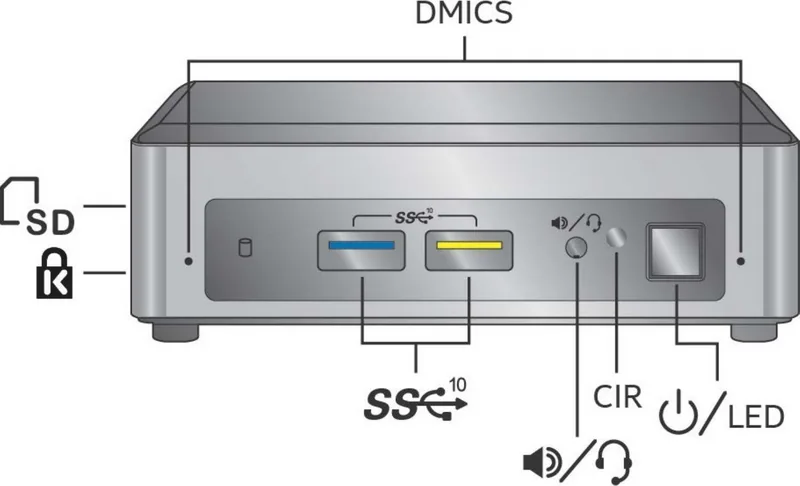
1x USB-A 3.1 (10Gb/s), 1x USB-A 3.1 (10Gb/s, BC), 1x 0.14 in jack, 1x microSD
Expansion slots
N/A
Wireless
Wi-Fi 5 (WLAN 802.11a/b/g/n/ac, 2x2, Intel 9560, soldered), Bluetooth 5.1
Card reader
microSD
Power supply
external, 1x barrel connector (90W)
VESA mount
2.95x2.95/3.94x3.94 (included)
CPU cooler
included
Features
Security lock (Kensington), Infrared sensor
Manufacturer warranty
three years
USB notation
Link
Product Description
Intel NUC Kit - Bean Canyon: Compact Power for Modern Workspaces
The Intel NUC Kit - Bean Canyon Manual describes a small yet capable mini PC platform built for users who want desktop-class flexibility in a tiny footprint. With a 4 x 4 inch board, this family balances performance, connectivity, and customization for home offices, small studios, digital signage, and technical builds.
At the heart of the Bean Canyon line are soldered 8th Gen Intel Core options: Core i3-8109U, Core i5-8259U, and Core i7-8559U. Each model pairs with Intel Iris Plus Graphics 655, giving the system a strong edge for everyday productivity, media playback, and light content creation. It is a compact design, but it still feels thoughtfully engineered for practical use.
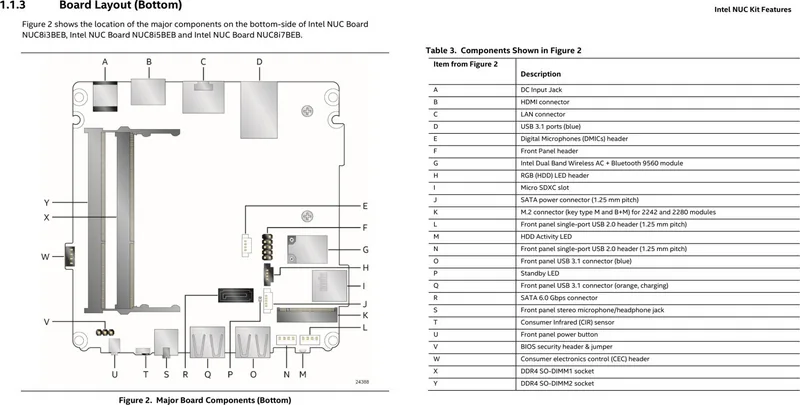
Memory support is equally solid. Two DDR4 SO-DIMM slots allow up to 32 GB of DDR4-2400 memory, which is enough for multitasking and demanding office workloads. Storage options include SATA and M.2 support, so users can combine speed and capacity depending on their build goals. That flexibility makes the platform appealing to both casual builders and integrators.
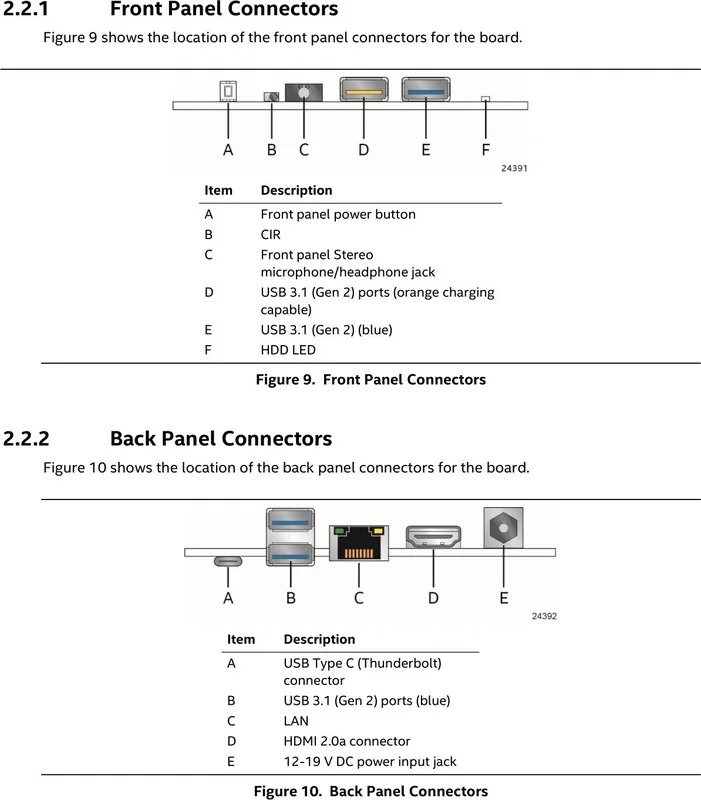
Connectivity is one of the Bean Canyon’s biggest strengths. The rear USB Type-C port supports Thunderbolt 3, DisplayPort output, USB 3.1 Gen 2, and charging capability. Add HDMI 2.0a, multiple USB Type-A ports, Gigabit Ethernet, wireless AC with Bluetooth 5, and micro SDXC expansion, and you get a very versatile tiny system. Audio support also covers front-panel analog use, HDMI audio, and digital microphone input.
The platform is designed with business and advanced home users in mind. It includes BIOS controls, ACPI power states, wake options, Intel Platform Trust Technology, and virtualization support. These features make it suitable for users who want a small system that still behaves like a full PC in terms of manageability and security.
Notes
- Best suited for compact desktops, kiosks, and small-form-factor deployments.
- Thermal design matters: airflow and chassis choice directly affect sustained performance.
- Memory compatibility and BIOS settings can impact stability and boot behavior.
Search for 67,635 Manuals online


Type-in Brand or Model