
Intel NUC 8 Mainstream-G Manual
PDF manual · 63 Pages
English



Quick check
Incorrect answer, please try again.
Chat with your Intel NUC 8 Mainstream-G manual using AI
Get instant AI answers from your Intel NUC 8 Mainstream-G manual
Ask anything about the Intel NUC 8 Mainstream-G. Answers come from this manual, with the pages they are based on.
Ask a Question
Do you recommend NUC 8 Mainstream-G?
Yes NoFrequently Asked Questions
Its main strength is packing useful desktop features into a very small chassis. It combines Intel 8th Gen Core processors, Radeon 540X graphics, multiple display outputs, and strong connectivity for compact computing.
Is this answer helpful?
It works well for home offices, digital signage, media centers, and light productivity. Users who want a small, tidy system with good everyday performance will get the most value from it.
Is this answer helpful?
Yes. The system includes HDMI and Mini DisplayPort outputs, which allows dual-monitor setups. This makes it practical for multitasking, presentations, and media viewing.
Is this answer helpful?
The platform supports both SATA and an M.2 connector, so storage flexibility is good for a mini PC. Exact upgrade options depend on the configuration you purchase.
Is this answer helpful?
No, the memory is soldered down on the board. That means capacity is fixed by the chosen model, so it is important to pick the right configuration upfront.
Is this answer helpful?
It supports BIOS passwords, recovery options, Intel Virtualization Technology, and Intel Platform Trust Technology. These features help with protection, administration, and controlled system access.
Is this answer helpful?
Advantages and Disadvantages
Advantages

- Compact 4x4-inch design fits easily in small workspaces and media setups.
- 8th Gen Intel Core i5/i7 options deliver solid everyday performance.
- AMD Radeon 540X graphics improve multimedia and display capabilities.
- Wide connectivity includes USB 3.1 Gen2, HDMI, Mini DP, Ethernet, and SDXC.
Disadvantages

- Memory is soldered, so upgrades are limited.
- Thermal performance depends heavily on chassis airflow.
- Not ideal for demanding gaming or heavy workstation tasks.
- Some recovery and wake features depend on BIOS settings and OS support.
Product Specification
Form Factor
Mini-PC
RAM
8GB LPDDR3-1866 (8GB soldered, not expandable)
Flash
N/A
Graphics
AMD Radeon 540X - 2GB GDDR5 - Mobile, 8CU/512SP, Codename "Polaris 23 MXL" (GCN 4.0, GF 14nm)
Rear Ports
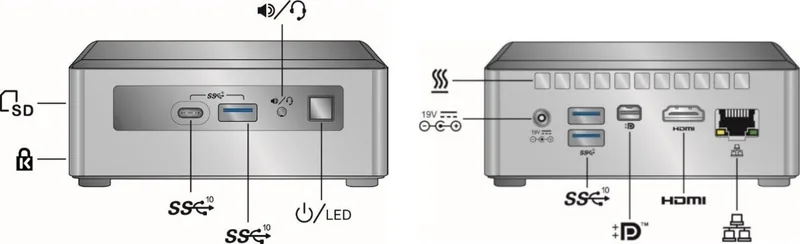
2x USB-A 3.1 (10Gb/s), 1x Mini DisplayPort 1.2, 1x HDMI 2.0b, 1x RJ-45 1Gb LAN (Intel I219-V), 1x DC-In Barrel Jack (Power Connector)
Front/Side Ports
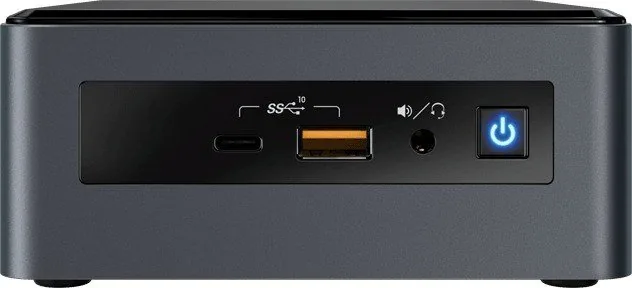
1x USB-C 3.1 (10Gb/s), 1x USB-A 3.1 (10Gb/s, BC), 1x 3.5mm Jack, 1x SD Card
Wireless
Wi-Fi 5 (WLAN 802.11a/b/g/n/ac, 2x2, Intel 9560), Bluetooth 5.1
Optical Drive
N/A
Camera
N/A
Operating System
Windows 10 Home 64bit
Power Supply
external 65W, 1x Barrel Connector
Dimensions
4.61x2.05x4.41in (WxHxD)
Volume
42.72in^3 (calculated)
Special Features
Security Lock (Kensington Security Slot), VESA Mount (2.95x2.95/3.94x3.94 in)
Warranty
three years
USB Notation
Link
Product Description
Intel NUC 8 Mainstream-G Mini PC - Islay Canyon: Compact Power for Modern Spaces
The Intel NUC 8 Mainstream-G mini PC - Islay Canyon brings desktop-class usefulness into a remarkably small 4x4-inch footprint. Built around soldered 8th Generation Intel Core i5 or i7 processors, it is designed for users who want a compact system that still feels responsive for work, streaming, and everyday multitasking. The Intel NUC 8 Mainstream-G mini PC - Islay Canyon Manual highlights a platform that blends efficiency, flexibility, and practical connectivity in one neat package.
One of the most appealing parts of this mini PC is its balance between size and capability. The system supports soldered LPDDR3 memory, fast storage options including SATA and M.2, and integrated wireless connectivity with Wi‑Fi and Bluetooth 5. For a small machine, it offers a well-rounded set of features that make it suitable for home offices, media setups, and lightweight creative workloads. The addition of AMD Radeon 540X graphics gives the unit a stronger visual profile than many basic mini PCs, especially for high-definition playback and dual-display use.
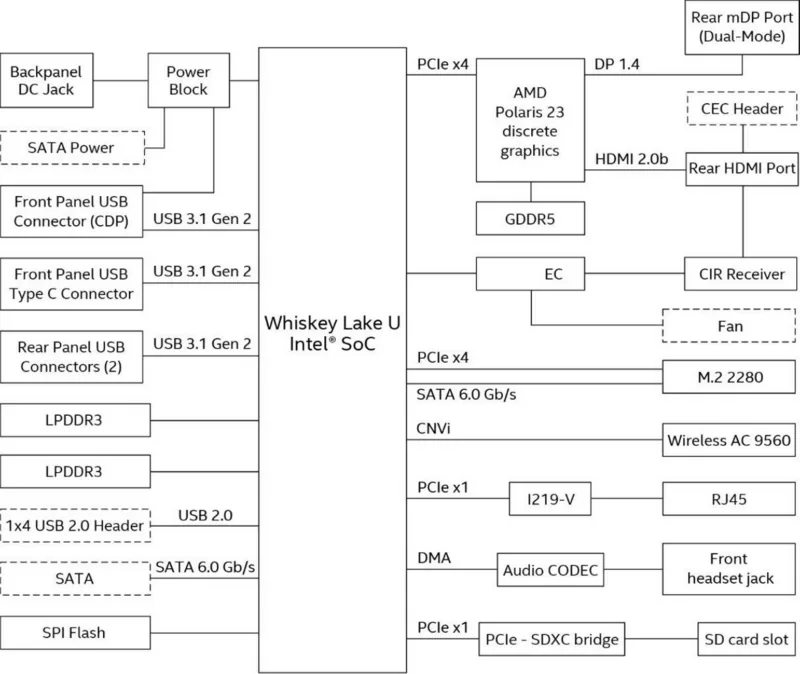
Connectivity is another strong point. With USB 3.1 Gen2 ports on both the front and rear, HDMI 2.0b, Mini DisplayPort 1.4, Gigabit Ethernet, SDXC support, and audio jacks, the device is built to handle modern peripherals without feeling limited. It also includes hardware-oriented extras such as CIR support, CEC options, and wake features that make it more versatile in living-room or embedded-style deployments.
The BIOS and platform security features add another layer of value. Support for ACPI, SMBIOS, BIOS recovery, password protection, Intel Virtualization Technology, and Intel Platform Trust Technology makes the system more attractive for managed environments and users who care about control and reliability. Thermal monitoring, fan control, and careful power management further show that the design is intended to be stable in real-world use, not just compact on paper.
In practice, this NUC is best viewed as a smart balance of convenience and performance. It is not a high-end gaming tower, but it does offer a polished blend of efficiency, graphics support, and enterprise-friendly features in a tiny chassis. For anyone looking at a space-saving desktop with strong everyday capability, the Islay Canyon model stands out as a practical and well-engineered choice.
Notes
- Best suited for compact desks, media centers, and small office setups.
- Storage and memory options vary by configuration.
- Thermal airflow matters for long-term performance.
- BIOS and security settings can influence boot and recovery behavior.
Search for 67,732 Manuals online


Type-in Brand or Model