
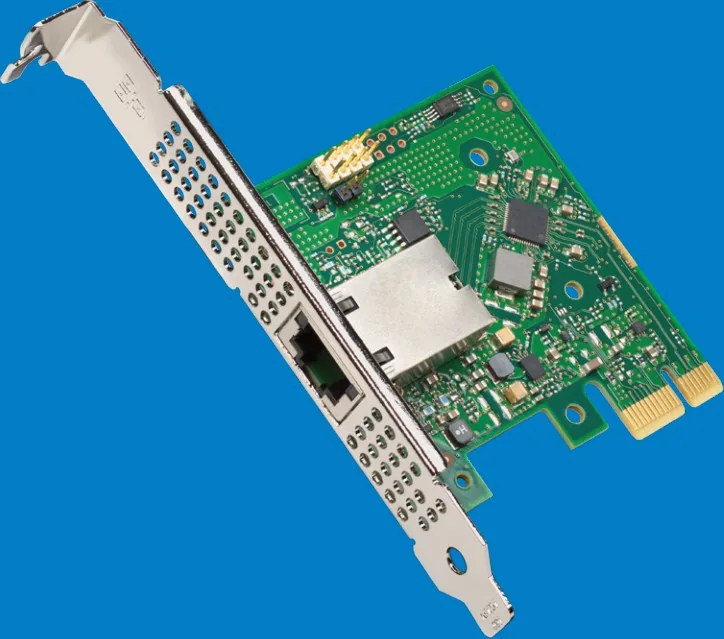
Intel I225 Manual
PDF manual · 161 Pages
English



Quick check
Incorrect answer, please try again.
Chat with your Intel I225 manual using AI
Get instant AI answers from your Intel I225 manual
Ask anything about the Intel I225. Answers come from this manual, with the pages they are based on.
Ask a Question
Do you recommend I225?
Yes NoFrequently Asked Questions
The Intel I225 supports Microsoft Windows Server versions 2016, 2019, and 2022, as well as Windows 10 and 11. It is also compatible with various Linux distributions, including RHEL, SUSE, and Ubuntu, along with VMware ESXi.
Is this answer helpful?
Yes, the adapter supports Intel Advanced Network Services (ANS) teaming modes such as Adapter Fault Tolerance and Adaptive Load Balancing. You can also configure Static Link Aggregation if your switch supports it.
Is this answer helpful?
Wake on LAN support depends on the specific variant and port configuration. While some models support Wake on Magic Packet from standby, others may have limitations regarding wake from power-off states or specific ports.
Is this answer helpful?
Download the latest driver package from the Intel support website. Run the installer, follow the wizard prompts, and restart your computer if required. Ensure you have administrative rights before starting the process.
Is this answer helpful?
For 1 Gigabit speeds, Category 5e, 6, 6a, and 7 cables support distances up to 100 meters. Ensure you use shielded cables if electromagnetic interference is a concern in your environment.
Is this answer helpful?
Advantages and Disadvantages
Advantages

- Provides reliable 1 Gigabit Ethernet speeds suitable for most business and home networks
- Significantly reduces CPU utilization through hardware offloading features
- Compatible with a wide range of operating systems including Windows and Linux
- Supports Energy Efficient Ethernet to lower overall power consumption
- Easy to install and manage using Intel PROSet software suite
Disadvantages

- Does not support Wake on LAN on all ports for certain server adapter variants
- May require specific switch configurations for advanced teaming features to work optimally
- Some older operating systems may lack full driver support compared to newer releases
- Performance can be limited if installed in PCIe slots with insufficient bandwidth
- Advanced features like DCB may not function correctly if linked partners do not support them
Product Specification
Type
LAN Adapter
Form Factor
1x PCIe Card (interchangeable bezel: full height and low profile bezel included)
Connection
1x PCIe 3.1 x1
Interface
1x RJ-45
Transmission
1x RJ-45 (10/100/1000/2.5GBase-T)
Power Supply
Power supply only via connection
Chipset
Intel I225-AT (LAN Adapter, RJ-45)
Dimensions
2.70x2.57 inches (WxD, without bezel)
Compatibility
universal
Features
Wake on LAN, PXE Boot ROM 2.1
Product Description
Intel I225: The Next Generation of Gigabit Connectivity
The Intel I225 represents a significant leap forward in network interface technology, designed specifically for modern desktops and entry-level servers. This adapter delivers reliable Gigabit Ethernet speeds, ensuring that your data transfers are swift and your connections remain stable even under heavy loads. Whether you are managing a small office network or setting up a high-performance workstation, the I225 provides the robust foundation needed for seamless operation.
Designed with efficiency in mind, this device integrates advanced features that optimize network performance without straining system resources. It supports various offloading capabilities that reduce CPU usage during packet processing, allowing your processor to focus on critical tasks. The hardware is built to handle diverse operating environments, offering compatibility across Windows, Linux, and other major platforms. Its compact form factor fits easily into standard expansion slots, making it an ideal upgrade for systems requiring enhanced connectivity options.
Installation is straightforward, guided by comprehensive software tools that simplify driver setup and configuration. Users can leverage Intel PROSet utilities to manage teaming configurations, adjust power settings, and monitor link status with ease. The adapter also supports energy-efficient protocols, helping to lower power consumption when the network is idle. For professionals who demand reliability and speed, the Intel I225 stands out as a versatile solution that bridges the gap between cost-effectiveness and high-end networking performance.
Key Features
- Gigabit Speeds: Delivers consistent 1 Gbps throughput for fast file transfers and smooth streaming.
- CPU Offloading: Reduces processor load through hardware-based packet processing.
- Broad OS Support: Compatible with Windows Server, Windows 10/11, and various Linux distributions.
- Energy Efficiency: Includes features like Energy Efficient Ethernet to save power during low activity.
- Easy Management: Utilizes Intel PROSet for intuitive configuration and troubleshooting.
Important Notes
Ensure your system BIOS is updated to the latest version before installation to avoid compatibility issues. When configuring teaming modes, verify that all connected switches support the specific aggregation protocol you intend to use. Always check cable quality and length to maintain optimal signal integrity.
Search for 67,732 Manuals online


Type-in Brand or Model