
Intel AXXSW1GB Manual
PDF manual · 220 Pages
English



Quick check
Incorrect answer, please try again.
Chat with your Intel AXXSW1GB manual using AI
Get instant AI answers from your Intel AXXSW1GB manual
Ask anything about the Intel AXXSW1GB. Answers come from this manual, with the pages they are based on.
Ask a Question
Do you recommend AXXSW1GB?
Yes NoFrequently Asked Questions
It provides managed Gigabit connectivity for server environments, helping administrators control ports, security, traffic handling, and monitoring from a web interface.
Is this answer helpful?
Yes. The module includes VLAN properties, membership, interface settings, and VLAN grouping options, making it useful for segmenting network traffic efficiently.
Is this answer helpful?
Yes. Storm control can limit broadcast, multicast, and unknown unicast traffic, reducing the risk of congestion and helping keep the network stable.
Is this answer helpful?
Yes. It supports LAGs and LACP, which can combine multiple links for more bandwidth and better redundancy between connected systems.
Is this answer helpful?
It offers port security and MAC/IP-based ACLs, allowing administrators to control who can access ports and how packets are handled.
Is this answer helpful?
They can use system logs, port statistics, RMON data, diagnostics, and interface views to track device health and troubleshoot issues.
Is this answer helpful?
Advantages and Disadvantages
Advantages

- Strong web-based management for remote configuration and monitoring
- Supports VLANs, ACLs, QoS, and port security for tighter traffic control
- Link aggregation and failover features improve bandwidth and resilience
- Diagnostics, logs, and statistics help with troubleshooting
Disadvantages

- Setup may be complex for users without networking experience
- Advanced security and routing options require careful planning
- Some changes may need a reboot to take effect
- Best value appears in managed environments, not simple plug-and-play setups
Product Specification
Ports
10x 1000Base-T
Product Description
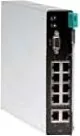
Intel Gigabit Switch Module for Multi-Flex Server, 10-Port, Managed
The Intel Gigabit Switch Module for Multi-Flex Server, 10-Port, managed is built for administrators who want more control over server-side networking without adding complexity. It combines compact hardware with a web-based management experience, making it easier to configure, monitor, and fine-tune traffic from a remote browser. For teams running multi-server environments, that means fewer manual interventions and a cleaner way to keep network behavior predictable.
Designed for practical control
What stands out most is the depth of management features. The switch supports everyday tasks such as port configuration, VLAN assignment, link aggregation, and security policies, while also giving visibility into system status, logs, and performance statistics. Features like storm control, ACLs, port security, and QoS help administrators shape traffic flow and protect critical services from unnecessary noise or unauthorized access.
The module is also a strong fit for structured networks that depend on segmentation and resilience. VLAN support helps separate traffic into logical groups, while LAG and LACP can increase bandwidth and add redundancy between links. For environments where uptime matters, trunk failover capabilities can improve continuity if one path becomes unavailable. Together, these tools make the switch feel more like a network control point than a simple connectivity device.
Easy to manage, monitor, and troubleshoot
The embedded web interface is organized for quick navigation, with tables, configuration pages, and live views that help you understand what each port is doing. Administrators can review system information, adjust settings, apply changes, and check interface statistics without leaving the browser. Diagnostics and RMON-style visibility add another layer of confidence when troubleshooting performance issues or tracing unusual traffic patterns.
For blog readers evaluating managed switch hardware, this Intel module offers a balanced mix of reliability and flexibility. It is especially appealing in server racks where space is tight but network demands are high. The combination of remote administration, layered security, and traffic optimization makes it a sensible choice for IT teams that value control, consistency, and scalability.
Notes
- Best suited for managed server networking
- Useful when VLANs, ACLs, and link aggregation are required
- Designed with administrator-friendly monitoring in mind
- Safety and ESD handling matter during installation
Search for 67,732 Manuals online


Type-in Brand or Model