

InLine Woodwoom 55380H Manual
PDF manual · 2 Pages
English



Quick check
Incorrect answer, please try again.
Chat with your InLine Woodwoom 55380H manual using AI
Get instant AI answers from your InLine Woodwoom 55380H manual
Ask anything about the InLine Woodwoom 55380H. Answers come from this manual, with the pages they are based on.
Ask a Question
Do you recommend Woodwoom 55380H?
Yes NoFrequently Asked Questions
Turn on Bluetooth on your phone, computer, or music player, then search for nearby devices. Press and hold the button on the bottom of the speaker for about 3 seconds until the blue LED flashes rapidly. Select the speaker from the list to complete pairing.
Is this answer helpful?
A rapidly flashing blue LED means the speaker is in pairing mode and ready to connect. When the blue LED stays on continuously, pairing is complete and the Bluetooth link is active.
Is this answer helpful?
The speaker can play music for up to about 7 hours, depending on the volume level and usage conditions. Higher volume settings usually reduce total playback time.
Is this answer helpful?
Charging takes roughly 2.5 hours using the included Micro-USB cable. It is best to fully charge the speaker before longer listening sessions.
Is this answer helpful?
Check that the speaker is switched on, charged, and within range. Bluetooth pairing may also fail if the speaker is already connected to another device or if the environment reduces wireless signal strength.
Is this answer helpful?
No. The InLine WOODWOOM Wood supports only one active Bluetooth connection at a time. It does not allow simultaneous pairing with multiple devices.
Is this answer helpful?
Yes. It can reconnect to the last paired device when that device is back within range, making it convenient for regular daily use.
Is this answer helpful?
Advantages and Disadvantages
Advantages

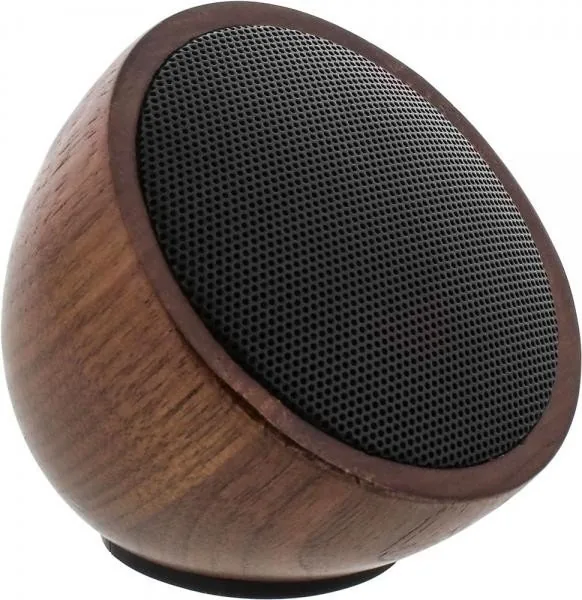
- Natural walnut wood design with a compact, stylish look.
- Easy Bluetooth pairing with clear LED status feedback.
- Up to 7 hours of playback for everyday listening.
- Automatic reconnect with the last paired device.
- Auto power-off helps save battery when idle.
Disadvantages

- Supports only one Bluetooth connection at a time.
- Range is limited to about 10 meters and can vary.
- Charging takes around 2.5 hours before full use.
- Battery life depends on volume and may be shorter at high levels.
Product Specification
Power
3W Peak
Display
no
Tuner
no
Frequency Range
150Hz-20kHz
Wireless
Bluetooth
Power Supply
Li-Ion Battery
Playback Time
7h
Dimensions
2.95x2.87x2.95in (WxHxD)
Weight
0.55 lb
Product Description
InLine WOODWOOM Wood Manual: Compact Walnut Bluetooth Sound
The InLine WOODWOOM Wood is a small Bluetooth speaker that blends practical wireless audio with the warm look of walnut wood. Its compact format makes it easy to place on a desk, shelf, or bedside table, while the natural wood finish gives it a more refined feel than many plastic mini speakers. For anyone who wants a portable speaker with a simple setup and a decorative touch, this model stands out as a charming everyday companion.
Connecting the speaker is straightforward. After turning on Bluetooth on your phone, computer, or music player, you search for available devices and pair with the speaker once it appears. A blue LED indicates the connection status: rapid flashing means pairing mode is active, while a steady light signals that the connection is complete. The speaker also remembers the last paired device, so it can reconnect automatically when that device is nearby again.
One of the biggest advantages of the WOODWOOM is its balance between convenience and portability. It offers up to 7 hours of music playback, depending on volume, which is enough for a long work session, a relaxed evening, or background music during the day. Charging takes about 2.5 hours with the included Micro-USB cable, making it easy to get back to listening without a long wait. The speaker also switches off automatically after 10 minutes of inactivity, helping conserve power when it is not in use.
The manual also highlights a few useful limitations to keep in mind. The Bluetooth range is around 10 meters, though walls and other environmental factors can reduce that distance. The speaker supports only one active connection at a time, so it cannot be paired simultaneously with multiple devices. If pairing fails, the most common reasons are that the speaker is not charged, is out of range, or is already connected to another device.
Notes
- Best used within a short Bluetooth range for stable playback.
- The wood design adds a natural, premium look to a compact speaker.
- Ideal for simple, single-device listening without complicated setup.
Search for 67,706 Manuals online


Type-in Brand or Model
qui33
10 months ago
My rubber stand foot on the small Bluetooth speaker came loose after a couple of days. Does this happen often, and can I fix it?
Manual.ly
9 months ago
We have seen occasional reports of the rubber base/stand foot detaching after use. It is not the typical experience, but if it happens, you can usually reattach it. Clean and dry the contact area first, then use strong double-sided tape or a suitable adhesive to secure the foot firmly. If the foot comes off again or does not align properly, please contact our support so we can help with a replacement option or further troubleshooting. On the positive side, users typically report trouble-free Bluetooth pairing, decent range, and several hours of battery life.