
InLine USB 3.2 Gen 1 Hub Manual
PDF manual · 2 Pages
English



Quick check
Incorrect answer, please try again.
Chat with your InLine USB 3.2 Gen 1 Hub manual using AI
Get instant AI answers from your InLine USB 3.2 Gen 1 Hub manual
Ask anything about the InLine USB 3.2 Gen 1 Hub. Answers come from this manual, with the pages they are based on.
Ask a Question
Do you recommend USB 3.2 Gen 1 Hub?
Yes NoFrequently Asked Questions
It is a powered USB 3.2 Gen 1 hub, so it can support multiple devices more reliably than a simple passive splitter. The external power supply helps keep performance stable when several peripherals are connected at once.
Is this answer helpful?
It is well suited for external hard drives, cameras, video equipment, audio interfaces, and other broadband USB peripherals. It can also be used with standard accessories like flash drives, keyboards, and mice.
Is this answer helpful?
Yes. The hub supports USB 3.2 Gen 1 speeds but is also backward compatible with USB 2.0 and USB 1.1, so older peripherals can still be connected and used.
Is this answer helpful?
Yes, for stable operation it is recommended to use the included power supply. This is especially important when several devices are attached or when you connect power-hungry hardware such as external drives.
Is this answer helpful?
Stop any ongoing read or write activity first, then use your system’s safe removal option. Wait until the port LED turns off before unplugging the device to avoid data loss or connection issues.
Is this answer helpful?
Advantages and Disadvantages
Advantages

- Four USB-A 3.0 ports expand connectivity for multiple devices at once.
- Powered design helps maintain stable performance for demanding peripherals.
- USB 3.2 Gen 1 support delivers up to 5 Gb/s and is backward compatible.
- Aluminum housing, LEDs, and a power switch make it practical and easy to use.
Disadvantages

- Requires external power, so it is less minimal than an unpowered hub.
- Best performance depends on USB 3.2 Gen 1 devices and proper setup.
- Physical size may be less convenient than ultra-compact travel hubs.
- Not intended for rough handling, moisture, or direct sunlight exposure.
Product Specification
Type
USB-Hub
Form factor
1x external wired
Connection
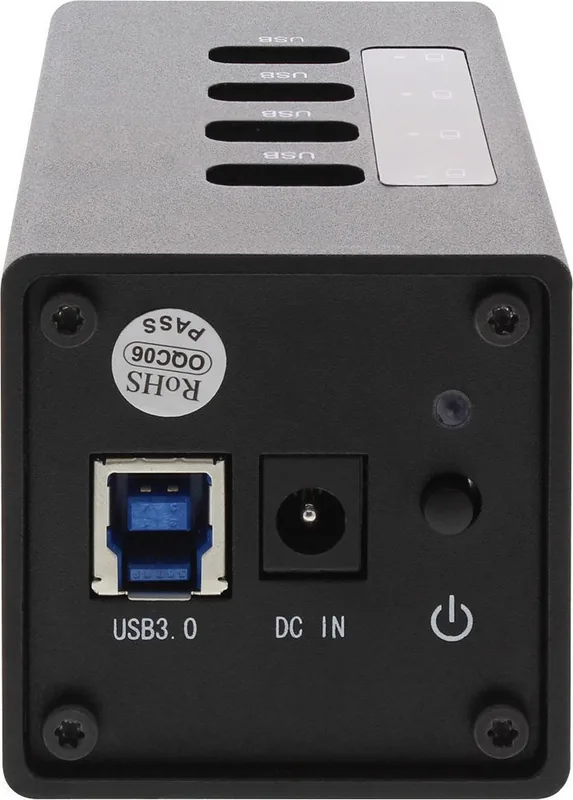
1x USB-B 3.0 (Female, 5Gb/s), 1x USB-A 3.0 (Male via cable, 5Gb/s, 39.37 in cable length)
Ports
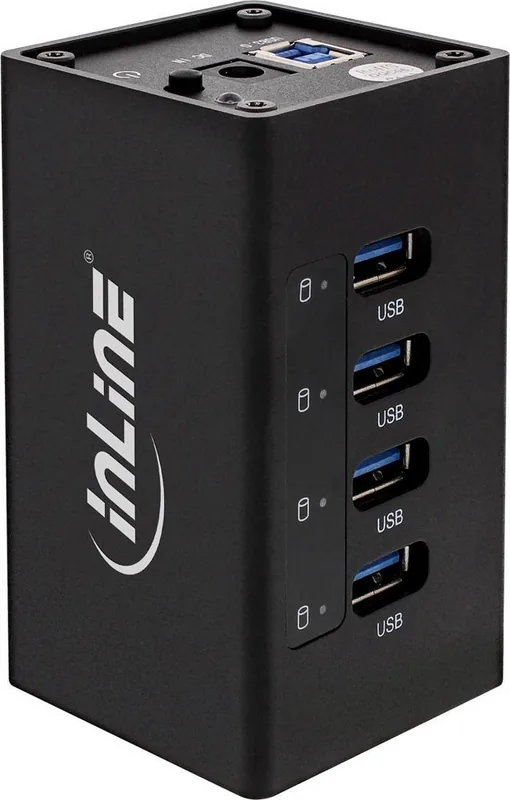
4x USB-A 3.0 (Female)
Transfer
4x USB-A 3.0 (Female, 5Gb/s)
Power supply
Power supply also via connection, mains connection (1x barrel connector), external power supply possible and included (1x barrel connector 12V/2.5A)
Chipset
VIA/VLI VL811 (USB-Hub, USB 3.0)
Dimensions
1.97x1.97x3.74in (WxHxD)
Weight
0.35 lb
Housing color
black
Compatibility
universal
Features
Metal housing, on/off switch
USB notation
Link
Product Description
InLine USB Hub, 4x USB-A 3.0, USB-B 3.0 Socket Manual
A compact powered hub for faster everyday connectivity
The InLine USB Hub is designed for users who need more reliable USB connections without cluttering a workspace. With four USB-A 3.0 ports and a USB-B 3.0 upstream socket, it expands a single computer port into a practical, high-speed connection point for multiple peripherals. Whether you are managing external drives, cameras, audio devices, or other data-hungry accessories, this hub aims to make expansion simple and efficient.
Fast transfer speeds with stable power
Built around USB 3.2 Gen 1 technology, the hub supports transfer rates up to 5 Gb/s and remains backward compatible with USB 2.0 and USB 1.1. That means older devices can still work, while modern hardware benefits from faster communication. Because it is a powered hub, it includes its own power supply, helping keep connected devices stable even when several ports are in use at the same time.
The aluminum housing gives the device a clean, durable look and helps it feel more solid on a desk or in a mobile setup. A built-in on/off switch adds convenience, while LED indicators provide quick status feedback for power and active USB ports. These small details make the hub feel thoughtful and user-friendly rather than just functional.
Useful for creative and professional setups
This hub is especially practical for high-resolution cameras, video surveillance equipment, digital video tools, and multi-channel audio devices. It also suits users who regularly connect and disconnect USB accessories and want a more organized setup. The combination of overvoltage protection and external power helps protect both the hub and connected devices during daily use.
At the same time, the design stays portable and easy to place near a laptop, desktop, or workstation. It is compatible with Windows XP and newer systems as well as Mac OS, which broadens its appeal for mixed environments.
Notes
- Use the included power adapter for the most stable performance.
- Always safely remove storage devices before unplugging them.
- Keep the hub away from moisture, impacts, and direct sunlight.
- Best results come from pairing it with USB 3.2 Gen 1 devices.
Search for 67,706 Manuals online


Type-in Brand or Model
Lena Koch
9 months ago
Is the included USB cable long enough? Mine feels a bit too short when using a USB hub.
Manual.ly
9 months ago
The USB cable length is indeed fixed, and some setups (especially when the hub is farther away) may feel cramped. If your hub or device is not close to the power source/port, we recommend using a short USB extension cable or a USB hub placed nearer to your device. Make sure the extension is USB-compatible with your device and hub, and avoid unnecessary adapters that could affect stability. If you share your hub model and how far the port is from where the cable reaches, support can suggest the best connection setup.