
InLine SmartHome 40160 Manual
PDF manual · 30 Pages
English



Quick check
Incorrect answer, please try again.
Chat with your InLine SmartHome 40160 manual using AI
Get instant AI answers from your InLine SmartHome 40160 manual
Ask anything about the InLine SmartHome 40160. Answers come from this manual, with the pages they are based on.
Ask a Question
Do you recommend SmartHome 40160?
Yes NoFrequently Asked Questions
It is a WiFi-enabled indoor standing fan with three speed levels, automatic oscillation, sleep mode, timer functions, onboard buttons, Smart Life app control, and compatibility with Amazon Alexa and Google Home.
Is this answer helpful?
The fan supports 2.4 GHz WiFi using IEEE 802.11b/g/n standards. It uses WPA or WPA2 encryption. A 5 GHz-only network cannot be used for direct setup.
Is this answer helpful?
Yes. Physical controls on the fan allow you to power it on or off, cycle through three speed levels, activate sleep mode, set the timer, and switch oscillation on or off.
Is this answer helpful?
Press and hold the speed button for about three seconds to activate sleep mode. The fan automatically reduces its speed by one level after 30 minutes and then continues running at speed level 1 until changed or switched off.
Is this answer helpful?
The timer can be set for automatic shutoff after 1, 2, 3, or 4 hours. The selected duration is shown through the fan's timer LEDs and can also be configured in the Smart Life app.
Is this answer helpful?
Check that the router and fan are powered on, confirm the WiFi password, and verify that the network is 2.4 GHz. Keep the fan near the router during setup. If normal pairing fails, use the Smart Life app's AP mode.
Is this answer helpful?
Advantages and Disadvantages
Advantages

- WiFi control through the Smart Life app enables remote operation, timers, scenes, sharing, and room assignment.
- Works with Amazon Alexa and Google Home for convenient voice-controlled fan operation.
- Three speeds, oscillation, sleep mode, and 1 to 4 hour timer settings support flexible daily use.
- Can be controlled locally with physical buttons when app or WiFi access is not needed.
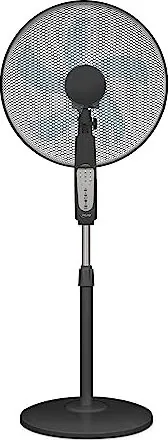
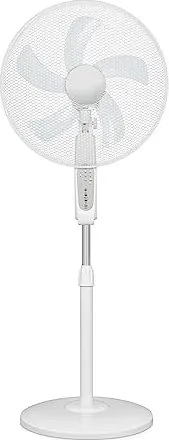
- Available in black or white with a tall freestanding design and protective grilles.
Disadvantages

- Requires a 2.4 GHz WiFi network; 5 GHz-only networks are not supported.
- The 50 watt power draw may be higher than some compact low-energy fan alternatives.
- Timer choices are limited to one, two, three, or four hours.
- Designed for indoor use only and must be kept away from water.
- Initial assembly and WiFi pairing require several setup steps.
Product Specification
Operating mode
Mains operation (50 W)
Speed settings
3
Blade diameter
13.78 in
Oscillation range
80 degrees horizontal oscillation (switchable off)
Tilt angle
60 degrees adjustable
Special features
Night mode, automatic shutoff after 4 h (adjustable), height adjustable (42.52-51.97 in)
Smart home
App control (Wi-Fi), voice assistant (Amazon Alexa, Google Assistant)
Noise level
57 dB(A)
Product Description
InLine 40160 Smart Home - Read, Download & Print Free
The InLine 40160 Smart Home standing fan brings connected comfort to everyday indoor cooling. Designed for homes, offices, bedrooms, and living areas, this practical fan combines a slim floor-standing format with straightforward local controls and WiFi-based operation through the Smart Life app. Available in black or white, it is an easy fit for many modern interiors while providing a focused airflow when temperatures rise.
Smart cooling with simple control
The fan can be operated directly from its onboard buttons or remotely after it is connected to a 2.4 GHz WiFi network. Using the Smart Life app, users can switch the fan on or off, select one of three speed levels, enable oscillation, choose normal or sleep operation, and set timed shutoff. This flexibility is useful when relaxing on the sofa, working at a desk, or preparing a bedroom before sleep.
Compatibility with Amazon Alexa and Google Home adds voice-control convenience to the experience. The app also supports device naming, room assignment, sharing access with other users, grouping compatible products, and creating schedules or automation scenarios. These options make the InLine 40160 Smart Home fan a useful addition to an existing smart-home routine.
Built for everyday placement
With dimensions of approximately 265 x 430 x 1320 mm and a weight of about 4.8 kg, the fan has a substantial freestanding design. Its telescopic structure, protective front and rear grilles, and stable base support practical use in indoor spaces. The unit delivers airflow of less than 3,200 m3/h while consuming 50 watts of power.
Three speed settings allow quick adjustment from gentle circulation to stronger cooling. Automatic oscillation helps distribute air across a wider area. For quieter evening use, sleep mode lowers the speed by one level after 30 minutes and then maintains level 1. A selectable timer offers automatic shutoff after one, two, three, or four hours.
Setup and care notes
For reliable setup, connect the fan to a 2.4 GHz WiFi network using IEEE 802.11b/g/n. Automatic scanning is available in the app, while Access Point mode provides an alternative connection method if needed. Positioning the fan near the router during setup can help ensure a stronger signal.
Note: Use the fan indoors only on a firm, level surface. Keep it away from water, children, pets, and objects that could obstruct the grille. Switch off and unplug the unit before cleaning it with a damp cloth, then dry it thoroughly.
Search for 67,706 Manuals online


Type-in Brand or Model