
InLine PURE Air TWS 55356T Manual
PDF manual · 10 Pages
English



Quick check
Incorrect answer, please try again.
Chat with your InLine PURE Air TWS 55356T manual using AI
Get instant AI answers from your InLine PURE Air TWS 55356T manual
Ask anything about the InLine PURE Air TWS 55356T. Answers come from this manual, with the pages they are based on.
Ask a Question
Do you recommend PURE Air TWS 55356T?
Yes NoFrequently Asked Questions
Each earbud provides about 10 hours of playback at moderate volume. The charging case has a 2,500 mAh battery and can recharge the earbuds up to eight times, extending total available playback significantly between case charges.
Is this answer helpful?
Charge the case via the micro-USB port or place it on a Qi-compatible wireless charger. Earbuds charge when placed into the case. Full case charging takes around 5 hours; earbuds charge in about 1.5 hours.
Is this answer helpful?
The earbuds use Bluetooth 5.0 with an Airoha AB1532 chipset and support common profiles such as A2DP, AVRCP and HFP for media playback, remote control and hands-free calls. TWS enables true left/right stereo when both earbuds are paired.
Is this answer helpful?
Open the charging case to enter pairing mode (LEDs flash and a voice prompt says "pairing"). Select "InLine® PURE Air TWS" in your device's Bluetooth menu. Once paired, devices typically reconnect automatically when the case is opened.
Is this answer helpful?
Ensure both earbuds and the source device are powered on and paired. Check volume settings on both devices. Reduce interference by moving closer and removing obstacles. If problems persist, verify Bluetooth profile compatibility and reset or re-pair the earbuds.
Is this answer helpful?
Yes. You can use a single earbud while placing the other in the charging case. The unused earbud will enter standby automatically while the active earbud continues playback and call functions.
Is this answer helpful?
The earbuds have an IPX6 rating, offering protection against heavy splashes and sweat, making them suitable for most workouts. Avoid full submersion and do not expose the charging case to moisture.
Is this answer helpful?
Advantages and Disadvantages
Advantages

- Long total runtime: earbuds ~10 hours, case provides ~8 full recharges (2,500 mAh).
- Qi-compatible charging case that also works as a USB-A powerbank.
- Lightweight earbuds (≈5 g each) with IPX6 splash resistance for active use.
- Bluetooth 5.0 and TWS support for stable stereo pairing and improved range.
- On-ear multifunction controls for playback, calls and voice assistant access.
Disadvantages

- Charging case uses micro-USB (non-USB-C) which is less future-proof.
- 10 m range is modest; obstacles and interference can reduce performance.
- No advanced active noise cancellation—may affect use in noisy environments.
- Users with pacemakers should exercise caution due to Bluetooth emissions.
- Charging case recharge time (~5 hours) may be long for some users.
Product Specification
Design
Earbuds (In-Ear)
Form Factor
True Wireless, without ear hooks
Microphone
integrated
Wireless
Bluetooth
Controls
1-button remote control
Battery
USB Micro-B charging port, charging case (2,500mAh, power bank), wireless charging (Qi)
Device features
water-resistant (IPX6)
Color
black
Product Description
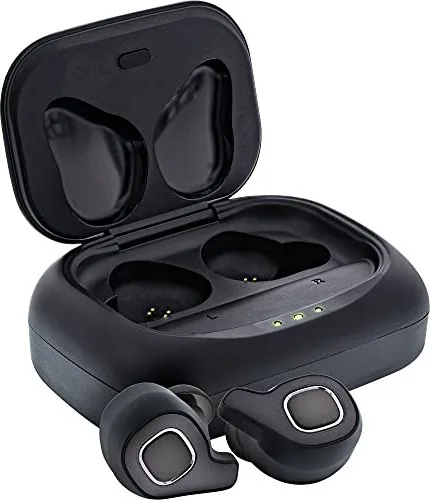
InLine PURE Air TWS — Lightweight True Wireless Earbuds with Qi PowerBank
The InLine PURE Air TWS are compact true wireless in-ear headphones designed for users seeking portable sound, reliable Bluetooth connectivity and convenient charging on the go. The earbuds pair automatically when removed from their Qi-compatible charging case, delivering stereo audio via Bluetooth 5.0 and an Airoha AB1532 chipset. Each earbud is lightweight, IPX6-rated for water resistance, and houses an 85 mAh battery that offers roughly 10 hours of playback at moderate volume. The charging case contains a 2,500 mAh Li‑Po battery, able to recharge the earbuds up to eight times and function as a USB-A powerbank for other devices.
Ergonomics and controls are biased toward simple one-handed operation: multifunction buttons on both earbuds control play/pause, volume (double press), track skip (3-second press on left or right), call handling and voice assistant activation (triple press). Integrated microphones enable hands-free calls. The earbuds support common Bluetooth profiles including A2DP, AVRCP and HFP to ensure media control and call compatibility across many smartphones and tablets.
Charging and connectivity are straightforward. The case charges via micro-USB or wirelessly on Qi chargers. LED indicators show charging status for both case and earbuds. For initial use, charge the case fully (about 5 hours) and the earbuds (about 1.5 hours). Range is typically up to 10 meters in unobstructed environments. TWS (True Wireless Stereo) technology ensures independent left/right channels when using both earbuds; single-ear operation is supported by returning the unused bud to the case.
Practical safety notes include volume moderation to protect hearing, avoiding use in situations requiring full situational awareness (e.g., active road traffic), and caution for users with pacemakers due to Bluetooth emissions. Maintenance is simple: clean the earbuds with a dry, soft cloth and avoid exposing the case or earbuds to excessive heat, moisture inside the case, or strong shocks.
Overall, InLine PURE Air TWS aim to combine long runtime, wireless charging convenience and essential hands-free features in a lightweight package suitable for daily use, commutes and casual sport thanks to IPX6 splash resistance.
Notes
- Qi-compatible wireless charging for the case adds convenience for users with wireless chargers.
- Replacement ear tips (S/M/L) and spare sets are available via the manufacturer or retailers.
- The product manual contains troubleshooting tips for pairing, charging and audio issues.
Search for 67,706 Manuals online


Type-in Brand or Model
Thekla Keil
8 months ago
I prefer firmer ear tips than the soft ones included. Are the earbuds supplied with different interchangeable tips, and can I swap them for a better fit?
Manual.ly
8 months ago
Yes. The earbuds come with multiple interchangeable ear tips (different sizes/types) so you can choose the firmness and fit that works best for your ears. We recommend trying several pairs to find the one that creates a tight seal, since that directly affects comfort and sound quality. If you still do not like the feel of the included soft tips, you can simply use the other included tip sets. Make sure the tips are seated firmly in the correct orientation and that the fit is stable during movement (sport, housework, calls).