
InLine Master/Slave 16646A Manual
PDF manual · 2 Pages
English



Quick check
Incorrect answer, please try again.
Chat with your InLine Master/Slave 16646A manual using AI
Get instant AI answers from your InLine Master/Slave 16646A manual
Ask anything about the InLine Master/Slave 16646A. Answers come from this manual, with the pages they are based on.
Ask a Question
Do you recommend Master/Slave 16646A?
Yes NoFrequently Asked Questions
It is designed to power multiple devices from one strip while letting a main device control connected peripherals automatically. This is especially useful for desktop setups with a PC and accessories.
Is this answer helpful?
You connect the primary device to the master socket and the other devices to the slave sockets. When the master turns on, the slave outlets receive power; when it turns off, they switch off as well.
Is this answer helpful?
Yes. It includes surge protection, which helps reduce the risk of damage from voltage spikes. Indicator lights show whether protection and slave output are active.
Is this answer helpful?
Yes, it is a strong fit for a home office. It can link a computer with a monitor, printer, scanner, and other desk devices, helping keep the workspace neater and easier to manage.
Is this answer helpful?
Make sure it is connected to a proper 230V household supply, that the master device is set up correctly, and that the total connected load stays within the rated power limits.
Is this answer helpful?
It should be used only in dry indoor areas. It is not intended for damp environments or for use near conditions that could damage the strip or its labeling.
Is this answer helpful?
Advantages and Disadvantages
Advantages

- Master/slave control can switch peripherals on and off automatically with the main device.
- Eight outlets provide flexible connectivity for PCs, monitors, and office accessories.
- Surge protection helps shield connected electronics from unexpected voltage spikes.
- Child protection and a built-in switch add safety and convenience for everyday use.
Disadvantages

- Master/slave sensitivity may need manual adjustment during setup.
- The strip is intended for dry indoor use only, so placement is limited.
- Total load must stay within the rated maximum, which can restrict heavy setups.
- Devices powered through USB standby may not switch off exactly with the master.
Product Specification
Outputs
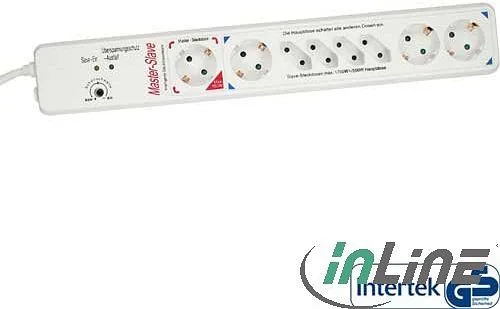
3x Schuko, 4x Europlug
Input voltage
230V
Power
1700W (max.)
Material
Plastic
Cable length
59.06 in
Special features
45-degree arrangement
Product Description
InLine Power Strip, 8-way, with Child Protection and Master/Slave Control
The InLine 8-way power strip is made for people who want a cleaner, smarter way to power a home office, gaming setup, or multimedia desk. With its white finish, 1.5 m cable, integrated switch, and child protection, it combines practical everyday use with a safety-focused design that fits neatly into modern interiors.
What makes this model especially useful is its master/slave function. One main device, such as a PC, can act as the master, while connected accessories like a monitor, printer, scanner, speakers, or external drives can be assigned as slave devices. When the master turns on, the supported peripherals follow automatically. When the master turns off, the strip helps shut the system down in one step. That simple behavior can reduce wasted standby power and keeps a desk setup more organized.
The strip offers a total of eight outlets in a mixed layout, making it flexible for both standard plugs and smaller euro-style connectors. Its surge protection adds an extra layer of confidence by helping defend connected devices against voltage spikes. For users who rely on sensitive electronics, that protection is one of the most valuable parts of the design. The indicator lights also make operation easy to read at a glance, so you can quickly see whether protection is active and whether the slave outputs are engaged.
Setup is straightforward, but the master/slave threshold may need a small adjustment to match the power draw of your main device. Once configured correctly, the strip works as a quiet helper in the background, especially for workstation environments where several devices should power up together. It is a good fit for users who value convenience, energy awareness, and a tidier cable routine.
Although it is compact in concept, the product is built for serious daily use. The 1.5 m lead offers enough reach for most desks, and the overall layout keeps the strip easy to position near a computer or entertainment center. As long as the total connected load stays within the recommended limits, it can serve as a dependable central power point for a busy setup.
Notes
- Best suited for dry indoor spaces.
- Keep the total power load within the stated limits.
- Child protection and surge protection make it a stronger everyday choice for shared spaces.
Search for 67,706 Manuals online


Type-in Brand or Model
Gotthard Stahl
9 months ago
How reliable is the Master/Slave power function, and is the German labeling on the outlet strip prone to smearing or rubbing off when touched?
Manual.ly
9 months ago
The Master/Slave function should work reliably once set up: use the sensitivity knob to match your device (a bit of trial and error is normal) until the controlled outlets switch as expected. If the strip arrived with German labeling that feels like it smears, note that some labeling is stamped/printed and can mark if you touch it immediately with bare fingers. You can gently wipe the area with a dry, soft cloth and avoid rubbing directly on the print. In most cases the device performance is unaffected by the label finish. If the smearing is extreme, keep the packaging and contact support with your order details so we can help.