
InLine BT woodin-ear 55360 Manual
PDF manual · 18 Pages
English



Quick check
Incorrect answer, please try again.
Chat with your InLine BT woodin-ear 55360 manual using AI
Get instant AI answers from your InLine BT woodin-ear 55360 manual
Ask anything about the InLine BT woodin-ear 55360. Answers come from this manual, with the pages they are based on.
Ask a Question
Do you recommend BT woodin-ear 55360?
Yes NoFrequently Asked Questions
Press and hold the center multifunction button for about 5 seconds until you hear the pairing tone and the LED flashes red/blue. Open Bluetooth settings on your device, select "InLine woodin-ear" and enter PIN "0000" if prompted. A short tone and a slow blue LED indicate a successful connection.
Is this answer helpful?
The built‑in lithium‑polymer battery provides up to approximately 4.5 hours of playback and up to 300 hours standby. Charging takes about 1.5 hours using the supplied Micro‑USB cable with a USB power source that can deliver at least 5V/500mA; LED shows red while charging and turns blue when fully charged.
Is this answer helpful?
The headset supports Bluetooth 4.1 profiles A2DP v1.2 (audio streaming), AVRCP v1.4 (remote control), HFP v1.6 and HSP v1.2 (hands‑free telephony). Under ideal conditions the wireless range is up to about 10 meters; obstacles or interference in the 2.4 GHz band can reduce range and audio quality.
Is this answer helpful?
To accept a call press the multifunction button briefly. To reject an incoming call press and hold the multifunction button until a two‑tone confirmation then release. To redial the last number press the multifunction button twice quickly.
Is this answer helpful?
Ensure the headset and your playback device have Bluetooth enabled and adequate battery charge. If pairing fails, switch the headset off and on and retry pairing. For audio issues check volume settings on both devices, confirm correct Bluetooth profile support, and remove obstacles or nearby interfering devices in the 2.4 GHz band.
Is this answer helpful?
No. The headset is switched off during charging and cannot be used until charging is complete and the LED indicates a full charge (blue).
Is this answer helpful?
Clean the headset with a dry, soft cloth; never use water or liquids. For disposal, do not throw the device or batteries in household waste—return them to public electronic waste collection points or the retailer for proper recycling in accordance with local regulations.
Is this answer helpful?
Advantages and Disadvantages
Advantages

- Natural walnut housing gives a premium aesthetic and lightweight feel.
- Bluetooth 4.1 with A2DP, AVRCP, HFP and HSP supports music and hands‑free calling.
- Three ear pad sizes and a linen pouch included for fit and portability.
- Compact 8mm drivers cover 20–20,000 Hz for balanced everyday playback.
- Quick pairing and inline controls for play/pause, track skip and call handling.
Disadvantages

- Battery life ~4.5 hours may be short for extended travel or long usage days.
- Limited Bluetooth range (~10 m) can be affected by obstacles and interference.
- No active noise cancellation; awareness of surroundings can still be limited.
- Inline controls rely on device profile support; some functions may not work on all phones.
- Charging via Micro‑USB (older connector) rather than modern USB‑C standard.
Product Specification
Type
Earphones (In-Ear)
Form Factor
hookless, neckband
Microphone
Cable Microphone
Wireless
Bluetooth 4.1
Controls
3-Button Remote Control
Operating Time
4.5h, 300h (Standby)
Battery
USB Micro-B Charging Port
Frequency Range
20Hz-20kHz
Impedance
16Ω
Driver
0.31 in
Color
brown
Weight
0.46 oz
Product Description
InLine BT woodin-ear — Walnut Bluetooth In‑Ear Headset
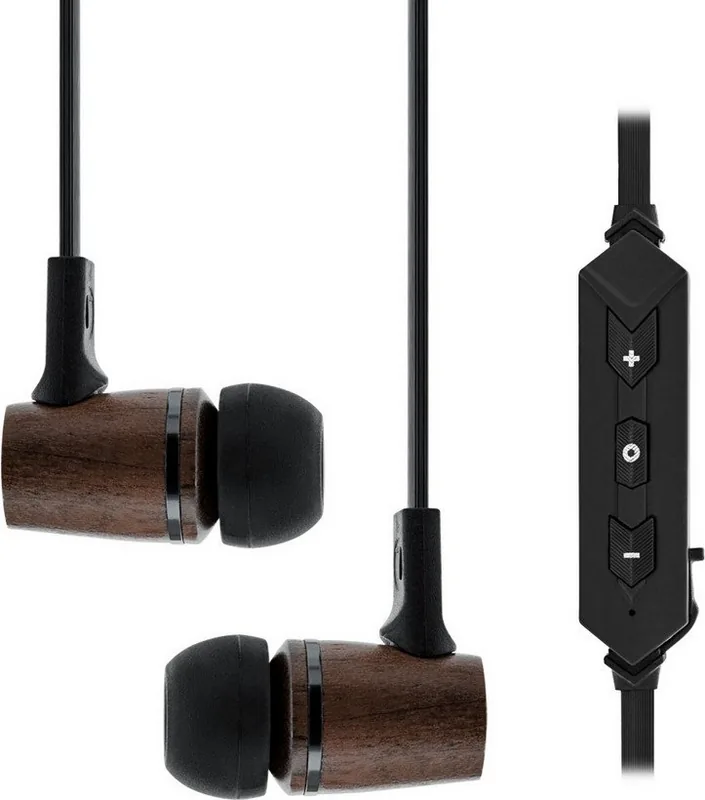
The InLine BT woodin-ear blends natural walnut aesthetics with compact Bluetooth 4.1 functionality, delivering a lightweight in‑ear headset designed for everyday listening and hands‑free calls. With an integrated inline control panel and cable microphone, it offers simple call and media management without fumbling for your phone. Three sizes of soft ear pads and a linen storage pouch are included to ensure a comfortable fit and safe transport.
Compact and practical, the headset supports A2DP, AVRCP, HFP and HSP profiles for music streaming and telephony. Its 8 mm drivers reproduce frequencies from 20 Hz to 20 kHz, with a rated sensitivity and a maximum sound pressure level suitable for typical mobile use. Bluetooth range reaches up to 10 m under ideal conditions, and the rechargeable lithium‑polymer battery provides around 4.5 hours of playback with a roughly 1.5‑hour charge time via the supplied Micro‑USB cable.
Pairing is straightforward: hold the multifunction button to enter pairing mode, select "InLine woodin-ear" from your device’s Bluetooth menu (PIN 0000 if requested), and use the inline buttons to play/pause, skip tracks, adjust volume, answer or decline calls. The headset indicates status through LED colors (red for charging/low battery, blue for charged/connected) and brief audio prompts.
Safety and proper use are emphasized: avoid loud volumes for extended periods, do not use the headset where auditory awareness is essential (e.g., traffic), protect it from moisture, heat and shocks, and do not attempt self‑repair. Users with implanted medical devices should exercise caution due to wireless emissions. For non‑German markets, check local radio frequency regulations before use.
Maintenance is minimal—clean with a dry soft cloth and swap ear pads for hygiene and fit. At end of life, return the headset and battery to appropriate electronic waste collection points rather than disposing of them with household trash.
Notes
- Included accessories: Micro‑USB cable (≈0.35 m), three ear pad sizes (S/M/L), linen pouch.
- LED and audio cues indicate charging, pairing and low battery.
- Recommended USB supply: ≥5V/500mA; charging time may vary with power source.
- Some phone functions depend on the mobile device’s Bluetooth profile support.
Search for 67,706 Manuals online


Type-in Brand or Model