
InLine BNC/RJ11/RJ45 79998 Manual
PDF manual · 8 Pages
English



Quick check
Incorrect answer, please try again.
Chat with your InLine BNC/RJ11/RJ45 79998 manual using AI
Get instant AI answers from your InLine BNC/RJ11/RJ45 79998 manual
Ask anything about the InLine BNC/RJ11/RJ45 79998. Answers come from this manual, with the pages they are based on.
Ask a Question
Do you recommend BNC/RJ11/RJ45 79998?
Yes NoFrequently Asked Questions
The InLine Cable Tester for BNC/RJ-11/RJ-45 Manual supports 10Base-T, 10Base-2, RJ-45, RJ-11, TIA-568A, TIA-568B, and Token Ring configurations. It comes with BNC adapter cables for coaxial testing.
Is this answer helpful?
Yes, the kit includes a remote terminator that allows you to test installed cables from wall jacks or patch panels. This feature helps you verify long-distance runs from a single location.
Is this answer helpful?
No, you must never use this tester on live circuits. Operating the tester on powered cables may damage the device and create safety hazards. Always ensure cables are powered down before testing.
Is this answer helpful?
The LED display shows pin configuration status. If the upper and lower LEDs light up together, the wiring is correct. If lights are missing or mismatched, it indicates an open, short, or miswire fault.
Is this answer helpful?
The item number for this InLine Network Cable Tester is 79998. This identifier helps you locate the specific manual and kit contents in inventory systems.
Is this answer helpful?
Advantages and Disadvantages
Advantages

- Supports multiple cable types including BNC, RJ-11, and RJ-45
- Includes remote unit for testing long distances and wall jacks
- Provides both manual and automatic scanning modes for flexibility
- LED displays clearly indicate continuity, shorts, and miswire faults
- Simple operation saves valuable time during network installation and maintenance
Disadvantages

- Cannot be used on live circuits as it may damage the device
- Batteries may drain if left inside during long periods of non-use
- Requires specific battery replacement type for proper operation
- Only supports wired connections and cannot test wireless infrastructure
- Limited diagnostic detail beyond basic pin configuration and faults
Product Description
Introduction to the InLine Cable Tester
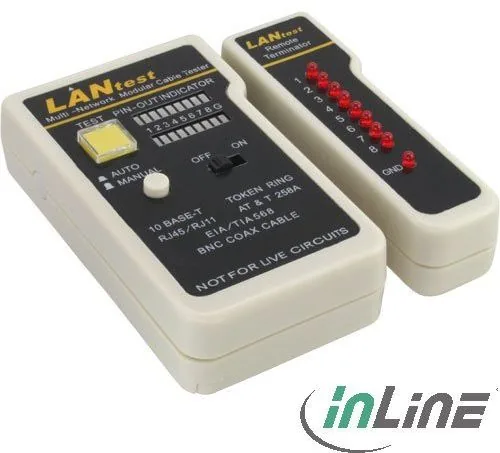
The InLine Cable Tester for BNC/RJ-11/RJ-45 Manual is an essential tool for network technicians and installers worldwide. It helps verify pin configurations for various cable types efficiently. If you install networks or maintain servers, this kit is vital for ensuring connectivity and reliability. The manual item number 79998 identifies this specific kit reliably for inventory purposes. It simplifies finding continuity issues quickly during deployment and maintenance phases effectively.
Versatile Testing Capabilities
This device handles 10Base-T and 10Base-2 standards effectively for different network speeds and architectures. It also supports TIA-568A and 568B wiring standards globally for consistent performance. You can test Token Ring configurations too with ease. The tester-kit tests the correct pin configuration of 10BaseT and 10Base-2 network cabling. It works with RJ-45 and RJ-11 modular connectors as well as BNC adapters. Troubleshooting becomes straightforward with the bright LED indicators. Miswires, shorts, and opens show up immediately on the LEDs for quick diagnosis. This saves valuable time in a busy environment significantly for professionals.
Remote Testing Features
The kit includes a remote unit for distant testing purposes effectively over long runs. You can check cables from wall jacks easily without carrying the main unit across the room. Patch panels are also easy to test remotely while staying near the source. This saves significant time during installation projects across large buildings or campuses. Distance testing is a key benefit for large builds and data centers where length matters.
Manual and Automatic Modes
Users can switch between modes using a simple switch on the side of the unit. The auto mode scans pins sequentially for results automatically and quickly. The manual mode allows individual pin testing if the scan is too fast to read accurately. LED displays show clear results for faults instantly without ambiguity for everyone. Open wires and shorts are indicated visually on the display clearly for all users. Reading the status is simple with bright LEDs that are easy to see even in dim light.
Safety and Maintenance
Do not use this tester on live circuits ever under any circumstances to avoid harm. Damage may occur to the device if powered incorrectly while testing. Remove batteries if not using the unit for long periods to preserve life and health. This preserves battery life for future use and prevents leaks inside the compartment. Proper maintenance ensures years of service for your equipment in good condition.
Conclusion
This network tester is valuable for troubleshooting wires regularly in a rack or office. It reduces time spent on wire management significantly for professionals and hobbyists. Ensure cables are powered down before testing always to protect the unit from voltage. This tool ensures reliable connectivity for your infrastructure consistently over time. Get the Item No. 79998 today to start testing your cables accurately.
Search for 67,706 Manuals online


Type-in Brand or Model