
InLine Aluminium 55378B Manual
PDF manual · 8 Pages
English



Quick check
Incorrect answer, please try again.
Chat with your InLine Aluminium 55378B manual using AI
Get instant AI answers from your InLine Aluminium 55378B manual
Ask anything about the InLine Aluminium 55378B. Answers come from this manual, with the pages they are based on.
Ask a Question
Do you recommend Aluminium 55378B?
Yes NoVideo Manual
Universal Mini Foldable Wireless Keyboard with Touchpad 🔔✅ Product Link in Bio ( # 1978 )
Frequently Asked Questions
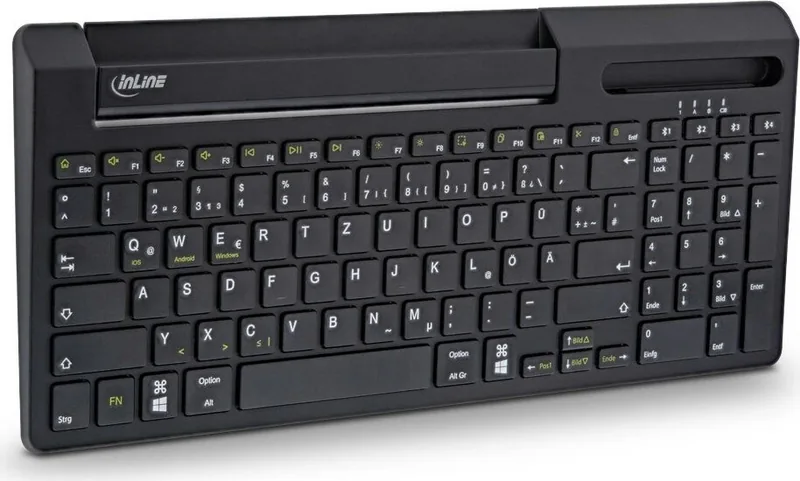
The keyboard is compatible with Windows, macOS, Android and iOS/iPadOS. OS-specific functions can be activated with FN + Q (iOS), FN + W (Android) or FN + E (Windows) after pairing.
Is this answer helpful?
You can pair up to four Bluetooth devices. Hold one of the four Bluetooth keys for ~3 seconds to enter pairing mode for that channel; to switch, briefly press the Bluetooth key assigned to the paired device.
Is this answer helpful?
The built-in 180 mAh lithium battery provides approximately 70 hours of typical use and charges in about 1.5 hours via the Micro-USB port. LEDs indicate charging status (green while charging, off when full; red when battery is low).
Is this answer helpful?
Turn the keyboard on, press and hold a Bluetooth channel key for about 3 seconds to enter pairing mode, then select "InLine Bluetooth Keyboard" in your device’s Bluetooth settings. Enter the numeric code shown on the device and press Enter to complete pairing.
Is this answer helpful?
Clean the keyboard with a dry, soft (velvety) cloth. Do not use water or cleaning fluids that could damage electronics. Protect the keyboard from dust, moisture and extreme heat.
Is this answer helpful?
"1" lights blue when the number pad is active; "A" lights blue for Caps Lock. The Bluetooth LED lights briefly when powered on, flashes during pairing, and lights briefly when selecting a paired device. Battery LED: red for low, green while charging.
Is this answer helpful?
No. The keyboard is not user-serviceable. Do not disassemble it. For defects or missing components, contact the retailer or manufacturer. Improper handling may void warranties and pose safety risks.
Is this answer helpful?
Advantages and Disadvantages
Advantages

- Aluminum chassis offers a premium look and sturdy feel while remaining slim.
- Pair up to four devices and switch instantly using dedicated Bluetooth keys.
- Full numeric keypad with German QWERTZ layout suits office and data-entry tasks.
- Long battery life (~70 hours) with quick recharge (~1.5 hours) via Micro-USB.
- Multimedia and OS-specific FN shortcuts increase productivity across platforms.
Disadvantages

- 180 mAh battery may require frequent charging under heavy continuous use.
- Micro-USB charging is less modern than USB-C for future-proofing.
- Not suitable for outdoor use and should be kept away from moisture and dust.
- Fixed German layout (QWERTZ) limits usability for non-German typists.
- Keyboard is not user-serviceable; do not disassemble or attempt repairs.
Product Specification
Layout
DE
Type
Rubber Dome
Lighting
N/A
Keycap Level
regular, with frame, Chiclet
Keycap Format
flat
Keycap Dome
straight
Numeric Keypad
Standard
Cursor Block
offset
Control Keys
N/A
Enter Key
shortened
Delete Key
Standard
Status Indicator
N/A
Palm Rest
N/A
Housing
Metal
Connection
wireless (Bluetooth)
Power Supply
Battery
Dimensions (WxHxD)
14.57x0.67x6.30in
Weight
1.83 lbs
Special Features
Bluetooth connections switchable by button (4 devices), FN key
Product Description
InLine Bluetooth aluminium keyboard with numeric keypad black, Bluetooth, DE
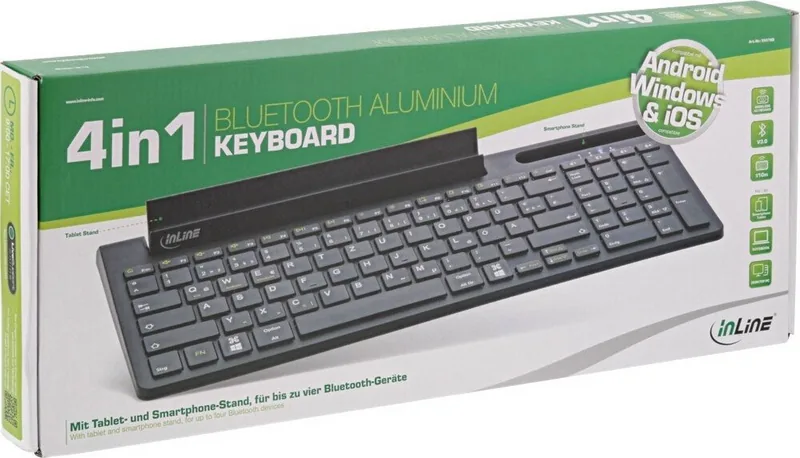
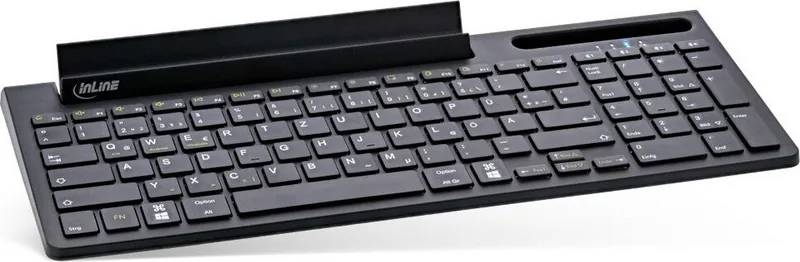
The InLine Bluetooth aluminium keyboard with numeric keypad (DE) is a sleek, multi-device wireless keyboard designed for everyday productivity. Housed in a slender aluminum frame and finished in black, this keyboard balances style with function. It supports up to four Bluetooth devices and lets you switch between them instantly using dedicated Bluetooth channel keys. A full numeric keypad and a German QWERTZ layout make it ideal for office work, spreadsheets and extended typing sessions.
Built for cross-platform compatibility, the keyboard works with Windows, macOS, Android and iOS/iPadOS devices. Function keys and FN combinations provide quick access to multimedia controls, brightness, copy/paste and OS-specific shortcuts. The keyboard is powered by a built-in 180 mAh lithium battery offering roughly 70 hours of operation from a short 1.5-hour charge via Micro-USB. Status LEDs show Bluetooth pairing, battery charge and Num/Caps lock states for clear feedback.
Setup is straightforward: slide the power switch to turn on, press and hold one of the four Bluetooth keys to enter pairing mode, then select "InLine Bluetooth Keyboard" in your device’s Bluetooth settings. After pairing, enter the numeric code shown on the host device and press Enter to complete pairing. OS-specific modes (iOS, Android, Windows) are selectable using FN+Q/W/E.
Maintenance is simple—clean with a dry, soft cloth and avoid liquids. The keyboard is intended for indoor use only; do not disassemble. Built-in safeguards and warnings are provided to prevent misuse, and the product complies with typical radio frequency allocations (2400–2483.5 MHz) for Bluetooth/WLAN devices. Dispose of the keyboard and its battery at appropriate electronic waste collection points when it reaches end of life.
Notes
- Compact aluminum build with full numeric keypad and German QWERTZ layout.
- Supports pairing with up to four devices and quick switching via dedicated keys.
- Rechargeable battery with ~70 hours runtime; charges via Micro-USB in ~1.5 hours.
- Avoid exposure to heat, dust and moisture; keep away from children due to small parts.
Search for 67,706 Manuals online


Type-in Brand or Model