

InLine 4x4 MultiView HDMI Matrix 57830I Manual
PDF manual · 30 Pages
English



Quick check
Incorrect answer, please try again.
Chat with your InLine 4x4 MultiView HDMI Matrix 57830I manual using AI
Get instant AI answers from your InLine 4x4 MultiView HDMI Matrix 57830I manual
Ask anything about the InLine 4x4 MultiView HDMI Matrix 57830I. Answers come from this manual, with the pages they are based on.
Ask a Question
Do you recommend 4x4 MultiView HDMI Matrix 57830I?
Yes NoFrequently Asked Questions
The device supports six modes: Matrix, Picture-in-Picture (PIP), Windows, Video Wall, PAP, and Quadview. Each mode allows different arrangements of the four input sources across the four output displays.
Is this answer helpful?
No, this specific model is designed for a 4x4 configuration, meaning it handles exactly four inputs and four outputs. It cannot drive more than four displays simultaneously.
Is this answer helpful?
It supports Full HD up to 1920x1200 per channel. When combining multiple channels, the total system resolution can reach 4K x 2K, but individual inputs are limited to Full HD.
Is this answer helpful?
Turn off the unit, hold the SET button while turning it back on until the LED blinks, then connect a USB cable to the Type B port on the rear panel to initiate the automatic update.
Is this answer helpful?
Yes, you can use the RS-232 port to send commands from a computer or controller to switch modes, change inputs, or adjust settings automatically.
Is this answer helpful?
The package includes the 57830I unit, a power adapter, user manual, IR extender, and an RS-232 cable. Monitors and keyboards are not included.
Is this answer helpful?
Advantages and Disadvantages
Advantages

- Supports six distinct viewing modes including Matrix, PIP, Windows, Video Wall, PAP, and Quadview
- No delay or black screen during mode switching or scaling operations
- Capable of Full HD 1920x1200 resolution with combined 4Kx2K output potential
- Offers eight programmable memory slots for saving custom configurations
- Multiple control methods including front panel, IR remote, keyboard, and RS-232
Disadvantages

- Firmware updates require specific button sequences and a USB connection
- RS-232 configuration requires external terminal software like Hyper Terminal
- Video wall performance may vary depending on monitor orientation and lighting
- IR extender cable is required for extended remote control range
- Manual setup for EDID configuration can be complex for novice users
Product Specification
Video Inputs
4x HDMI In
Video Outputs
4x HDMI Out
Resolutions up to
1920x1080
Product Description
Transform Your Visual Experience with the InLine HDMI 4x4 Multi View Matrix Videowand Switch
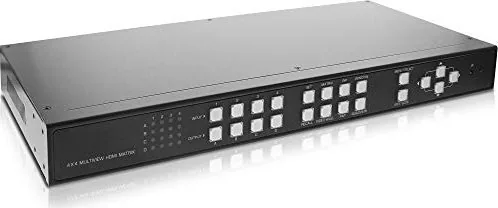
The InLine HDMI 4x4 Multi View Matrix Videowand Switch is a powerhouse for modern video management, designed to seamlessly handle four distinct HDMI input sources and distribute them across four separate output displays. This device stands out as a fully independent system that allows users to dynamically switch between six unique viewing modes without any lag or black screen interruptions. Whether you are managing a control room, a broadcast studio, or a large conference center, this matrix offers the flexibility needed to adapt to any visual requirement instantly.
One of the standout features of this unit is its ability to scale each source independently while maintaining Full HD resolution up to 1920 x 1200. The combined output can reach impressive 4K x 2K totals when multiple screens are utilized together. Users appreciate the intuitive control options, which include front panel buttons, an on-screen display menu controlled by a mouse, keyboard hotkeys, an infrared remote, and RS-232 serial commands for automation. The sturdy metal chassis is built for rack mounting in a standard 1U space, ensuring durability in demanding environments.
The versatility of the switch lies in its six operating modes. The Matrix mode allows individual routing of inputs to outputs. PIP (Picture-in-Picture) lets you view a main image with a smaller subordinate window. The Windows mode treats every source as a movable, resizable window on a desktop-like interface. The Video Wall mode stitches a single source across multiple screens in 2x2 or 1x3 layouts. PAP (Picture Above Picture) displays one main image alongside three smaller ones, and Quadview splits a single screen into four equal quadrants. With eight programmable memory slots, you can save your favorite configurations for quick recall.
Key Notes
- Supports locking HDMI cables to prevent accidental disconnection.
- Includes firmware update capability via USB Type B port.
- Compatible with both English and Chinese OSD languages.
- Features adjustable bezel correction for seamless video wall appearances.
Search for 67,706 Manuals online


Type-in Brand or Model