
InLine 33293I Manual
PDF manual · 2 Pages
English



Quick check
Incorrect answer, please try again.
Chat with your InLine 33293I manual using AI
Get instant AI answers from your InLine 33293I manual
Ask anything about the InLine 33293I. Answers come from this manual, with the pages they are based on.
Ask a Question
Do you recommend 33293I?
Yes NoFrequently Asked Questions
It can connect compatible USB 2.0 Type-A peripherals such as a mouse, keyboard, webcam, headset, USB flash drive, and similar accessories. It is also specified for hard drive connections up to 1 TB, subject to the drive's power requirements.
Is this answer helpful?
No. The hub is designed for Plug and Play operation. Connect its USB-A plug to a compatible computer port and it is automatically recognized and initialized without additional driver installation.
Is this answer helpful?
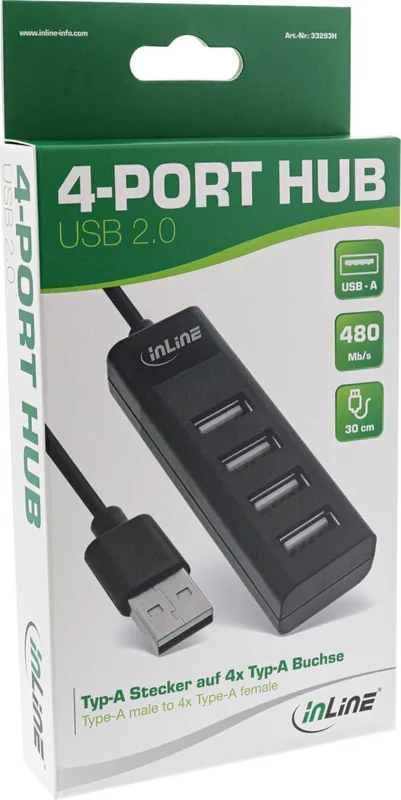
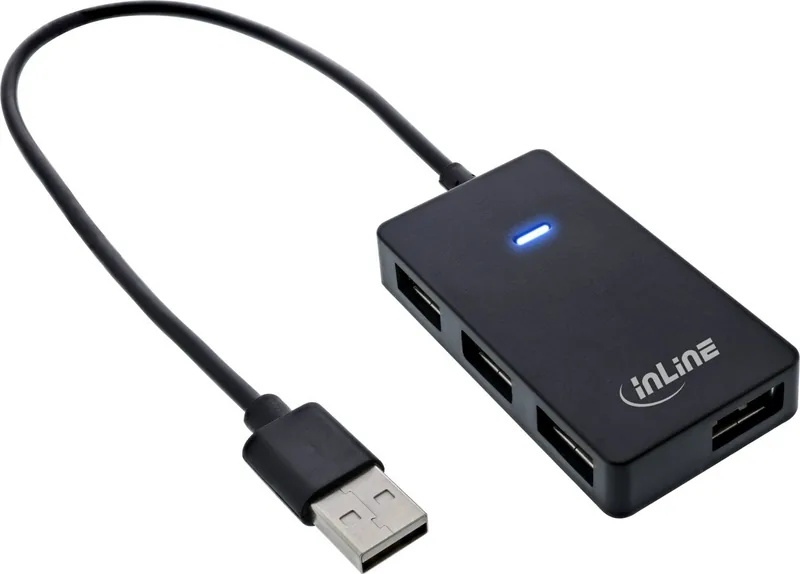
The hub provides four USB 2.0 Type-A female ports. It connects to the computer through one integrated USB Type-A male plug.
Is this answer helpful?
The specified maximum USB 2.0 transfer rate is 480 Mb/s. Actual performance can vary according to the computer, connected devices, cables, and the type of data being transferred.
Is this answer helpful?
The listed compatibility includes Windows Vista and later, plus Mac OS X version 10.8 and later. A free USB Type-A port is required on the host computer.
Is this answer helpful?
Yes. Each port supports hot swapping, allowing compatible USB devices to be connected or removed while the computer is running.
Is this answer helpful?
Use a dry, soft cloth for cleaning. Do not use water or liquid cleaners. Keep the hub indoors and protect it from excessive heat, dust, and moisture.
Is this answer helpful?
Advantages and Disadvantages
Advantages

- Adds four USB 2.0 Type-A ports from one USB-A host connection.
- Offers Plug and Play and hot-swap support for convenient peripheral changes.
- Provides up to 480 Mb/s transfer speed for everyday USB 2.0 devices.
- 30 cm integrated cable helps position ports in a more accessible location.
- Compatible with Windows Vista or later and Mac OS X 10.8 or later.
Disadvantages

- USB 2.0 speed is slower than modern USB 3.x alternatives.
- Maximum specified current is 500 mAh per port, limiting demanding peripherals.
- Designed for indoor use and should be protected from dust and moisture.
- Only Type-A USB connections are provided; USB-C devices require an adapter.
Product Specification
Type
USB hub
Form factor
1x external wired (connection cable not detachable)
Connection
1x USB-A 2.0 (plug via cable, 480 Mb/s, 11.81 in cable length)
Ports
4x USB-A 2.0 (socket)
Transfer
4x USB-A 2.0 (socket, 480 Mb/s)
Power supply
Power supplied via connection only
Case color
black
Compatibility
universal
USB notation
Link
Product Description
InLine USB 2.0 USB-Hub, USB-A 2.0 [Plug] - Read, Download & Print Free
The InLine USB 2.0 4-Port Hub is a practical desktop accessory designed to expand a single USB-A connection into four USB 2.0 Type-A ports. Its compact black plastic housing and integrated 30 cm cable make it a convenient choice for laptops, desktop PCs, and workstations where available USB ports are difficult to reach.
Four Ports for Everyday Devices
This hub supports common USB peripherals such as keyboards, mice, webcams, headsets, USB flash drives, and other compatible accessories. By bringing connections closer to the user, it can help create a tidier workspace and reduce the need to reach behind a computer case or under a desk.
Each of the four ports supports Plug and Play and hot swapping. Compatible devices can therefore be connected or removed while the computer is running, without requiring separate driver installation. The hub is automatically recognized through a USB Type-A port, making setup straightforward for everyday use.
USB 2.0 Performance
With USB 2.0 data transfer rates of up to 480 Mb/s, the InLine hub is suited to routine peripheral connections and standard data transfers. It supports hard drives with capacities of up to 1 TB, subject to the connected device's power needs. The specified maximum current is 500 mAh per port, so lower-power accessories are particularly well suited to this hub.
The product is compatible with Windows Vista and later as well as Mac OS X 10.8 and later. Its simple wired design avoids the need for external configuration and provides four accessible USB-A sockets from one host connection.
Compact Connection Expansion
Whether used for a home office, study area, or general computer setup, this four-port hub offers an easy way to organize USB accessories. The 30 cm cable provides useful flexibility for positioning the hub on a desk, while the black finish blends discreetly with many computers and peripherals.
Care Notes
Keep the hub away from excessive heat, dust, and moisture. It is intended for indoor use only and should not be disassembled. For cleaning, use a dry, soft cloth and avoid water or cleaning liquids that could damage the electronics. At the end of its service life, dispose of the hub through appropriate electronic waste collection channels.
Search for 67,706 Manuals online


Type-in Brand or Model