

InLine 3-in-1 55363 Manual
PDF manual · 2 Pages
English



Quick check
Incorrect answer, please try again.
Chat with your InLine 3-in-1 55363 manual using AI
Get instant AI answers from your InLine 3-in-1 55363 manual
Ask anything about the InLine 3-in-1 55363. Answers come from this manual, with the pages they are based on.
Ask a Question
Do you recommend 3-in-1 55363?
Yes NoFrequently Asked Questions
Press the mode button located on the bottom of the mouse. Each press cycles through the available connections: Bluetooth, USB-A receiver, and USB Type-C receiver. The LED indicator will change color to show the active mode.
Is this answer helpful?
No, the InLine 3in1 Mouse is plug-and-play. When using the 2.4GHz radio mode with the USB receivers, the connection establishes automatically without needing any additional software or drivers.
Is this answer helpful?
The mouse uses one AA alkaline battery. With automatic power saving modes activating after 10 seconds of idle time and full sleep after 30 minutes, the battery life is optimized for extended usage periods.
Is this answer helpful?
Yes, the mouse is compatible with mobile devices that support Bluetooth 4.0. You can pair it with tablets running supported operating systems for a larger screen experience.
Is this answer helpful?
The mouse will stop functioning immediately. Since it relies on a single AA battery, you must replace the battery to resume use. Ensure you keep spare batteries handy for uninterrupted workflow.
Is this answer helpful?
Use a dry, velvety cloth to wipe the surface. Do not use water or liquid cleaning fluids as they can damage the internal electronics and void the warranty.
Is this answer helpful?
Advantages and Disadvantages
Advantages

- Supports connection to three devices simultaneously via Bluetooth and dual USB receivers
- Features switchable DPI levels (1000/1600/2400) for customized cursor speed
- Compatible with Windows, macOS, and Linux operating systems without drivers
- Includes advanced power saving modes to extend battery life significantly
- Durable construction with 3 million click lifespan and ergonomic design
Disadvantages

- Requires separate USB receiver dongles which can be easily lost
- Not suitable for outdoor use due to lack of weather resistance
- Cannot be disassembled for user repairs or component replacement
- Battery type is not rechargeable, requiring periodic AA replacements
- Bluetooth support is limited to Windows 8/10 and macOS, excluding older OS versions
Product Specification
Suitability
right hand
Keys
6 (total), 2 (main), 1 (top), 2 (left), 1 (scroll wheel click)
Scroll Wheel
1x 2-way
Sensing
LED-red/IR
Resolution
2400dpi, reducible to 1600/1000dpi
Lighting
N/A
Connection
wireless (2.40GHz), USB-A, USB-C (USB-A receiver, USB-C receiver) or wireless (Bluetooth)
Power Supply
1x AA
Dimensions (WxDxH)
2.44x1.46x4.13in
Approximate Volume
3.85cu in (approximate shape)
Color
multicolor, gray/black
Product Description
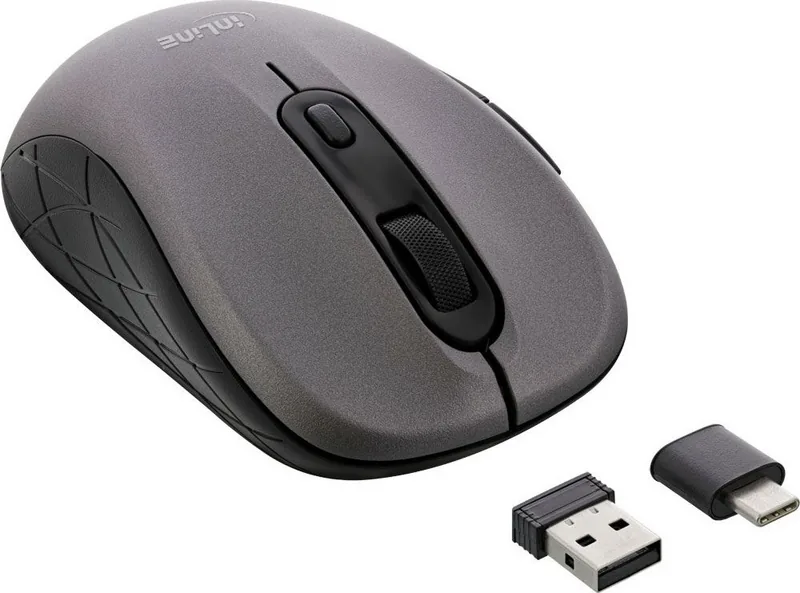
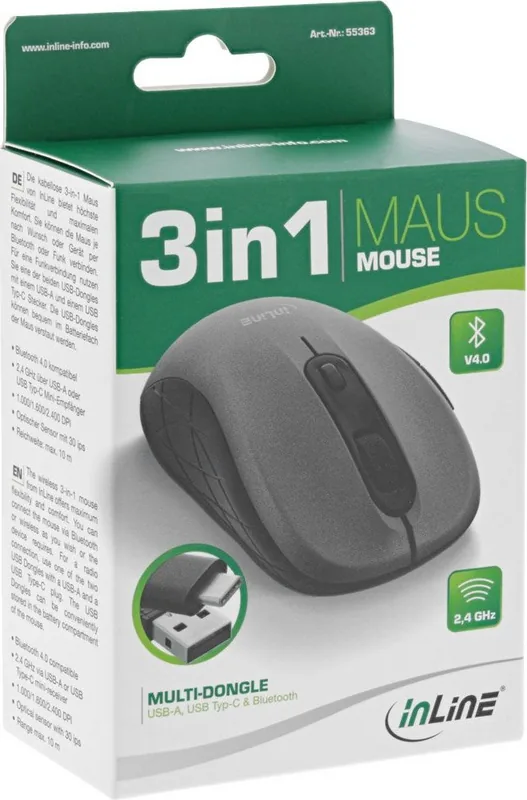
The Ultimate Versatility of the InLine Maus 3-in-1
The modern workspace demands flexibility, and the InLine Maus 3-in-1 in a sleek grey and black finish delivers exactly that. Designed for professionals who juggle multiple devices, this optical mouse bridges the gap between PC, Mac, and mobile tablets with effortless precision. Whether you are working on a Windows desktop, a Linux server, or a macOS laptop, this device adapts to your environment seamlessly.
Seamless Connectivity Options
One of the standout features of the InLine Maus 3-in-1 is its ability to connect up to three devices simultaneously through three distinct methods. You can switch instantly between Bluetooth 4.0 connections or utilize the included USB receivers for 2.4GHz wireless connectivity via both standard USB-A and modern USB Type-C ports. This tri-mode functionality ensures you never have to choose between compatibility and performance. The switching process is intuitive; a simple press of the mode button on the underside toggles between active connections, indicated by color-coded LED lights - blue for Bluetooth, red for USB-A, and green for USB Type-C.
Precision and Power Efficiency
For users who demand accuracy, the mouse offers adjustable DPI settings of 1000, 1600, and 2400, allowing you to tailor cursor speed to specific tasks like graphic design or general office work. The optical sensor supports a detection speed of 30 ips with a maximum acceleration of 10g, ensuring smooth tracking across various surfaces. Despite its robust feature set, power consumption remains low. The device runs on a single AA alkaline battery and includes an intelligent power-saving mode that enters sleep after 30 minutes of inactivity, extending battery life significantly. The keys are rated for 3 million clicks, promising durability for heavy daily use.
Practical Design and Safety
Constructed from durable ABS plastic and metal, the mouse balances comfort with longevity. It features practical navigation buttons including forward and back controls, making web browsing more efficient. However, it requires careful handling; exposure to extreme heat, moisture, or dust should be avoided, and the unit must not be disassembled. Proper disposal at electronic waste collection points is mandatory to comply with environmental regulations.
Important Usage Notes
- Do not use outdoors as the device is not weatherproof.
- Always ensure correct battery polarity when inserting the AA cell.
- Clean only with a dry, soft cloth to protect internal electronics.
Search for 67,706 Manuals online


Type-in Brand or Model