
Inateck RedComets U21 KU5211 Manual
PDF manual · 25 Pages
English



Quick check
Incorrect answer, please try again.
Chat with your Inateck RedComets U21 KU5211 manual using AI
Get instant AI answers from your Inateck RedComets U21 KU5211 manual
Ask anything about the Inateck RedComets U21 KU5211. Answers come from this manual, with the pages they are based on.
Ask a Question
Do you recommend RedComets U21 KU5211?
Yes NoFrequently Asked Questions
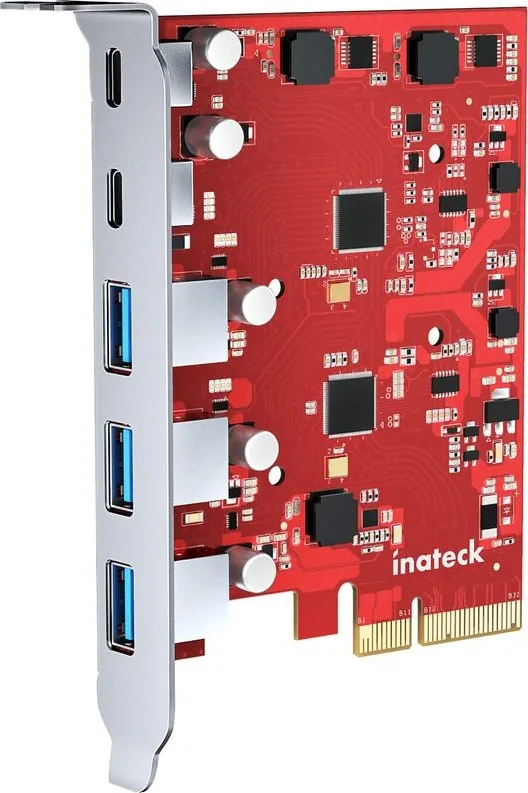
The card provides five USB 3.1 Gen 2 ports total: two USB-C (Type-C) ports and three USB-A ports, supporting up to 10 Gbps per interface under recommended conditions.
Is this answer helpful?
You need an available PCIe x4 slot or larger (PCIe 2.0 or above). The card uses a PCIe 2.0 x4 interface; it will work in x8 or x16 slots as well but requires the system to be powered off for installation.
Is this answer helpful?
Windows 8 and newer typically do not require additional drivers. For Windows 7 you must download and install the latest driver from Inateck’s website and reboot the computer for proper operation.
Is this answer helpful?
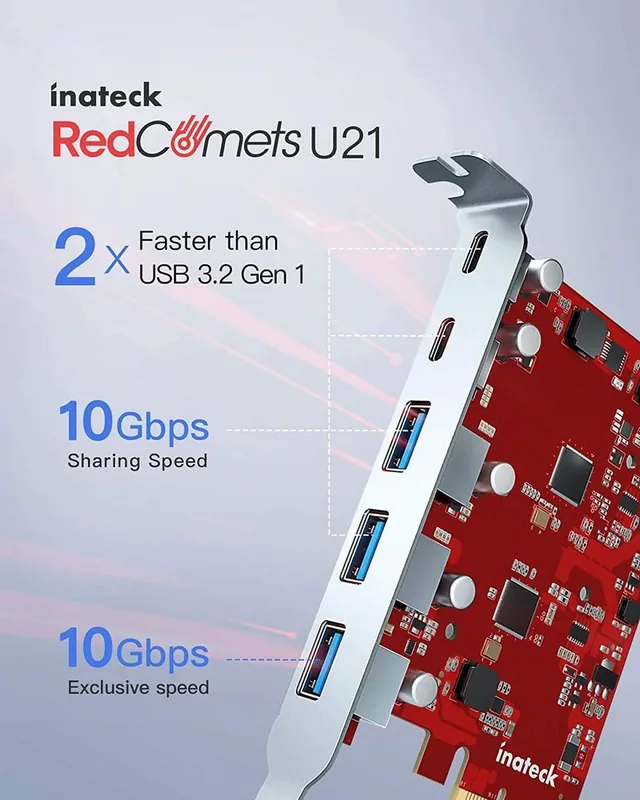
No. Port 1 has a dedicated 10 Gbps channel. The other four ports share a separate 10 Gbps channel, so multiple heavy transfers on those shared ports will divide the available bandwidth.
Is this answer helpful?
Power off the system, remove the card and reboot. If the system boots, clean the card contacts, reinstall it in a different PCIe slot or another computer, and reinstall drivers if needed. Contact Inateck support if problems persist.
Is this answer helpful?
Yes — the USB 3.1 Gen 2 ports support high-throughput storage devices and will deliver excellent single-device performance, though simultaneous transfers across shared ports may be limited by the shared 10 Gbps channel.
Is this answer helpful?
The package includes the USB3.1 Gen 2 PCIe card, backplate, four screws, a screwdriver, an instruction manual, and an after-sales service card for support and warranty information.
Is this answer helpful?
Advantages and Disadvantages
Advantages

- Five USB 3.1 Gen 2 ports (2x USB-C, 3x USB-A) for versatile high-speed connectivity.
- PCIe 2.0 x4 interface delivers up to 10 Gbps per channel for fast single-device transfers.
- Includes mounting hardware and screwdriver for easy installation.
- Compatible with Windows and macOS; Windows 8+ typically driver-free.
- Compact card ideal for adding modern ports to older desktops.
Disadvantages

- Four ports share a single 10 Gbps channel, limiting simultaneous multi-device throughput.
- Not hot-swappable — requires powering down the PC for installation or removal.
- Windows 7 requires manual driver download and installation.
- Dependent on available PCIe slot; may conflict in compact builds.
- Performance constrained by PCIe 2.0 x4 bandwidth on older motherboards.
Product Specification
External
2x USB-C 3.1, 3x USB-A 3.1
Internal
N/A
Interface
PCIe 2.0 x4
Chipset
ASMedia
Power supply
Power supply only via connection
USB designation
Link
Product Description
Inateck RedComets U21 — High-Speed PCIe USB Expansion
The Inateck RedComets U21 is a PCIe 2.0 x4 expansion card that brings five USB 3.1 (Gen 2) ports to desktop systems: two USB-C 3.1 ports and three USB-A 3.1 ports. Designed for users who need extra high-speed external connectivity, the card offers a mix of modern Type-C convenience and legacy Type-A compatibility. One port (Port 1) receives a dedicated 10 Gbps channel while the remaining four ports share a separate 10 Gbps channel; individual devices can still achieve up to 10 Gbps when using a single device on a channel.
What it offers
This compact add-in card is intended for systems with an available PCIe x4 (or larger) slot and supports Windows 7/8/10 (32/64-bit) and macOS 10.8.2 or later. Installation is straightforward: mount the backplate, insert the card into the PCIe slot (power off the PC first — the card is not hot-swappable), secure it with screws, and install drivers only if using Windows 7 (Windows 8+ typically requires no driver installation). The package includes the PCIe card, backplate, screws, a screwdriver, a manual, and an after-sales service card.
Performance and usage notes
Thanks to USB 3.1 Gen 2 support, the U21 is well suited for fast external SSDs, high-resolution audio interfaces, docking solutions, and other bandwidth-hungry peripherals. The card’s bandwidth partitioning means one port has a guaranteed 10 Gbps lane while the others share another 10 Gbps pipe — in practice this provides excellent single-device throughput but multiple simultaneous heavy transfers may be limited by the shared channel. For trouble-free operation, ensure the card is seated properly, update or reinstall drivers on older Windows systems, and test alternate PCIe slots or systems if issues arise. Contact Inateck support if problems persist.
Notes
- Not hot-swappable — always power off before installing or removing.
- For Windows 7, download the latest driver from Inateck’s website and reboot after installation.
- If the system fails to boot after installation, remove the card and test; clean contacts and try a different slot or machine before contacting support.
Search for 67,706 Manuals online


Type-in Brand or Model