
Inateck FE3001 Manual
PDF manual · 8 Pages
English



Quick check
Incorrect answer, please try again.
Chat with your Inateck FE3001 manual using AI
Get instant AI answers from your Inateck FE3001 manual
Ask anything about the Inateck FE3001. Answers come from this manual, with the pages they are based on.
Ask a Question
Do you recommend FE3001?
Yes NoFrequently Asked Questions
It supports 2.5-inch and 3.5-inch SATA I, II, and III hard drives and SSDs. That makes it a flexible enclosure for older drives, spare storage, or performance upgrades.
Is this answer helpful?
No. The enclosure is designed for plug and play use, so you can connect a compatible drive and start using it without installing extra drivers or restarting your system.
Is this answer helpful?
It uses an external 12V/2A power adapter. This helps provide stable power, which is especially important for 3.5-inch drives and continuous data transfers.
Is this answer helpful?
It works with Windows XP, Vista, 7, 8, and 8.1, plus Linux, Android, and Mac OS 10.3 or later. That broad support makes it useful across many devices and environments.
Is this answer helpful?
The green LED indicates power status, while the blue LED shows data activity. They help you quickly see whether the enclosure is on and transferring data.
Is this answer helpful?
Always stop any file transfers first, then use your operating system's safe eject feature. Wait for confirmation before disconnecting power or unplugging the enclosure to avoid data loss.
Is this answer helpful?
Advantages and Disadvantages
Advantages

- USB 3.0 and SATA III support help deliver fast transfers and efficient backups.
- Supports 2.5-inch and 3.5-inch SATA HDDs and SSDs for flexible storage upgrades.
- Plug and play with hot-swapping makes setup easy and driver-free.
- Aluminum construction, anti-slip pads, and LEDs improve cooling, stability, and usability.
Disadvantages

- Requires a 12V/2A external power adapter, so it is not bus-powered.
- Supports SATA drives only, not newer NVMe storage.
- Less portable than small pocket enclosures because of its size and power needs.
Product Specification
Form factor
3.5"
Internal connector
1x SATA 6Gb/s (up to 0.37in height)
External connector
1x USB-B 3.0 (5Gb/s)
RAID level
N/A
Fan
N/A
Dimensions
7.48x4.41x1.26in
Color
black
Features
Aluminum housing, incl. USB cable (USB-A), On/off switch
USB notation
Link
Product Description
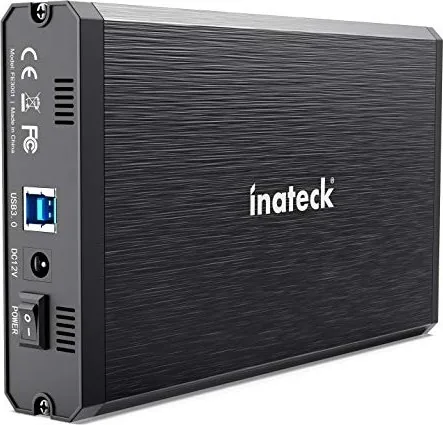
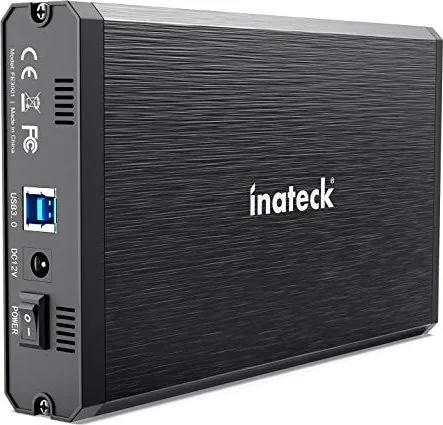
Inateck FE3001 USB-B 3.0 Manual: A Smart 3.5-Inch Drive Enclosure
The Inateck FE3001 USB-B 3.0 is built for users who want a practical way to turn a SATA drive into fast external storage. With USB 3.0 transfer speeds of up to 5 Gb/s and an ASM1153E chipset that supports SATA III bandwidth, it is designed for quick backups, file transfers, and everyday data access. As a result, it fits well into home setups, small offices, and media storage workflows.
What makes this enclosure appealing is its wide drive support. It handles both 2.5-inch and 3.5-inch SATA I/II/III hard drives and SSDs, so it can adapt to older drives as well as newer storage upgrades. The USB 3.0 connection is also backward compatible with USB 2.0 and USB 1.1, which helps when working with mixed hardware. In practice, that means you can reuse spare drives without worrying about compatibility issues.
The design focuses on convenience and durability. The aluminum alloy body helps with heat dissipation while keeping the unit lightweight enough to move around easily. Anti-slip pads add stability on a desk, and the LED indicators make it simple to check power and activity at a glance. The included 12V/2A power adapter ensures stable operation, which is especially important for 3.5-inch drives that need consistent power delivery.
Setup is straightforward thanks to plug-and-play support and hot-swapping. No extra drivers or reboot are required, making the FE3001 a friendly choice for users who want a direct, low-friction storage solution. It also supports sleep mode, which can help reduce wear during idle periods. With compatibility across Windows, Linux, Android, and Mac OS 10.3 and later, it offers broad flexibility for different systems and use cases.
Notes
- Best suited for SATA drives, especially when you want to repurpose an old HDD or SSD.
- The external power adapter is part of the setup, so it is more of a desktop-style enclosure than a travel-only accessory.
- For safe removal, always stop data activity before disconnecting the drive.
Quick take
The Inateck FE3001 USB-B 3.0 combines speed, sturdy construction, and simple operation in one compact enclosure. It is a reliable option for users who need dependable external storage with strong compatibility and easy day-to-day use.
Search for 67,706 Manuals online


Type-in Brand or Model