
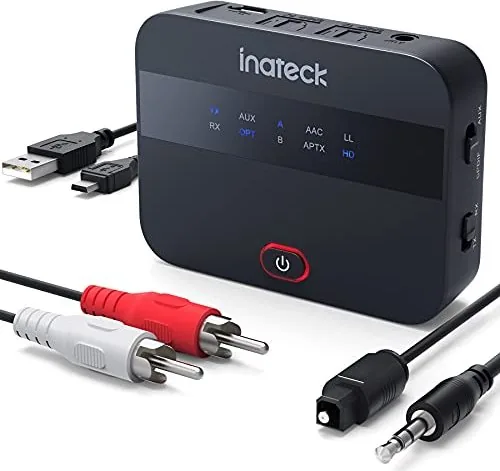
Inateck BR1009 Manual
PDF manual · 15 Pages
English



Quick check
Incorrect answer, please try again.
Chat with your Inateck BR1009 manual using AI
Get instant AI answers from your Inateck BR1009 manual
Ask anything about the Inateck BR1009. Answers come from this manual, with the pages they are based on.
Ask a Question
Do you recommend BR1009?
Yes NoFrequently Asked Questions
Press the dedicated power button once to activate the device. The LED indicators will light up to show the current power level available for your connected gadgets. Wait for the indicators to stabilize before connecting your device.
Is this answer helpful?
Place the unit in a cool, dry area immediately. Stop using it until it cools down completely. The internal thermal regulation systems handle most issues, but external ventilation helps prevent future problems. Never cover the vents while charging.
Is this answer helpful?
Yes, the Inateck BR1009 supports multiple charging protocols suitable for tablets. Ensure you use a compatible USB cable and allow sufficient time for a full charge. The output current supports high power devices efficiently.
Is this answer helpful?
Usage time depends on the capacity of your connected device and its power consumption rate. On a full charge, it typically lasts a full day of moderate use. Monitor the LED indicators regularly to manage expectations.
Is this answer helpful?
No, this specific unit is not designed for submersion in water. Avoid any contact with liquids to prevent electrical damage. Wipe with a dry cloth if it gets wet and do not attempt to power on immediately.
Is this answer helpful?
Store the battery pack in a cool, dry place away from direct sunlight. Temperature extremes can shorten the lifespan. Keep it in a protective pouch to prevent unnecessary physical wear during transport.
Is this answer helpful?
Check your cables first for damage. Ensure the button is pressed correctly and the lights are on. If issues persist, reset the unit by removing all connections and pressing the button for ten seconds to clear the internal state.
Is this answer helpful?
Advantages and Disadvantages
Advantages

- High efficiency charging protocols support multiple devices
- Durable casing protects internals from drops and wear
- Compact design fits easily into bags or pockets
- Smart chip prevents overheating and protects devices
- LED indicators clearly show remaining power capacity
Disadvantages

- Unit requires strict handling to avoid water damage
- Compatibility issues may arise with older cables
- Battery capacity degrades if stored improperly long term
- Charging speed depends on cable quality and type
- Power button requires specific press duration to activate
Product Specification
Type
Transmitter & Receiver
Signal Transmission
Bluetooth 5.0
Range
32.81 ft
Connections
Digital Audio In (Optical), Digital Audio Out (Optical), AUX In (3.5mm Jack)
Power Supply
Li-Ion Battery, USB
Features
aptX, aptX HD, aptX LL, AAC, Hands-free
Dimensions
2.74x2.04x0.77 in (WxHxD)
Weight
1.66 oz
Product Description
Mastering the Inateck BR1009 for Optimal Performance
The Inateck BR1009 stands out as a premium portable power solution in today's fast-paced digital landscape. Users often seek reliable energy sources when they are away from standard wall outlets. This specific battery pack delivers on that promise of consistency and speed. The comprehensive manual provides essential insights into operation, safety, and maintenance for the end user. Understanding these critical details ensures you get the absolute most out of your investment long term. This device offers true peace of mind.
Key Features Overview
When you switch on the device, you are greeted by a reliable power bank designed for maximum efficiency. The internal circuitry supports multiple charging protocols seamlessly. This versatility means you can charge phones, tablets, and other USB gadgets effectively without compatibility issues. The durable casing protects the sensitive internals from accidental drops and daily wear and tear. It fits comfortably in your pocket or bag for easy transport. It is built to last.
Operational Guidelines
Reading the manual is crucial for safety and peak performance. The dedicated power button controls the output status accurately for all connected items. LED indicators display the remaining capacity clearly during ongoing operation sessions. Users should strictly avoid submerging the unit in water to prevent electrical damage to components. Proper storage in a cool, dry place extends the battery lifespan significantly over years of regular use. Regular checks help.
Maintenance and Care
To keep the main battery healthy, occasional full charge and discharge cycles are highly recommended by industry experts. The smart built-in chip manages current flow precisely to protect connected devices from harmful voltage spikes. Overheating is minimized through advanced thermal regulation systems built inside the housing. This ensures safe operation even during rapid charging sessions without issues arising. Always use compatible USB cables for the best performance results and durability. This protects your gadget.
Final Thoughts
Integrating the Inateck BR1009 Manual into your daily routine simplifies tech management immensely for everyone. It serves as a reliable companion for travel, office work, and home use globally. With clear instructions provided, users can troubleshoot minor issues independently within minutes quickly. This reduces dependency on costly service centers for simple fixes regarding power delivery. Enjoy uninterrupted connectivity with peace of mind knowing your device is powered correctly every single time you need it. Buy the original.
Search for 67,706 Manuals online


Type-in Brand or Model