
iiyama ProLite TF2234MC-B7X Manual
PDF manual · 30 Pages
English



Quick check
Incorrect answer, please try again.
Chat with your iiyama ProLite TF2234MC-B7X manual using AI
Get instant AI answers from your iiyama ProLite TF2234MC-B7X manual
Ask anything about the iiyama ProLite TF2234MC-B7X. Answers come from this manual, with the pages they are based on.
ProLite TF2234MC-B7X Maintenance Schedule
Wipe spots with a soft damp cloth using mild detergent solution. Do not use abrasive or harsh chemicals.
Use a soft clean cloth with mild glass cleaner or a 50/50 mix of water and IPA. Avoid acid or alkaline solvents.
Ask a Question
Do you recommend ProLite TF2234MC-B7X?
Yes NoFrequently Asked Questions
While the monitor has an IP65 rating for the front panel, it is not designed for direct exposure to outdoor weather conditions. It should be used indoors or in covered areas to prevent damage from rain, extreme temperatures, or direct sunlight.
Is this answer helpful?
Yes, the monitor is compatible with Windows 10 and includes plug-and-play functionality. However, for full touch capabilities, ensure the specific touchscreen driver software is installed from the official iiyama website.
Is this answer helpful?
Absolutely. The monitor conforms to the VESA 100mm x 100mm mounting standard, allowing you to install it on walls, ceilings, or desktop arms using M4 screws with a maximum length of 8mm.
Is this answer helpful?
The main difference lies in the surface finish. The B7X model features an anti-fingerprint coating, while the B7AG model has an anti-glare coating. Both share similar technical specifications regarding resolution and connectivity.
Is this answer helpful?
Calibration is typically handled automatically by the operating system upon driver installation. If adjustments are needed, use the calibration tool provided within the touchscreen driver software settings on your computer.
Is this answer helpful?
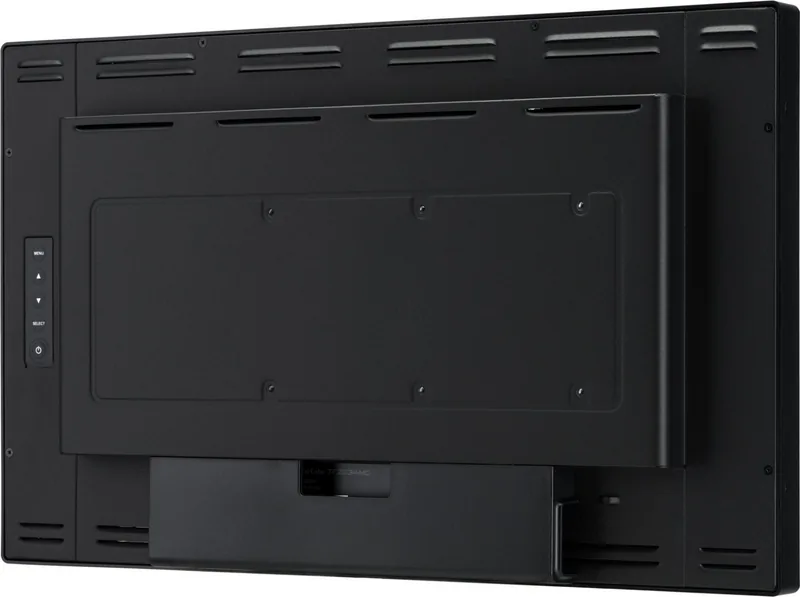
The monitor is equipped with ventilation slots to dissipate heat. Ensure these slots remain unobstructed and maintain at least 10cm of space behind the unit to prevent overheating and potential damage.
Is this answer helpful?
Advantages and Disadvantages
Advantages

- IP65 rated front panel offers superior protection against dust and water splashes
- Capacitive touch screen supports multi-touch gestures for intuitive interaction
- IPS panel technology provides wide 178-degree viewing angles and accurate colors
- Multiple connectivity options including HDMI, DisplayPort, and VGA for flexibility
- Anti-fingerprint coating maintains screen clarity during extended use
Disadvantages

- Not specifically designed for continuous 24/7 operation without downtime
- Touch functionality may have limitations on older operating systems like Windows XP
- VGA cable is not included in the package, requiring separate purchase
- Standby mode still consumes minimal power when not fully turned off
- Screen brightness decreases slightly when the touch panel is active
Product Specification
Touchscreen
capacitive, Multi-Touch
Diagonal
21.5"/21.5 in
Resolution
1920x1080, 16:9
Brightness
305cd/m²
Contrast
1,000:1 (static), not specified (dynamic)
Response Time
8ms
Viewing Angle
178°/178°
Panel
IPS
Backlight
White-LED
HDR
N/A
Color Depth
8bit (16.7 million colors)
Refresh Rate
60Hz
Signal Frequency
30-84kHz (horizontal), not specified (vertical)
Connections
1x VGA (60Hz@1920x1080), 1x HDMI, 1x DisplayPort
Additional Connections
1x USB-B (touch function)
Ergonomics
N/A
VESA
100x100 (free)
Power Consumption
not specified (max), 18W (typical), not specified (old energy label A+++ to G), 1.5W (standby)
Energy Efficiency Class SDR (A to G)
F
SDR Energy Consumption
19kWh/1000h
Dimensions (WxDxH)
20.4x12.3x1.8 in
Weight
9.7 lbs
Features
Speakers (2x 3W), IP65 certified (front), tempered glass (7H)
Manufacturer Warranty
three years (processing via manufacturer, product registration within 60 days of purchase: Link, warranty information: Link)
Product Description
Unlocking Productivity with the iiyama ProLite TF2234MC-B7X
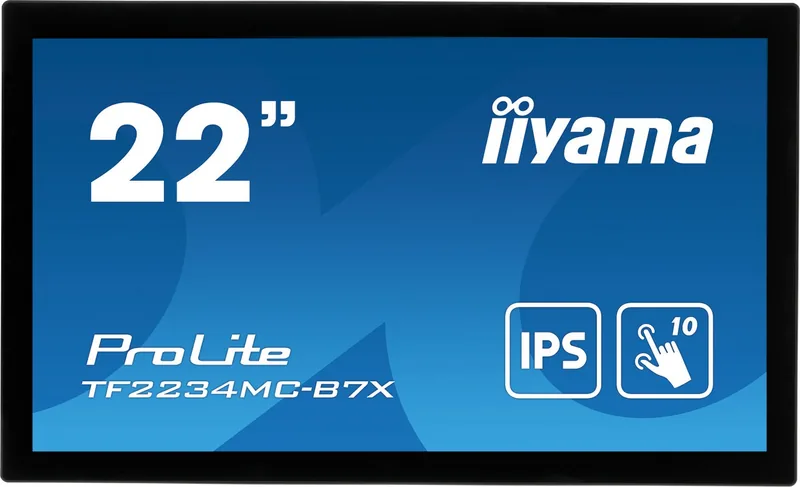
The iiyama ProLite TF2234MC-B7X is a versatile 21.5-inch touch monitor designed to elevate your digital workspace. This device combines high-resolution visuals with responsive capacitive touch technology, making it an ideal choice for retail kiosks, interactive displays, or modern office environments. With a native resolution of 1920 x 1080 pixels and IPS panel technology, users enjoy vibrant colors and wide viewing angles that ensure clarity from almost any position.
One of the standout features of this model is its durability and adaptability. The front panel meets the IP65 standard, providing excellent protection against dust and water jets, which is crucial for high-traffic areas. Additionally, the anti-fingerprint coating on the screen keeps the display clean and readable even after heavy use. The monitor supports multiple connectivity options including HDMI, DisplayPort, and VGA, ensuring seamless integration with various computers and devices.
Installation is straightforward thanks to the VESA mounting compatibility, allowing for flexible placement on desks, walls, or ceilings. The included power supply unit ensures stable operation, while the ergonomic design minimizes eye strain during long sessions. Whether you are managing inventory, guiding customers, or presenting data, the iiyama ProLite TF2234MC-B7X delivers reliability and performance in a sleek package.
Search for 67,706 Manuals online


Type-in Brand or Model