
iiyama ProLite TF1634MC-B6X Manual
PDF manual · 27 Pages
English



Quick check
Incorrect answer, please try again.
Chat with your iiyama ProLite TF1634MC-B6X manual using AI
Get instant AI answers from your iiyama ProLite TF1634MC-B6X manual
Ask anything about the iiyama ProLite TF1634MC-B6X. Answers come from this manual, with the pages they are based on.
Ask a Question
Do you recommend ProLite TF1634MC-B6X?
Yes NoFrequently Asked Questions
It uses projected capacitive technology with support for up to 10 simultaneous touch points. The touch surface connects through USB and is designed for responsive interactive use.
Is this answer helpful?
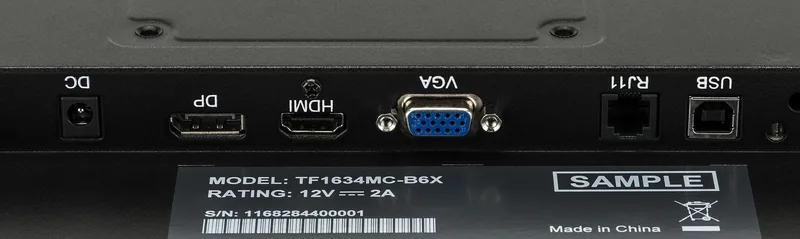
The monitor includes VGA, HDMI, and DisplayPort inputs. This allows connection to a variety of computers, media players, and embedded systems.
Is this answer helpful?
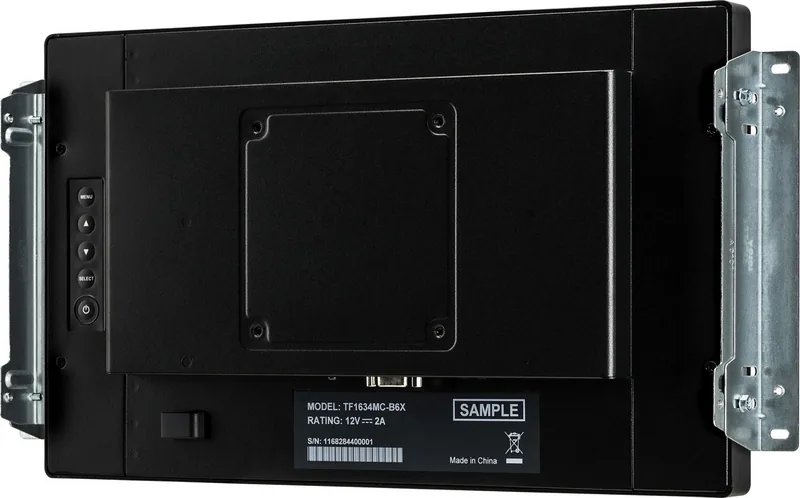
Yes. Its open-frame construction, 100 x 100 mm VESA support, and supplied L-brackets make it suitable for integration into kiosks, cabinets, walls, and custom equipment.
Is this answer helpful?
The IP65 protection applies only to the front of the display. The rear panel, ports, and cables should be protected when the monitor is installed in demanding environments.
Is this answer helpful?
The recommended native resolution is 1366 x 768. Using this resolution provides the sharpest image because lower resolutions may be scaled by the panel.
Is this answer helpful?
Touch support is listed for selected Windows versions, Windows CE, macOS, and Linux. Available functions can depend on the operating system, installed driver, and system configuration.
Is this answer helpful?
Advantages and Disadvantages
Advantages

- 10-point projected capacitive touch delivers responsive multi-touch control.
- Front IP65 protection and 7H anti-fingerprint glass suit public and industrial installations.
- VGA, HDMI, DisplayPort, and USB provide flexible integration options.
- Compact open-frame design supports VESA mounting and built-in installation.
- Native 1366 x 768 resolution, 360 cd/m2 brightness, and 16 W typical power use.
Disadvantages

- The front-only IP65 rating does not protect the rear or connection area.
- TN panel viewing angles and color performance may not match IPS displays.
- Designed for landscape use and not specifically for 24/7 operation.
- Native resolution is limited to 1366 x 768.
- VGA image adjustments may require manual calibration for best results.
Product Specification
Touchscreen
capacitive, multi-touch
Diagonal
15.6 in / 15.59 in
Resolution
1366 x 768, 16:9
Brightness
360 cd/m2
Contrast
700:1 (static), not specified (dynamic)
Response time
8 ms
Viewing angles
170 degrees / 160 degrees
Panel
TN
Backlight
White LED
HDR
N/A
Refresh rate
60 Hz
Signal frequency
not specified (horizontal), not specified (vertical)
Ports
1 x VGA (60 Hz at 1366 x 768), 1 x HDMI, 1 x DisplayPort
Other ports
1 x USB-B (touch function)
Ergonomics
N/A
VESA
3.94 x 3.94 in (clearance)
Power consumption
not specified (maximum), 16 W (typical), not specified (old energy label A+++ to G), 2 W (standby)
Energy efficiency class SDR (A to G)
E
Energy consumption SDR
11 kWh/1,000 h
Dimensions (W x H x D)
15 x 9.06 x 1.81 in
Weight
7.72 lb
Special features
IP65 certified (front)
Manufacturer warranty
three years (handled through the manufacturer, product registration within 60 days of purchase: Link, warranty information: Link)
Product Description
iiyama ProLite TF1634MC-B6X, 15.6" - Read, Download & Print Free
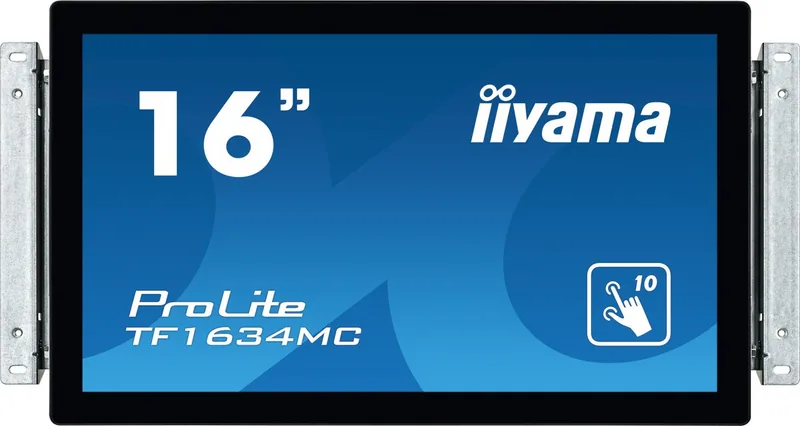
The iiyama ProLite TF1634MC-B6X is a compact 15.6-inch open-frame touchscreen display designed for professional interactive installations. Its projected capacitive 10-point touch technology supports smooth multi-touch operation, making it suitable for kiosks, control panels, retail displays, industrial interfaces, and self-service applications. The anti-fingerprint coating helps the screen remain clean and presentable in frequently used environments.
Built for dependable interactive use
This model combines a durable touch surface with a front-facing IP65 rating, providing protection against dust and water jets from the front. The glass has a 7H hardness rating and a 2.4 mm thickness, offering added resilience for public-facing installations. It is intended for landscape orientation and can be integrated into cabinets, walls, counters, and custom enclosures using the supplied mounting brackets.
The 15.6-inch TN panel delivers a native resolution of 1366 x 768, a typical 500:1 contrast ratio, and brightness of up to 360 cd/m2 with the touch panel fitted. With 170-degree horizontal and 160-degree vertical viewing angles, it offers clear visibility for many point-of-use settings. A typical 8 ms response time supports responsive visual performance for everyday interactive content.
Flexible connectivity and installation
The ProLite TF1634MC-B6X includes VGA, HDMI, and DisplayPort inputs, allowing it to connect to a broad range of PCs, media players, and embedded systems. A USB connection enables touchscreen operation. Compatibility extends across common Windows versions, Linux, macOS, and selected Windows CE environments, although touch capabilities can vary by operating system and driver configuration.
For installation flexibility, the display supports 100 x 100 mm VESA mounting and includes L-brackets for built-in configurations. Its compact 381 x 230.5 x 46 mm enclosure and 3.5 kg weight make it practical where space is limited. The monitor uses an external 12 V DC power supply and has a typical power consumption of 16 W.
Practical display management
On-screen controls let users adjust brightness, contrast, color temperature, input source, and image position. Automatic adjustment is available for analog signals, while power management can reduce consumption to a maximum of 2 W when no active signal is detected. For the best image quality, use the native 1366 x 768 resolution.
Notes
- The IP65 rating applies to the front side only.
- The model is not specifically designed for continuous 24/7 operation.
- Ensure adequate ventilation when integrating the display into an enclosure.
- Use the supplied or approved power adapter and mounting hardware for safe operation.
Search for 67,706 Manuals online


Type-in Brand or Model